

Clean Admin Bar Removal
Allows you to hide the top admin bar in WP 3.2+ on the public site by changing user preferences en masse for both existing and new users.
Plugin info
Maintenance & Compatibility
Maintenance score
Possibly abandoned • Last updated 5198 days ago • 2 reviews
Is Clean Admin Bar Removal abandoned?
Possibly abandoned (last update 5198 days ago).
Compatibility
Similar & Alternatives
Explore plugins with similar tags, and compare key metrics like downloads, ratings, updates, support, and WP/PHP compatibility.
Description
Clean Admin Bar Removal offers a simple solution to a small problem in WordPress 3.2 and 3.3. In these new versions, the top “admin bar” is shown on the public site by default for all users. This has been inconvenient on some of the sites we manage, where the WordPress admin area is otherwise “behind the scenes” for some logged in users, or where the top admin bar is incompatible with the site’s layout.
To solve this problem, Clean Admin Bar Removal disables the toolbar in existing users’ preferences and changes the default setting for new users. Once a site administrator installs the plugin, they can choose which behavior to use on their site by user role. Users can restore the admin bar in their individual preferences by choosing “Show Toolbar when viewing site” if needed.
I hope some of you find this plugin helpful. It is offered for free under the GPL-2 license with no support or warranty, but has already been put into production on several of our sites and is working well. Please feel free to leave a comment here with any questions or problems: http://fabapps.com/2012/01/clean-admin-bar-removal/
Contact
To contact the plugin author, please leave a comment at
http://fabapps.com/2012/01/clean-admin-bar-removal/
Installation
- Upload
clean-admin-bar-removalto the/wp-content/plugins/directory - Activate the plugin through the ‘Plugins’ menu in WordPress
- Visit Settings > Clean Admin Bar to set up the plugin behavior
Frequently Asked Questions
Does this plugin remove the Admin Bar completely?
No, it only changes user preferences so that the admin bar is hidden by default. Users can restore the admin bar in their individual preferences by choosing “Show Toolbar when viewing site” if needed.
I’m still seeing the admin bar, is this working?
If the admin bar is turned off but appears anyway, try logging out and logging back in. It also seems to turn itself back on if you have multiple sites running on the same domain with different admin bar preferences.
Review feed
Screenshots
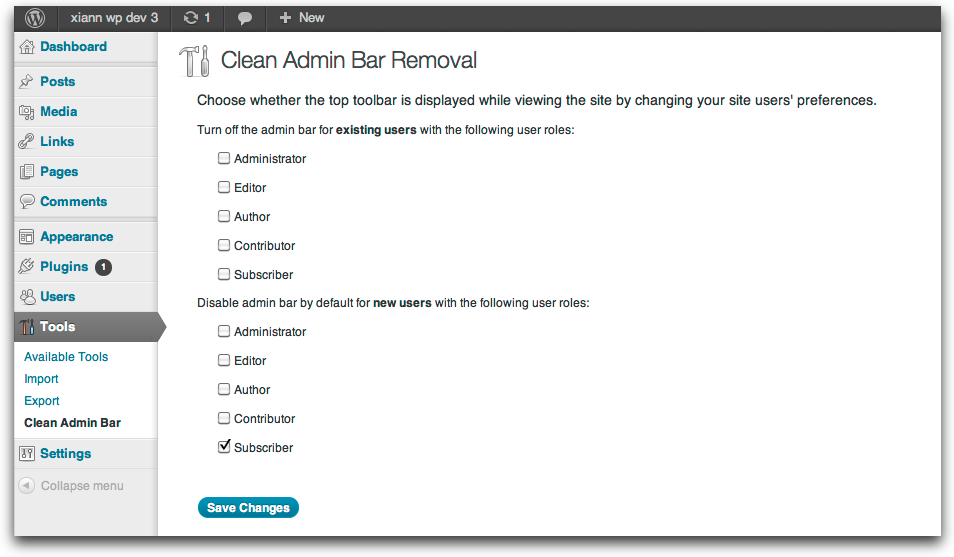
Settings > Clean Admin Bar

The Admin Bar this plugin this plugin refers to
Changelog
1.0
- First version