

Clean Image Filenames
This plugin automatically converts language accent characters to non-accent characters in filenames when uploading to the media library.
Plugin info
Maintenance & Compatibility
Maintenance score
Stale • Last updated 345 days ago • 21 reviews
Is Clean Image Filenames abandoned?
Likely maintained (last update 345 days ago).
Compatibility
Developers
Similar & Alternatives
Explore plugins with similar tags, and compare key metrics like downloads, ratings, updates, support, and WP/PHP compatibility.
Description
This plugin automatically converts language accent characters in filenames when uploading to the media library. Characters are converted into browser and server friendly, non-accent characters.
Features
- Converts accent characters to non-accent, latin equivalents in Swedish, Danish, German, and more.
- Removes special characters like exclamation marks, periods, hashtags, and more.
- Lets you choose if you want to convert only image files, or all file types.
- Makes site and server migrations easier thanks to non-accent character filenames.
- Provides filter hook for developers who want to specify which file types to convert.
Examples
- Räksmörgås.jpg raksmorgas.jpg
- Æblegrød_FTW!.gif aeblegrod-ftw.gif
- Château de Ferrières.png chateau-de-ferrieres.png
Worth noting
The plugin only converts filenames when the files are being uploaded. It can not convert existing files.
Filter for developers
This filter provides developers a way to specify which file types the plugin should convert. This filter overrides the plugin settings on the media settings page. For a complete list of mime types, see Wikipedia.
The following example will convert PDF, JPEG and PNG files only:
function my_clean_image_filenames_mime_types() {
    $mime_types = array(
        'application/pdf',
        'image/jpeg',
        'image/png',
    );
    return $mime_types;
}
add_filter( 'clean_image_filenames_mime_types', 'my_clean_image_filenames_mime_types' );
Installation
- Search for Clean Image Filenames in the plugins directory.
- Install and activate the plugin.
or
- Download and unzip the plugin and upload the
clean-image-filenamesdirectory to your/plugins/directory. - Activate the plugin through the ‘Plugins’ menu in WordPress.
Frequently Asked Questions
No, this plugin only cleans the filenames of files when they are being uploaded to the media library.
Review feed
Does what it says
Works as expected
Screenshots
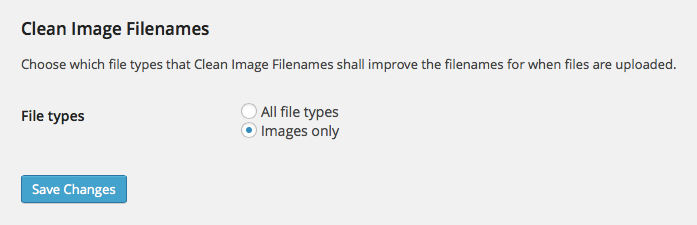
Easily choose between cleaning the filenames of all file types or images only.
Changelog
1.5
- Add support for WebP and AVIF image formats. Thanks to @vinkla for the pull request.
1.4
- Add support for cleaning filenames when sideloaded (usually when uploaded programmatically) using the wp_handle_sideload_prefilter hook.
1.3
- Rewrite cleaning function to better handle specific characters.
- Make sure code is compliant with WordPress Coding Standards.
1.2.1
- Enable plugin to be translated/internationalization.
1.2
- Set original, un-cleaned filename as attachment title.
1.1.1
- Added uninstall script that deletes plugin settings when the plugin is uninstalled.
1.1
- Added plugin settings to media settings page with option to convert all file types or just image file types.
- Added shortcut to plugin settings from the plugins list.
1.0
- Initial release.