

Cleaner Dashboard
Removes the WordPress news sections and reorganizes the sidebar for maximum screen usage. See the screenshots for more details.
Maintenance 20/1006762d since update
Active installs
10
Downloads
9,620
Reviews
0
Age
18.5y
Plugin info
Total downloads: 9,620
Active installs: 10
Total reviews: 0
Average rating: 0
Support threads opened: 0
Support threads resolved: 0 (0%)
Available in: 1 language(s)
Contributors: 1
Last updated: 9/27/2007 (6762 days ago)
Added to WordPress: 9/26/2007 (18 years old)
Minimum WordPress version: f
Tested up to WordPress version: 2.3
Minimum PHP version: f
Maintenance & Compatibility
Maintenance score
Possibly abandoned • Last updated 6762 days ago
20/100
Is Cleaner Dashboard abandoned?
Possibly abandoned (last update 6762 days ago).
Compatibility
Requires WordPress: f
Tested up to: 2.3
Requires PHP: f
Similar & Alternatives
Explore plugins with similar tags, and compare key metrics like downloads, ratings, updates, support, and WP/PHP compatibility.
Dashboard Detox – Hide Marketing & Review Popups
Rating 0.0/5 (0 reviews) • Active installs 0
Nova Dashboard Cleanup
Rating 5.0/5 (1 reviews) • Active installs 10
Simplify Admin Panel
Rating 5.0/5 (1 reviews) • Active installs 10
Dashboard & Menu Cleaner (Quick Menu Finder)
Rating 0.0/5 (0 reviews) • Active installs 10
RP Cleaner
Rating 0.0/5 (0 reviews) • Active installs 0
Advanced Database Cleaner – Optimize & Clean database to Speed Up Site Performance
Rating 4.9/5 (1,792 reviews) • Active installs 100,000
Description
This plugin does two things to your dashboard:
- The WordPress News and Other WordPress News sections are removed. You don’t even load them. Why? So you won’t have to bother
with the AJAX call for the news. Also, it looks neater. - The sidebar (with incoming links, recent posts, etc.) is made more horizontal, with four columns instead of the default one.
This makes it so you can see all the information at one glance, rather than having to scroll down.
Installation
- Upload
cleaner-dashboard.phpto thewp-content/plugins/directory. - Activate the plugin through the ‘Plugins’ menu in the WordPress admin.
- Go to your dashboard, and enjoy its cleanliness!
Frequently Asked Questions
What if we miss an update because the news is not there anymore?
No worry. If you’re on WordPress 2.3 or above, then update checking is already in WordPress and a separate notification will
be given to you.
Review feed
No reviews available
Screenshots
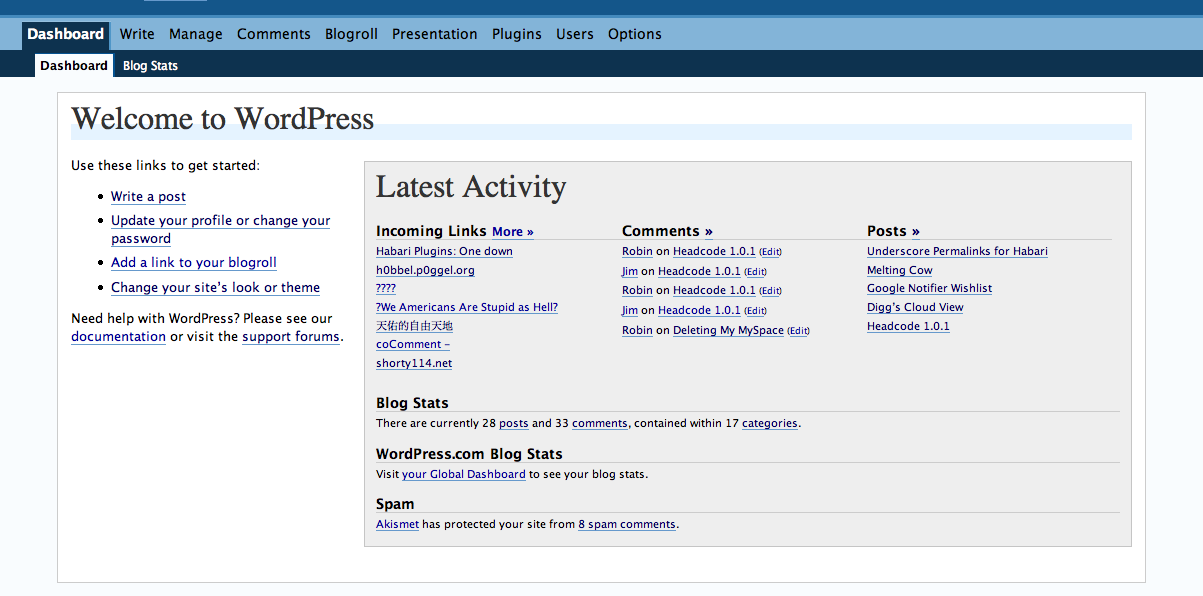
The new dashboard. Cleaner, neater, and did I mention cleaner?
Changelog
No changelog available