

Cleanup Action Scheduler
Delete Action Scheduler Events to avoid having large database tables.
Maintenance 28/100421d since update
Active installs
2,000
Downloads
16,723
Reviews
6
Age
3.8y
Plugin info
Total downloads: 16,723
Active installs: 2,000
Total reviews: 6
Average rating: 3.2
Support threads opened: 0
Support threads resolved: 0 (0%)
Available in: 1 language(s)
Contributors: 2
Last updated: 2/6/2025 (421 days ago)
Added to WordPress: 5/31/2022 (3 years old)
Minimum WordPress version: 4.9
Tested up to WordPress version: 6.7.4
Minimum PHP version: 7.4
Maintenance & Compatibility
Maintenance score
Possibly abandoned • Last updated 421 days ago • 6 reviews
28/100
Is Cleanup Action Scheduler abandoned?
Possibly abandoned (last update 421 days ago).
Compatibility
Requires WordPress: 4.9
Tested up to: 6.7.4
Requires PHP: 7.4
Similar & Alternatives
Explore plugins with similar tags, and compare key metrics like downloads, ratings, updates, support, and WP/PHP compatibility.
Crony Cronjob Manager
Rating 4.3/5 (6 reviews) • Active installs 1,000
WP Cron Cleaner
Rating 3.4/5 (12 reviews) • Active installs 600
WPX Cron Manager Light
Rating 3.7/5 (3 reviews) • Active installs 100
FastCron – Run WP Cron for free
Rating 5.0/5 (1 reviews) • Active installs 100
Run External Crons
Rating 5.0/5 (2 reviews) • Active installs 90
Description
Delete Action Scheduler Events to avoid having large database tables.
Features:
- Delete button to remove all actions [Completed, Failed]. See screenshots for example.
1.2.4
- Update: FS SDK to latest version.
1.2.1
- Update: FS SDK to add new garbage collector and fix PHP 8+ errors.
1.2.0
- Important bug fixes.
1.1.0
- Added new enhancement settings to allow better usage of the Action Scheduler plugin performance.
1.0.0
- Initial Plugin.
Features
Free Plugin
- Add delete icons for each state in admin area including pending actions..
- Add option to change default cleanup for the Action Scheduler.
- Advanced settings to allow better usage of the Action Scheduler plugin performance.
Premium Plugin
- All Free plugin features plus:
- Add WPCLI functionality to delete states.
- Deletion of pending actions.
- Add automated cleanup for selected action states.
Installation
- Extract the downloaded zip file and upload the
cleanup-action-schedulerfolder to the/wp-content/plugins/directory. Alternatively, install this plugin by searching for it from the plugins area of your WordPress website. - Activate the plugin through the ‘Plugins’ menu in WordPress
Frequently Asked Questions
-
First, check the version of WordPress that you are using. The Plugin works with WordPress version 4.9 or later.
-
Check if you have either the Action Scheduler Plugin or
WooCommerrce plugin installed and activated.
Deactivate the Plugin and activate it again.
Review feed
No reviews available
Screenshots

Pre Clean up database

Pre Clean up admin

Post Clean up database
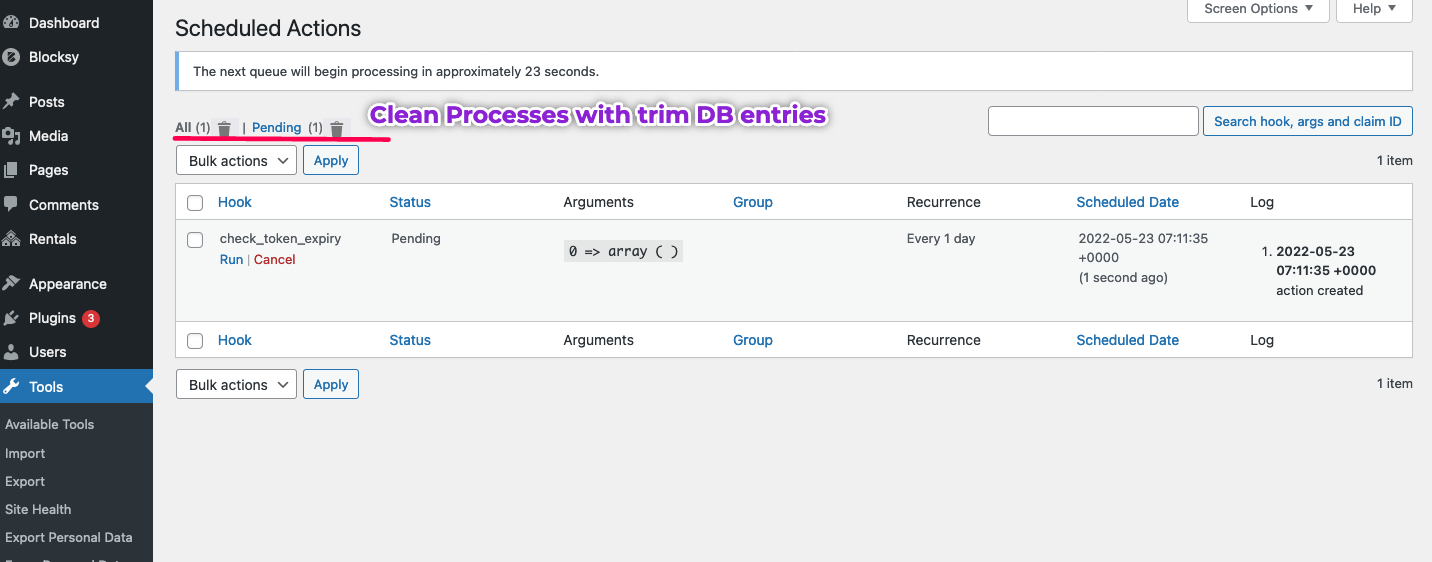
Post Clean up admin
Changelog
No changelog available