

Click To Tweet
This plugin allows you to create beautiful Click To Tweet boxes anywhere in your blog post.
Plugin info
Maintenance & Compatibility
Maintenance score
Maintained • Last updated 175 days ago • 14 reviews
Is Click To Tweet abandoned?
Likely maintained (last update 175 days ago).
Compatibility
Similar & Alternatives
Explore plugins with similar tags, and compare key metrics like downloads, ratings, updates, support, and WP/PHP compatibility.
Description
This WordPress plugin allows you to easily create tweetable content for your readers. Use pullquotes and custom messages inside the body of your blog post to highlight your content for the reader and make it simple for them to share on Twitter.
This is a plugin by CoSchedule, the all-in-one content marketing editorial calendar for WordPress.
Installation
To install the plugin manually in WordPress:
- Login as Admin on your WordPress blog.
- Click on the “Plugins” tab in the left menu.
- Select “Add New.”
- Click on “Upload” at the top of the page.
- Select the ‘tm-click-to-tweet.zip’ on your computer, and upload. Activate the plugin once it is uploaded.
To install the plugin manually with FTP:
- Unzip the ‘tm-click-to-tweet.zip’ file. Upload that folder to the ‘/wp-content/plugins/’ directory.
- Login to your WordPress dashboard and activate the plugin through the “Plugins” tab in the left menu.
Frequently Asked Questions
Read our help section to learn more about Click To Tweet: http://coschedule.com/click-to-tweet
Click To Tweet is a simple plugin that enables you to create beautiful Click To Tweet boxes in your blog posts. By either using simple code or a one-click in your editor, you can generate a custom tweet-able message for your blog readers.
Find out more here: http://coschedule.com/click-to-tweet
Review feed
Screenshots

Create beautiful Click To Tweet boxes in your blog posts.
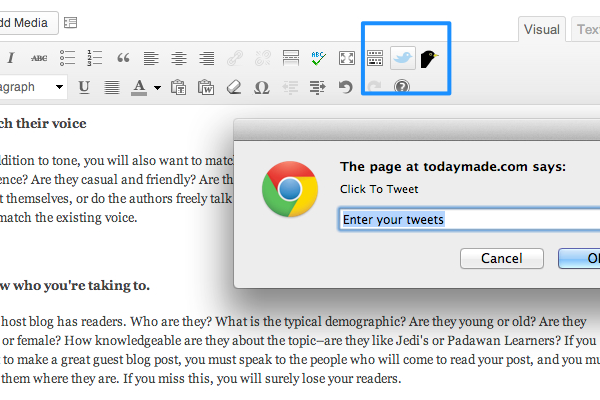
Easily add click to tweets boxes with a single click.

Click To Tweet box on a sample blog.

Click To Tweet box on a sample blog.
Changelog
1.5
- Update WordPress compatibility version
1.4
- Improved support for twitter 280 character length
1.3
- Removed powered by link
1.2
- Fixed support for php short tags
1.1
- Improvements to twitter sharing
1.0
- Initial Release