

Clone Pages/Posts/CPT/Woo Products
Adds a button to duplicate pages, posts, custom post types, and WooCommerce products in WordPress.
Plugin info
Maintenance & Compatibility
Maintenance score
Possibly abandoned • Last updated 663 days ago
Is Clone Pages/Posts/CPT/Woo Products abandoned?
Possibly abandoned (last update 663 days ago).
Compatibility
Similar & Alternatives
Explore plugins with similar tags, and compare key metrics like downloads, ratings, updates, support, and WP/PHP compatibility.
Description
This plugin allows you to easily clone pages, posts, custom post types, and WooCommerce products in WordPress for free.
Usage
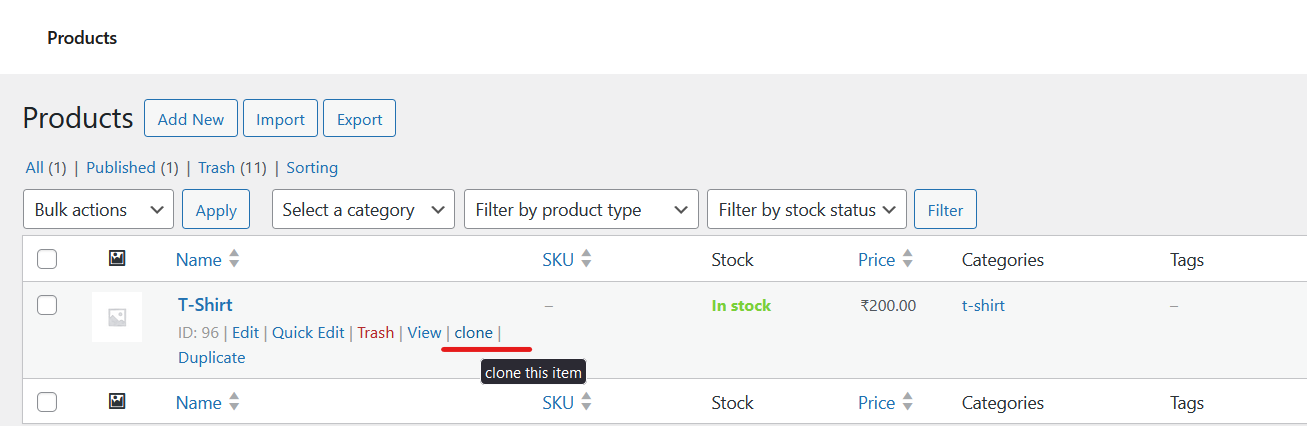
Once activated, a “Clone” link will be added to the row actions for pages, posts, custom post types and wooCommerce product in the WordPress admin interface. Clicking this link will create a draft copy of the selected item with “(Cloned)” appended to the title.
Notes
- Cloned items are created as drafts by default.
- Taxonomies associated with the original item will also be copied to the cloned item.
- Cloning functionality is available for all post types except for attachments.
- WooCommerce product cloning is supported.
Support
For support or inquiries, please contact MN Shariff at [email protected].
Installation
- Search for “Clone Pages/Posts/CPT/Woo Products” plugin
- Activate the plugin
Frequently Asked Questions
Q: How do I clone a page or post?
A: In the WordPress admin interface, navigate to the list of pages, posts, or custom post types. Hover over the item you want to clone, and you’ll see a “Clone” link in the row actions. Click on this link to create a draft copy of the selected item.
Q: Can I clone WooCommerce products with this plugin?
A: Yes, this plugin supports cloning of WooCommerce products. You can clone products in the same way as pages or posts.
Q: What happens to the original item after cloning?
A: The original item remains unchanged. A draft copy with “(Cloned)” appended to the title is created for you to edit separately.
Q: Can I customize the cloned item before saving it?
A: Yes, the cloned item is created as a draft, allowing you to make any desired modifications before publishing.
Q: Are taxonomies associated with the original item copied to the cloned item?
A: Yes, taxonomies (such as categories or tags) associated with the original item will also be copied to the cloned item.
Q: Is there a limit to the number of items I can clone?
A: There’s no inherent limit imposed by the plugin. However, server resources and WordPress settings may impose practical limits.
Review feed
Screenshots


Changelog
1.0.1
- Added compatibility with WordPress 6.5.2.
- Updated minimum PHP version requirement to 7.4.
1.0
- Initial release.