

WooCommerce Ajax Search
The plugin offers you to add a WooCommerce ajax search functionality for any existing field or create a new field using our shortcode.
Plugin info
Maintenance & Compatibility
Maintenance score
Possibly abandoned • Last updated 3017 days ago • 8 reviews
Is WooCommerce Ajax Search abandoned?
Possibly abandoned (last update 3017 days ago).
Compatibility
Similar & Alternatives
Explore plugins with similar tags, and compare key metrics like downloads, ratings, updates, support, and WP/PHP compatibility.
Description
The plugin offers you to add a WooCommerce ajax search functionality for any existing field or create a new field using our shortcode.
On user input, the plugin will start searching for relevant results through your WooCommerce website.
As well as the default settings, the WooCommerce ajax search plugin has many more options that will allow you to customize it in the way you\’d like.
The plugin supports RTL and LTR websites.
Configuration
Use the shortcode [cj_wc_ajax_search] or create a search field, or add “cjAjaxInput” class to an existing input field.
Installation
Important: First of all, you have to download and activate WooCommerce plugin, because without it WooCommerce Ajax Search cannot work.
Unzip the downloaded .zip file in your plugins folder and activate it.
Frequently Asked Questions
Installation Instructions
Important: First of all, you have to download and activate WooCommerce plugin, because without it WooCommerce Ajax Search cannot work.
Unzip the downloaded .zip file in your plugins folder and activate it.
Review feed
Smart, Helpful, Easy to use.
Screenshots

Input search
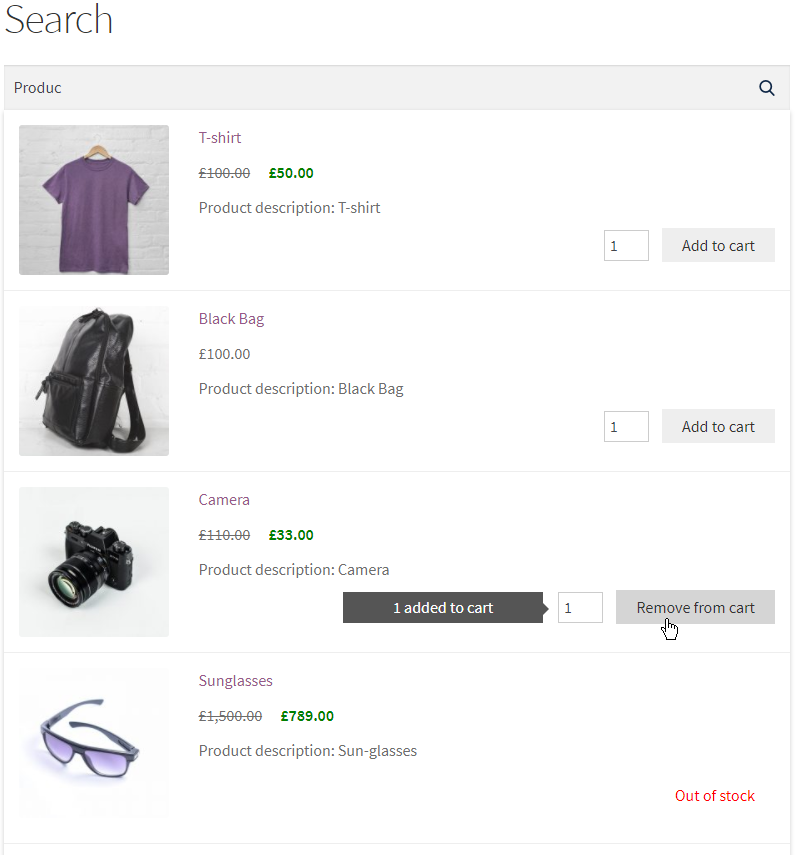
Input search - added to cart

Admin options
Changelog
1.0.0 Released