

Coffeeblack BBPress Extended Lite
Coffeeblack BBPress Extended Lite will extend the functionality already built into BBPress.
Maintenance 22/1003402d since update
Active installs
10
Downloads
1,451
Reviews
1
Age
9.4y
Plugin info
Total downloads: 1,451
Active installs: 10
Total reviews: 1
Average rating: 5
Support threads opened: 0
Support threads resolved: 0 (0%)
Available in: 1 language(s)
Contributors: 1
Last updated: 10/27/2016 (3402 days ago)
Added to WordPress: 10/11/2016 (9 years old)
Minimum WordPress version: 3.9.1
Tested up to WordPress version: 4.6.30
Minimum PHP version: f
Maintenance & Compatibility
Maintenance score
Possibly abandoned • Last updated 3402 days ago • 1 reviews
22/100
Is Coffeeblack BBPress Extended Lite abandoned?
Possibly abandoned (last update 3402 days ago).
Compatibility
Requires WordPress: 3.9.1
Tested up to: 4.6.30
Requires PHP: f
Similar & Alternatives
Explore plugins with similar tags, and compare key metrics like downloads, ratings, updates, support, and WP/PHP compatibility.
No similar plugins found yet.
Description
Here is a list of the functionality that Coffeeblack BBPress Extended Lite will add:
- Change the BBPress Editor to be TinyMCE & TeenyMCE (and set as default).
- Convert TinyMCE & TeenyMCE to be BBCode rather than HTML.
- Enable BBCode on BBPress Replies.
- Ability to change the template that the forum is using, to be a more readable one ? view here.
- Enable Shortcode in BBCode Content.
- Set default login & logout redirect links.
- Include Forums, Topics, and Replies in search.
- Show New Topic & New Reply links in the header of specific pages.
- Show First/Lastname or Username on the front of the Forums.
- Set xProfile Field as forum signature (if installed).
Installation
- Upload the files to the
/wp-content/plugins/cb_bbpressdirectory, or install the plugin through the WordPress plugins screen directly. - Activate Coffeeblack BBPress Extended Lite through the ‘Plugins’ screen in WordPress
- Use the Coffeeblack->BBPress screen to configure the plugin
Frequently Asked Questions
Coming Soon!
Review feed
siparker
All works as expected
This plugin has been installed on many different versions of Wordpress with many themes, and always works as expected !
Screenshots

Admin settings for defining which aspects of the plugin you want to use.

Admin settings for defining which aspects of the plugin you want to use.
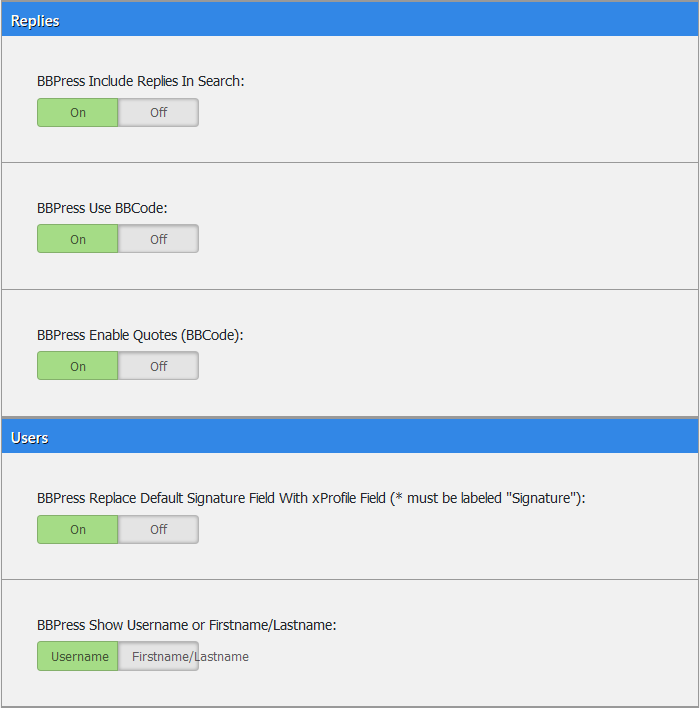
Admin settings for defining which aspects of the plugin you want to use.

Example of using the TinyMCE editor within your forums.
Changelog
1.1.0
- Bug Fix
- Add Screenshots and Icons.
- Add Module Information.
1.0.1
- Bug Fix regarding installation issue.
1.0.0
- Initial Release.