

Column Shortcodes
Adds shortcodes to easily create columns in your posts or pages.
Plugin info
Maintenance & Compatibility
Maintenance score
Possibly abandoned • Last updated 1269 days ago • 134 reviews
Is Column Shortcodes abandoned?
Possibly abandoned (last update 1269 days ago).
Compatibility
Languages
Similar & Alternatives
Explore plugins with similar tags, and compare key metrics like downloads, ratings, updates, support, and WP/PHP compatibility.
Description
Adds shortcodes to easily create columns in your posts or pages.
Sometimes you just need to divide your page into different columns. With this plugin you just select a column shortcode and it will add the column to the page. You can also change the padding of each individual column from the UI.
There are 10 different column widths available from which you can make all combinations:
- full width (1/1)
- half (1/2)
- one third (1/3)
- two third (2/3)
- one fourth (1/4)
- three fourth (3/4)
- one fifth (1/5)
- two fifth (2/5)
- three fifth (3/5)
- four fifth (4/5)
- one sixth (1/6)
- five sixth (5/6)
A preset stylesheet is included, which you can also overwrite to you liking in your theme’s stylesheet.
Related Links:
- http://www.codepresshq.com/
Installation
- Upload column-shortcodes to the /wp-content/plugins/ directory
- Activate Column Shortcodes through the ‘Plugins’ menu in WordPress
- A shortcode icon is added to the top of the WYSIWYG editor.
- Click the added icon and it will open a popup window from which you can pick your column shortcode.
Frequently Asked Questions
Standard
The easiest way is to use the added icon on the top of your editor ( right next to the media icon ). This will open a popup window from which you can select a column icon by clicking on one of the shortcodes.
Manual
You could also type in the shortcode yourself inside the editor. The following shortcodes are available:
[full_width][/full_width]
[one_half][/one_half]
[one_half_last][/one_half_last]
[one_third][/one_third]
[one_third_last][/one_third_last]
[two_third][/two_third]
[two_third_last][/two_third_last]
[one_fourth][/one_fourth]
[one_fourth_last][/one_fourth_last]
[three_fourth][/three_fourth]
[three_fourth_last][/three_fourth_last]
[one_fifth][/one_fifth]
[one_fifth_last][/one_fifth_last]
[two_fifth][/two_fifth]
[two_fifth_last][/two_fifth_last]
[three_fifth][/three_fifth]
[three_fifth_last][/three_fifth_last]
[four_fifth][/four_fifth]
[four_fifth_last][/four_fifth_last]
[one_sixth][/one_sixth]
[one_sixth_last][/one_sixth_last]
[five_sixth][/five_sixth]
[five_sixth_last][/five_sixth_last]
Another option
Another way to add shortcodes is to switch to HTML-view. On the top of editor you will now see all the shortcodes listed.
By default these buttons are hidden. If you’d like to use them you can add this to your theme’s functions.php:
add_filter('add_shortcode_html_buttons', '__return_true' );
When you have selected a shorcode it will be placed in you editor. You will see something like this:
[one_half][/one_half]
Make sure to place your content (text/images etc. ) between the two shortcodes, like so:
[one_half]My content goes here...[/one_half]
You can prefix the shortcode by placing the following in your functions.php. Problem solved =)
add_filter( 'cpsh_prefix', 'set_shortcode_prefix' );
function set_shortcode_prefix() {
    return 'myprefix_'; // edit this part if needed
}
In patch 0.6 we added padding settings (optional) to the plugin. If you would like to hide this settings menu you can place the following in your functions.php
add_filter( 'cpsh_hide_padding_settings', '__return_true' );
If you would like to hide certain column from the menu; place the following in your functions.php
function hide_column_shortcodes( $shortcodes ) {

    /* uncomment ( remove the '//' ) any of the following to remove it's shortcode from menu */

    // unset( $shortcodes['full_width'] );
    // unset( $shortcodes['one_half'] );
    // unset( $shortcodes['one_third'] );
    // unset( $shortcodes['one_fourth'] );
    // unset( $shortcodes['two_third'] );
    // unset( $shortcodes['three_fourth'] );
    // unset( $shortcodes['one_fifth'] );
    // unset( $shortcodes['two_fifth'] );
    // unset( $shortcodes['three_fifth'] );
    // unset( $shortcodes['four_fifth'] );
    // unset( $shortcodes['one_sixth'] );
    // unset( $shortcodes['five_sixth'] );

    return $shortcodes;
}
add_filter( 'cpsh_column_shortcodes', 'hide_column_shortcodes' );
You can easily overwrite the existing stylesheet. For example you would like to add a margin between your columns, you just place the following in your theme’s style.css:
.one_half {
    width: 49% !important;
    margin-right: 2% !important;
}
.one_half.last_column {
    width: 49% !important;
    margin-right: 0px !important;
}
.one_third {
    width: 32% !important;
    margin-right: 2% !important;
}
.one_third.last_column {
    width: 32% !important;
    margin-right: 0px !important;
}
.two_third {
    width: 66% !important;
    margin-right: 2% !important;
}
.two_third.last_column {
    width: 66% !important;
    margin-right: 0px !important;
}
.one_fourth {
    width: 23.5% !important;
    margin-right: 2% !important;
}
.one_fourth.last_column {
    width: 23.5% !important;
    margin-right: 0px !important;
}
.three_fourth {
    width: 74.5% !important;
    margin-right: 2% !important;
}
.three_fourth.last_column {
    width: 74.5% !important;
    margin-right: 0px !important;
}
.one_fifth {
    width: 18.4% !important;
    margin-right: 2% !important;
}
.one_fifth.last_column {
    width: 18.4% !important;
    margin-right: 0px !important;
}
.two_fifth {
    width: 39% !important;
    margin-right: 2% !important;
}
.two_fifth.last_column {
    width: 39% !important;
    margin-right: 0px !important;
}
.three_fifth {
    width: 59% !important;
    margin-right: 2% !important;
}
.three_fifth.last_column {
    width: 59% !important;
    margin-right: 0px !important;
}
.four_fifth {
    width: 79.6% !important;
    margin-right: 2% !important;
}
.four_fifth.last_column {
    width: 79.6% !important;
    margin-right: 0px !important;
}
.one_sixth {
    width: 15% !important;
    margin-right: 2% !important;
}
.one_sixth.last_column {
    width: 15% !important;
    margin-right: 0px !important;
}
If you would like to prevent the loading of the column styling on the frontend; place the following in your functions.php
add_filter( 'cpsh_load_styles', '__return_false' );
We would love to hear your feedback and suggestions on this. Just send an email to [email protected].
You will find a .po file in the languages folder which you can use. You can send the translation to [email protected].
Review feed
Screenshots
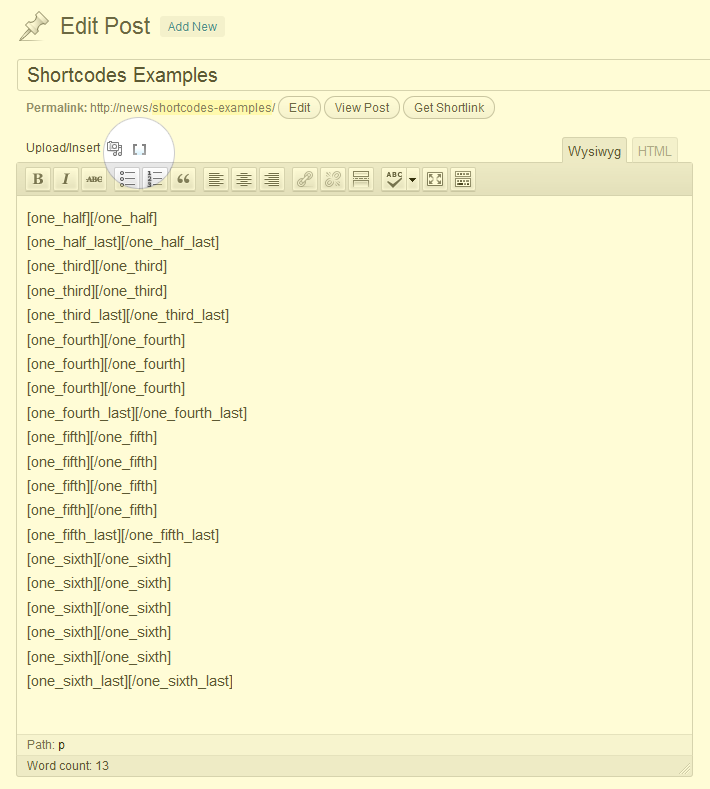
Editor with shortcode icon
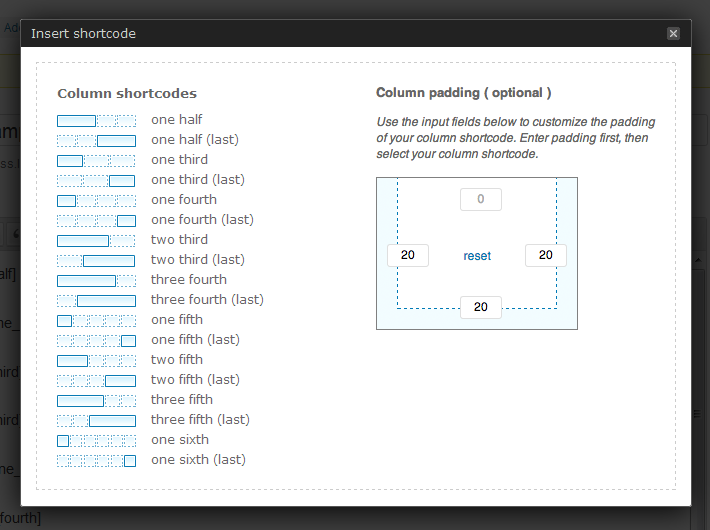
Shortcode popup with shortcode selector
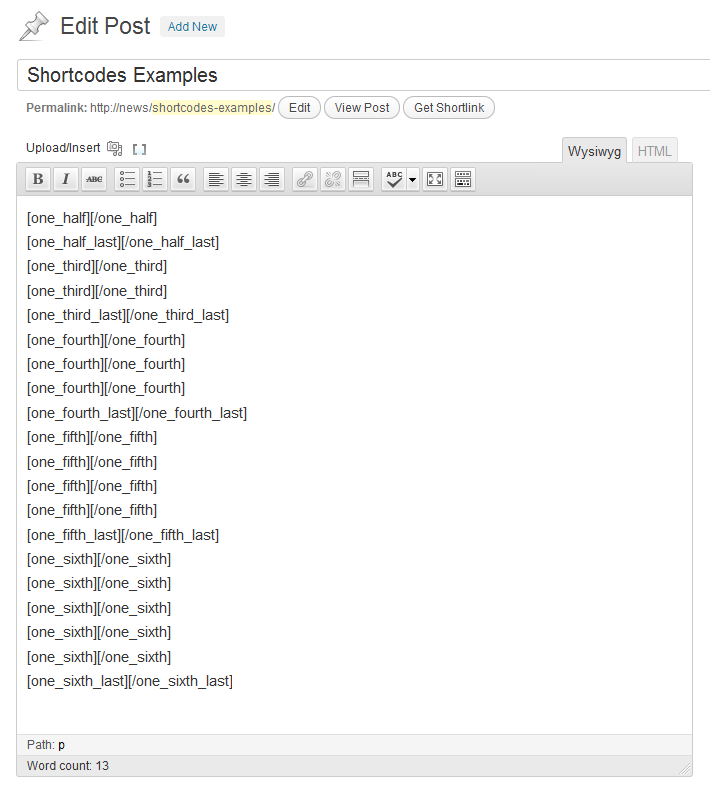
Editor with shortcodes
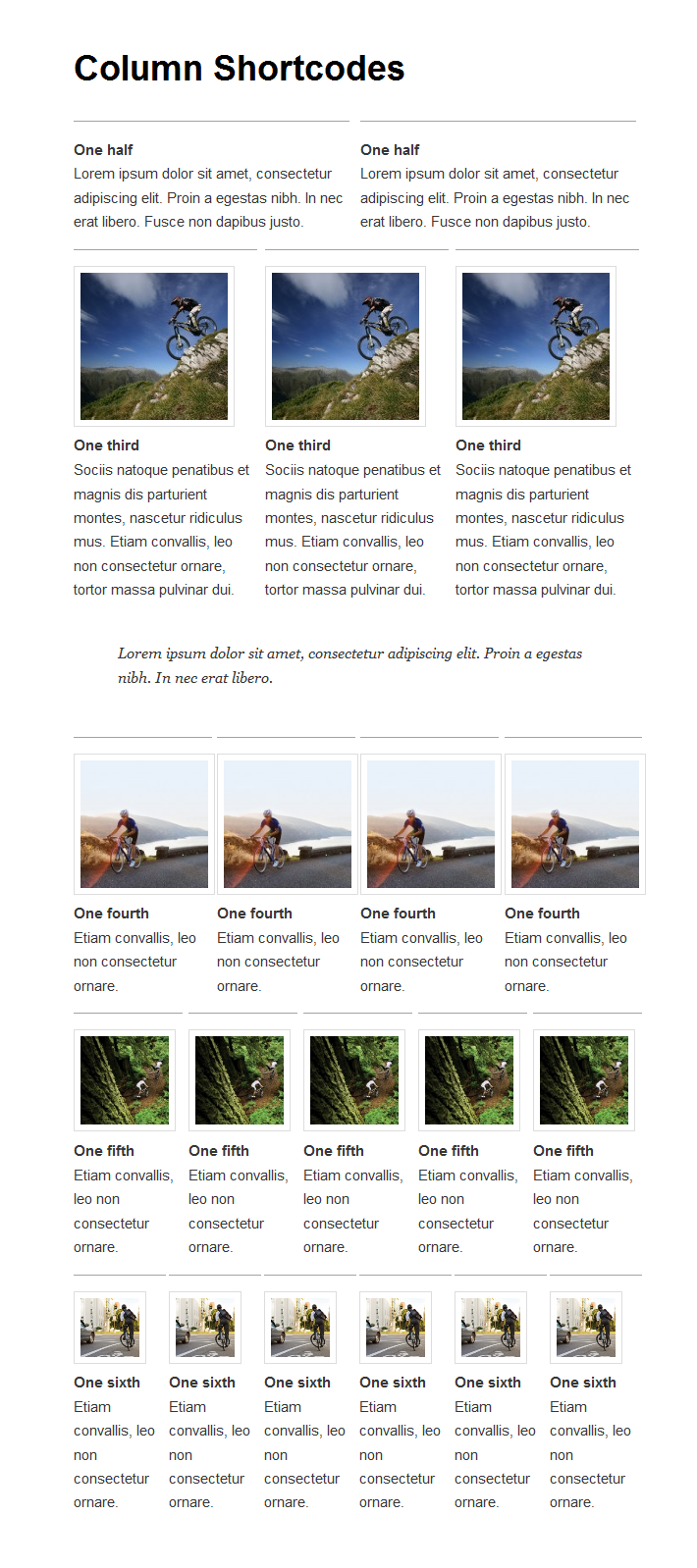
Example post with the use of column shortcodes
Changelog
1.0.1
- [Fixed] Hotfix for WordPress 5.5
1.0
- [Fixed] Compatible with WordPress 4.8 and up
- [Fixed] Padding generator will automatically add ‘px’ to numbers
- [Added] Added filter to hide banner
add_filter( 'cpsh_show_banner', '__return_false' ); - [Improved] UI improvements for better readability
0.6.9
- [Fixed] Rollback of the auto paragraphs. Too much conflicts with other shortcodes
0.6.8
- [Fixed] use wpautop() to wrap content in paragraphs when needed
0.6.7
- [Fixed] Paragraphs are added to the columns
0.6.6
- [Fixed] Swapped images for 5/6 columns
0.6.5
- added filter to prevent loading of frontend styles:
add_filter( 'cpsh_load_styles', '__return_false' ); - added 5/6 column;
0.6.4
- updated icon for WP3.8
0.6.3
- updated languages
0.6.2
- added Italian language ( thanks to Nicola )
- added Czech language and bug fix ( thanks to Michal Ratajsky )
0.6.1
- fixed jquery.cookie.js issue where in some cases the server would reject it
- added filter for hiding certain column shortcodes from view.
0.6
- added Danish translation ( thanks to Mads Rosendahl )
- added full width column
- updated css template for margins ( thanks to intheshallow )
- added responsive CSS for devices with a max-width viewport of 600pixels
0.5
- added the option to add paddings to the columns from the shortcode UI.
0.4
- added improvements made for inclusion on WordPress.com VIP ( thanks to danielbachhuber )
- added WordPress coding conventions ( see https://codex.wordpress.org/WordPress_Coding_Standards )
- added fix for script and style loading
0.3
- added RTL support and Hebrew language ( thanks to Rami Yushuvaey )
- added Slovak translation ( thanks to Branco from WebHostingGeeks )
- added column 4/5
0.2
- added french and spanish language ( thanks to Mikel Aralar )
- improved script loading
- shortcodes HTML-view buttons hidden by default. Enable them by adding this to your functions.php:
add_filter('add_shortcode_html_buttons', '__return_true' );
0.1
- Initial release.