

Advanced Comment Form
Advanced Comment Form lets you customize plenty of things on the default comment forms in WordPress.
Maintenance 30/100665d since update
Active installs
5,000
Downloads
71,335
Reviews
19
Age
11.8y
Plugin info
Total downloads: 71,335
Active installs: 5,000
Total reviews: 19
Average rating: 5
Support threads opened: 0
Support threads resolved: 0 (0%)
Available in: 1 language(s)
Contributors: 3
Last updated: 6/6/2024 (665 days ago)
Added to WordPress: 6/23/2014 (11 years old)
Minimum WordPress version: 6.0
Tested up to WordPress version: 6.5.7
Minimum PHP version: 7.2
Maintenance & Compatibility
Maintenance score
Possibly abandoned • Last updated 665 days ago • 19 reviews
30/100
Is Advanced Comment Form abandoned?
Possibly abandoned (last update 665 days ago).
Compatibility
Requires WordPress: 6.0
Tested up to: 6.5.7
Requires PHP: 7.2
Languages
Similar & Alternatives
Explore plugins with similar tags, and compare key metrics like downloads, ratings, updates, support, and WP/PHP compatibility.
autometa's FORMA
Rating 0.0/5 (0 reviews) • Active installs 0
Comments – wpDiscuz
Rating 4.7/5 (577 reviews) • Active installs 80,000
No CAPTCHA reCAPTCHA
Rating 4.3/5 (69 reviews) • Active installs 5,000
WP Forms Puzzle Captcha
Rating 4.8/5 (6 reviews) • Active installs 5,000
Power Captcha reCAPTCHA
Rating 5.0/5 (3 reviews) • Active installs 800
Comments Extra Fields For Post,Pages and CPT
Rating 4.2/5 (9 reviews) • Active installs 700
Description
Advanced Comment Form enables you to customize the WordPress comment form right from your dashboard.
You can find the settings page under Comments > Comment Form in the dashboard.
Remove Fields
- remove the email field for standard, and non standard comment forms
- remove the website field for standard, and non standard comment forms
Change Text
- remove the message that emails are not published and which fields are required
- remove the text about which html tags are allowed
- insert custom text before the form
- insert custom text after the form
Layouts
- use a two columns layout for the comment form
Shortcode
[comment-form]shortcode to insert comment form into posts and pages
Important Notes
- the plugin works only, if your theme uses the standard WordPress comment form function
- options that where submitted with the
comment_formfunction in your template overwrite most of the plugin functions
Installation
- Upload the plugin folder to the
/wp-content/plugins/directory - Activate the plugin through the ‘Plugins’ menu in WordPress
- Visit the settings page under
Comments > Comment Formto customize the form
Frequently Asked Questions
No FAQ available
Review feed
No reviews available
Screenshots
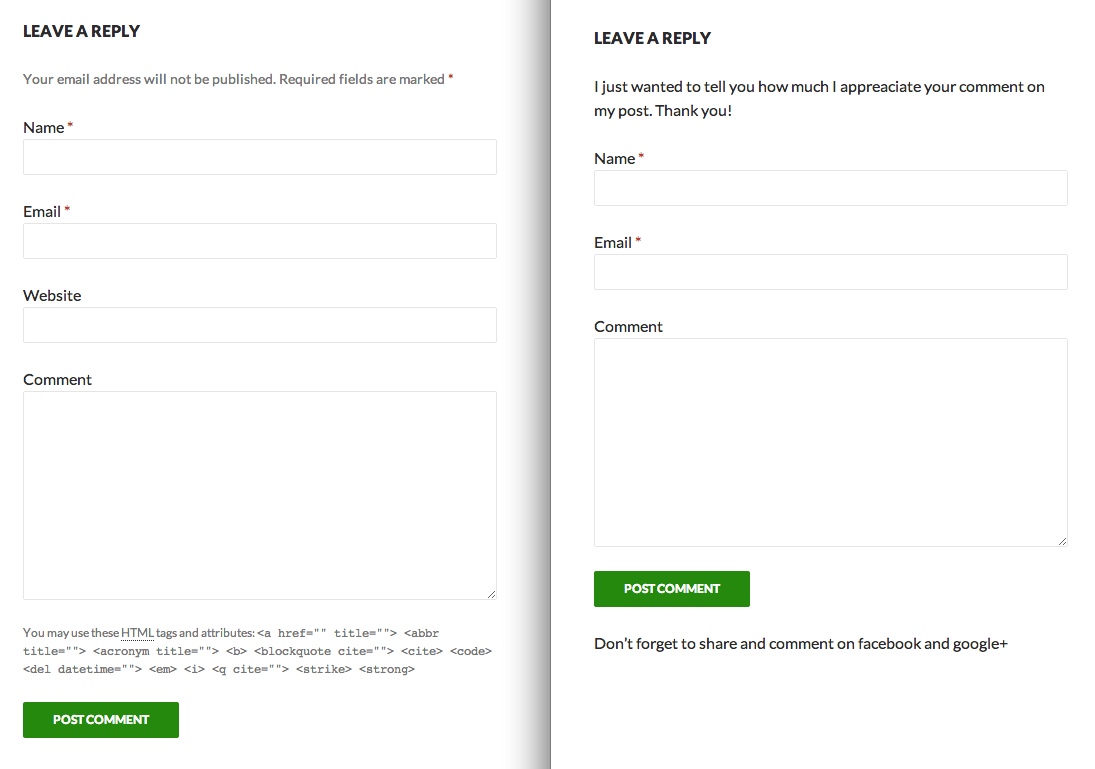
Comment form before and after applying some of the plugin options

Two-column comment form layout
Changelog
1.2.3
- Small tweaks
1.2.2
- Ignore two-column style on screens below 480px
1.2.1
- sanitize the input into text options using
wp_kses_postto prevent the usage of scripts and disallowed tags and attributes.
1.2.0
- added two columns layout
- restructured admin area
1.1.0
- renamed the plugin to Advanced Comment Form
- hopefully fixed some issues with the readme file
- remove website field using css as an alternative method
- added
[comment-form]shortcode to insert comment form into posts and pages
1.0.1
- so many plugins written and still not getting the readme.txt right
1.0
- first version of the plugin