

Comment Notice
The main function of this plugin is to display a subscription option on the end of the comment area, so they can be noticed when there are new commen …
Maintenance 20/1005156d since update
Active installs
10
Downloads
1,977
Reviews
0
Age
14.2y
Plugin info
Total downloads: 1,977
Active installs: 10
Total reviews: 0
Average rating: 0
Support threads opened: 0
Support threads resolved: 0 (0%)
Available in: 1 language(s)
Contributors: 2
Last updated: 1/7/2012 (5156 days ago)
Added to WordPress: 12/3/2011 (14 years old)
Minimum WordPress version: 3.0.1
Tested up to WordPress version: 3.2.1
Minimum PHP version: f
Maintenance & Compatibility
Maintenance score
Possibly abandoned • Last updated 5156 days ago
20/100
Is Comment Notice abandoned?
Possibly abandoned (last update 5156 days ago).
Compatibility
Requires WordPress: 3.0.1
Tested up to: 3.2.1
Requires PHP: f
Similar & Alternatives
Explore plugins with similar tags, and compare key metrics like downloads, ratings, updates, support, and WP/PHP compatibility.
Subscriber by BestWebSoft
Rating 4.6/5 (11 reviews) • Active installs 1,000
Subscribers – Free Web Push Notifications
Rating 2.6/5 (7 reviews) • Active installs 1,000
Leaky Paywall
Rating 4.2/5 (33 reviews) • Active installs 700
Scratch & Win – Giveaways and Contests. Boost subscribers, traffic, repeat visits, referrals, sales and more
Rating 4.7/5 (30 reviews) • Active installs 200
WordPress Login Redirect
Rating 4.0/5 (4 reviews) • Active installs 200
MS-Subscriber
Rating 5.0/5 (3 reviews) • Active installs 70
Description
Main Features:
- List comment subscriptions email, post name, date.
- Ban or Active the subscribers.
- Modify email notification subject, body, footer by tags.
- Modify email styles, include body background, text color and footer background.
- Change the display text on the end of comment area.
More info:
Installation
- Upload the contents of comment-notice.zip to your plugins directory.
- Activate the plugin
- There will be a “Notice” menu on your admin panel.
- Set email contant and style on the “Email format” menu.
Frequently Asked Questions
No FAQ available
Review feed
No reviews available
Screenshots
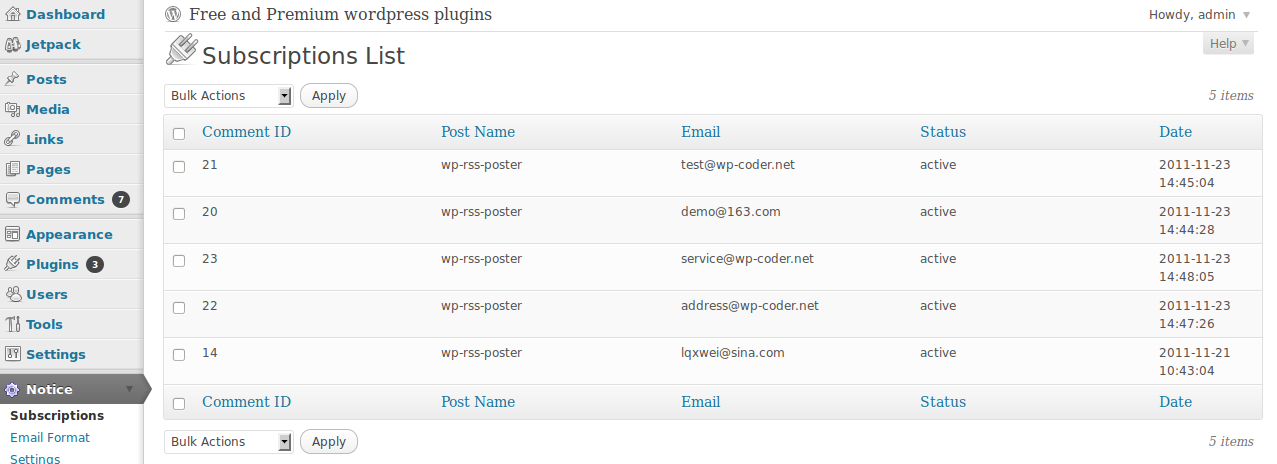
Subscriptions List page

Email content setting page

Email style setting page
Changelog
1.0.0
Beta release