

Recent Comments Widget Plus
Provides custom recent comments widget with extra features such as display avatar, comment excerpt and much more!
Plugin info
Maintenance & Compatibility
Maintenance score
Possibly abandoned • Last updated 1255 days ago • 20 reviews
Is Recent Comments Widget Plus abandoned?
Possibly abandoned (last update 1255 days ago).
Compatibility
Developers
Similar & Alternatives
Explore plugins with similar tags, and compare key metrics like downloads, ratings, updates, support, and WP/PHP compatibility.
Description
This plugin will enable a custom and advanced recent comments widget. Allows you to display a list of the most recent comments with avatar and excerpt, you can also choose which to show newer comments first or older comments first and choose comments from any post type.
Support this project
If you are enjoying this plugin. I would appreciate a cup of coffee to help me keep coding and supporting the project! Support & donate.
Features Include
- Display avatar with customizable size.
- Display comment excerpt with customizable length.
- Exclude pingback & trackback
- Post type option.
- Offset option.
- Option to choose the comments order.
- Allows you to set title url.
- Custom CSS class.
- Multiple widgets.
Links
- Translate to your language.
- Contribute or submit issues on Github.
Installation
Through Dashboard
- Log in to your WordPress admin panel and go to Plugins -> Add New
- Type comments widget plus in the search box and click on search button.
- Find Comments Widget Plus plugin.
- Then click on Install Now after that activate the plugin.
- Go to the widgets page Appearance -> Widgets.
- Find Recent Comments Plus widget.
Installing Via FTP
- Download the plugin to your hardisk.
- Unzip.
- Upload the comments-widget-plus folder into your plugins directory.
- Log in to your WordPress admin panel and click the Plugins menu.
- Then activate the plugin.
- Go to the widgets page Appearance -> Widgets.
- Find Recent Comments Plus widget.
Frequently Asked Questions
This plugin add a small css code to your website, to remove it please add the code below in your theme functions.php
add_filter( 'cwp_use_default_style', '__return_false' );
If you use cache plugin, please try to clear the cache or re-save the widget.
Review feed
Screenshots
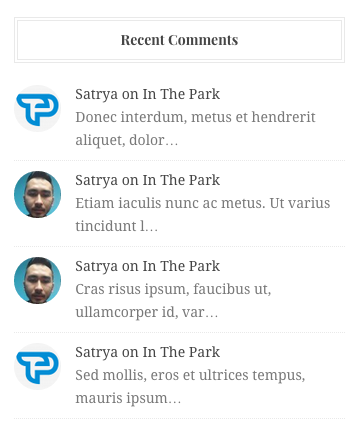
Widgets output
Changelog
1.3
- Enchancement: Code refactor to follow latest WordPress coding standard.
1.2.0
- Support new Widget block.