

Commission Junction Link Shortcode
Customize and insert Commission Junction links using a simple shortcode.
Plugin info
Maintenance & Compatibility
Maintenance score
Possibly abandoned • Last updated 4839 days ago • 1 reviews
Is Commission Junction Link Shortcode abandoned?
Possibly abandoned (last update 4839 days ago).
Compatibility
Similar & Alternatives
Explore plugins with similar tags, and compare key metrics like downloads, ratings, updates, support, and WP/PHP compatibility.
Description
This plugin allows you to customize and insert text links from the Commission Junction affiliate program into a post or page using a simple shortcode. This prevents the WordPress WYSIWYG editor from messing up the links and simplifies your HTML code. Inserting the shortcode [cj] with the parameters below will output the proper link HTML code in your published post or page.
Readme Generator
- This plugin’s readme.txt file was generated by the bitacre Readme Generator for WordPress Plugins.
Support
Donations
Donations are graciously accepted to support the continued development and maintenance of this and other plugins. We currently accept Paypal and kind words.
Installation
- Download the latest zip file and extract the ‘cj-link-shortcode’ directory.
- Upload it to your ‘/wp-content/plugins/’ directory.
- Activate ‘Commission Junction Link Shortcode’ on the ‘Plugins’ menu in WordPress.
- Insert
[cj url="link-url" img="tracking-img-url"]Example link[/cj]in your post or page (replacing your link’s information).
Frequently Asked Questions
How do I use the shortcode?
Simply type [cj url="link-url" img="tracking-img-url"]Example link[/cj] into your post. Replace link-url, tracking-img-url, and Example link with your Commission Junction link’s information.
Where do I find my link’s information?
The relevant urls are contained within the HTML code of any of the Commission Junction links you are instructed to copy and paste. See the screenshot or visit this plugin’s help page for more detailed instructions on finding your link information.
Review feed
Screenshots
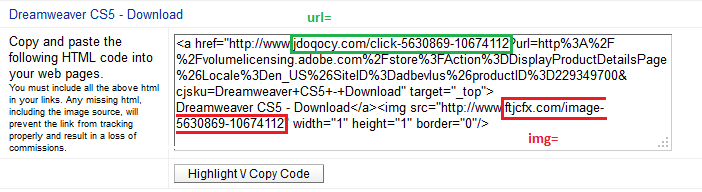
Where to find the url and img arguments for your Commission Junction link.
Changelog
1.0.1
- Fixed help page link using generic function (which may prevent it from being activated).
1.0
- First released version.
- There may still be bugs, but I can’t find any.