

Connections Business Directory
An easy-to-use directory plugin to create an addressbook, business directory, member directory, staff directory or church directory.
Plugin info
Maintenance & Compatibility
Maintenance score
Possibly abandoned • Last updated 504 days ago • Support resolved 77% • 430 reviews
Is Connections Business Directory abandoned?
Possibly abandoned (last update 504 days ago).
Compatibility
Similar & Alternatives
Explore plugins with similar tags, and compare key metrics like downloads, ratings, updates, support, and WP/PHP compatibility.
Description
Showcase | Documentation | Support | Templates | Extensions
Connections Business Directory is one of the best business directory plugins available for WordPress. Its simplicity in design and function, vast array of unique features and versatility are the reasons more and more people are turning to Connections Business Directory for their directory needs. You can use Connections to create a simple address book, maintain a staff or member directory and run a business directory or link directory. Connections Business Directory was built bottom up to be as configurable as possible while providing the features you need. Read on to learn about some of the best features Connections Business Directory has to offer…
Features
- Highly rated support.
- Continuously updated bringing you new features for free.
- Compatible with all themes including popular themes such as Avada, Divi, Enfold and OceanWP.
- Compatible with most popular page builders such as Elementor, Beaver Builder, Brizy, Visual Composer, Fusion, SiteOrigin, etc…
- SEO. Every entry in your business directory outputs following the hCard spec. Soon to be updated to following Schema.org.
- Supports the native sitemaps feature available in WordPress versions 5.5 and newer.
- Yoast SEO and Rank Math sitemaps integration.
- Event Logging Integrates with the Simple History plugin; logging directory related events such as creating a new entry, modifying an entry, and deleting an entry.
- Supports the WordPress Block (Gutenberg) Editor with the following blocks.
- Carousel Block :: Display your directory as a carousel.
- Directory Block :: Use this block to embed your directory in a page.
- Team Block :: It’s easy to use Connections to build your team page! Team Block is a full-featured block with multiple layout styles. While premium team plugins can set you back $20 or more, Team Block is free for all Connections users.
- Upcoming List Block :: Use this block to display an upcoming list of anniversaries, birthdays or other events.
- A growing selection of Content Blocks:
- Related Entries:: Display related Entries in a mobile responsive carousel.
- Nearby Entries:: Increase discoverability of Entries by displaying nearby Entries in a mobile responsive carousel.
- Recently Viewed:: A list a directory Entries the user has recently viewed.
- Last Viewed:: The last directory Entry the user viewed.
- Frontend Entry Management:: Management options include a quick link to edit the Entry and a Delete option.
- Entry Meta:: Display details such as when the Entry was added nad last modified and by whom.
- Dashboard admin page where you can see at a glance today’s anniversaries and birthdays as well as upcoming anniversaries and birthdays of members in your directory.
- Multiple entry types from which to choose; such as individual, organization and family. The family entry type is unique to Connections. This entry type allows you to group individuals together as a family which makes Connections ideally suited for creating a church directory.
- You control which entries are viewable to the public and which entries are private, viewable for logged-in users only. You can even have entries set as unlisted so only admins can view them.
- Repeatable fields for address, phone numbers, email, instant messenger, social media, links and dates which allow you to add as much or as little as you need for each business in your business directory.
- Hierarchical (nested) category support. Businesses and members in your business directory can be added to any number of categories.
- Include a biographical text for an individual member or business description for each entry in your business directory using an easy-to-use rich text editor.
- You can easily add a business logo or photo of the staff member for each entry in your business directory or staff directory. The photo and logo images are fully responsive with HiDPI (Retina) display support.
- Scalable, manage directories which contain hundreds of thousands of entries.
- CSV Export of addresses, phone numbers, email addresses and dates.
- CSV Import of nested categories.
- Role capability support.
- Displaying your business directory on the frontend is as simple as putting a shortcode on a page. Don’t let this simplicity fool you. The shortcode provides a large array of options that are just too numerous to list. To learn more, go here.
- Extensible and developer friendly.
- Robust templating support with the Template Customizer. Several basic templates are provided to get you started with you business directory with many more premium templates available to really make your business directory shine.
Extensible
Here are some great free extensions (with more on the way) that enhance your experience with Connections Business Directory:
Utility
- Toolbar :: Provides quick links to the admin pages from the admin bar.
- Login :: Provides a simple-to-use login shortcode and widget.
- Anniversary and Birthday Emails :: Add the ability to automatically send a customizable email to entries on their anniversary or birthday.
Custom Fields
- Business Open Hours :: Add the business open hours.
- Certifications :: Create and assign certifications to individuals in your directory.
- Local Time :: Add the business local time.
- Facilities :: Add the business facilities.
- Income Level :: Add an income level.
- Education Level :: Add an education level.
- Languages :: Add languages spoken.
- Hobbies :: Add hobbies.
Misc
- Face Detect :: Applies face detection before cropping an image.
- Authored :: Displays a list of blog posts written by the entry on their profile page.
- Contact :: Displays a contact form on the entry’s profile page to allow your visitors to contact the entry without revealing their email address.
- CSV Import :: Bulk import your data in to your directory.
- Custom Category Order :: Order your categories exactly as you need them.
- Custom Entry Order :: Allows you to easily define the order that your business directory entries should be displayed.
- Enhanced Categories :: Adds many features to the categories.
- Form :: Allow site visitor to submit entries to your directory. Also provides frontend editing support.
- Link :: Links a WordPress user to an entry so that user can maintain their entry with or without moderation.
- ROT13 Encryption :: Protect email addresses from being harvested from your business directory by spambots.
- SiteShot :: Show a screen capture of the entry’s website.
- Widget Pack :: A set of feature rich, versatile and highly configurable widgets that can be used to enhance your directory.
Connections Business Directory comes with a couple templates to get you started which fully support the Template Customizer. In addition to these free templates there are many premium templates available to take your business directory the level visually.
- Circled :: A simple but bold template specifically designed for displaying small team or staff directory.
- cMap :: Our most popular go to template for a business directory and chamber of commerce business directory, featuring full Template Customizer support.
- Excerpt Plus :: Simple design which features a directory entry name, photo thumbnail and excerpt.
- Gridder :: Another simple but bold template which displays the directory in a grid layout. Perfect for displaying a small team or staff directory
- Slim Plus :: Specifically designed to take up as little space on the page as possible.
- Tile Plus :: This template was purposely designed to display the directory in a grid or column layout.
Developer Friendly
- Open development on GitHub.
- Access to 180 action hooks and over 300 filters … and counting.
- Term API.
- Custom Metabox and Fields API.
- Template Engine and API.
- Fragment Cache API.
- Log API (stateless and stateful).
- Admin Notices API.
- Email API.
- Settings API.
Connections Business Directory has a very flexible template engine. The loading of template and CSS are context aware. This means you could create specific templates that load when a user visits a specific entry, category, postal code and more.
Templates and CSS overriding is very granular and update safe. Check out these links for the details:
Languages
Connections Business Directory has been embraced around the world and has been translated by its users in the following languages.
- Arabic [60% Complete]
- Catalan [52% Complete]
- Croatian (Croatia) [22% Complete]
- Danish [31% Complete]
- Danish (Denmark) [29% Complete]
- Dutch (Netherlands) [49% Complete]
- Finnish [78% Complete]
- French (France) [90% Complete]
- German (Germany) [86% Complete]
- Greek (Greece) [69% Complete]
- Hebrew (Israel) [61% Complete]
- Hungarian (Hungry) [52% Complete]
- Italian (Italy) [58% Complete]
- Norwegian [13% Complete]
- Persian (Iran) [52% Complete]
- Polish (Poland) [52% Complete]
- Portuguese (Brazil) [77% Complete]
- Portuguese (Portugal) [24% Complete]
- Romanian (Romania) [69% Complete]
- Russian (Russia) [40% Complete]
- Serbian (Latin) [2% Complete]
- Spanish (Latin America) [49% Complete]
- Spanish (Mexico) [99% Complete]
- Spanish (Spain) [99% Complete]
- Sweden (Swedish) [96% Complete]
- Turkish (Turkey) [58% Complete]
Credits:
- Connection Business Directory was based off LBB, “Little Black Book”; which was based on Addressbook, both of which can be found in the Plugin Directory.
- vCard class is a modified version by Troy Wolf.
- Update Notice in plugin admin inspired by Changelogger 1.2.8 by Oliver Schlöbe.
- Screen Options class by Janis Elsts.
- $.goMap() jQuery Google Maps Plugin by Jevgenijs Shtrauss.
- MarkerClustererPlus jQuery Google Maps Marker Clustering Plugin by Gary Little.
- Validation jQuery plugin by Jörn Zaefferer.
- Chosen jQuery plugin by Harvest.
- qTip jQuery plugin by Craig Thompson.
- Email and URL validation methods by Gizmo Digital Fusion.
- Social media icons by WPZOOM.com; license CC BY-SA 3.0.
- iTunes icon by Paul Robert Lloyd; license Attribution-ShareAlike 2.0 UK: England & Wales (CC BY-SA 2.0).
- Podcast icon by schollidesign; license GNU/GPL.
- CSS theme and image used for the jQuery UI Datepicker by helenhousandi.
Installation
Frequently Asked Questions
A comprehensive list of FAQs can be found here.
Installation instructions can be found here.
Using the WordPress Plugin Search
- Navigate to the
Add Newsub-page under the Plugins admin page. - Search for
connections business directory. - The plugin should be listed first in the search results.
- Click the
Install Nowlink. - Lastly click the
Activate Pluginlink to activate the plugin.
Uploading in WordPress Admin
- Download the plugin zip file and save it to your computer.
- Navigate to the
Add Newsub-page under the Plugins admin page. - Click the
Uploadlink. - Select Connections Business Directory zip file from where you saved the zip file on your computer.
- Click the
Install Nowbutton. - Lastly click the
Activate Pluginlink to activate the plugin.
Using FTP
- Download the plugin zip file and save it to your computer.
- Extract the Connections Business Directory zip file.
- Create a new directory named
connectionsdirectory in the../wp-content/plugins/directory. - Upload the files from the folder extracted in Step 2.
- Activate the plugin on the Plugins admin page.
We have a QuickStart available that’ll walk you through the most basic setup. Basically all you need to do is, create a page, and add the [connections] shortcode and then start adding entries to your directory.
Connections Business Directory has been designed to work with any theme.
Yes it is. Connections Business Directory comes with many user supplied translations. We use Transifex to manage translations. This service make it easy for us manage and easy for you to translate. To read more, see this page.
Yes it is. However, do not Network activate Connections. Activate it on only the subsites that you wish to use Connections.
Yes this is possible but there is a special setup required to do so. It is recommended this is done before added entries to your business directory.
- Activate Connections Business Directory the primary site.
- Add
define( 'CN_MULTISITE_ENABLED', FALSE );to yourwp-config.phpfile. NOTE: If you have added any entries to any of your subsites, that data will be lost as Connections will read the directory entry data from the primary site’s database tables. - Activate Connections Business Directory on the subsites you wish to use Connections.
- WordPress version: >= 2.3
- PHP version: >= 5.6.20 ( 7.1 is highly recommended)
Review feed
Screenshots

The many possible faces of your business directory. Connections Business Directory supports templates. This screenshot showcases (left to right) Excerpt Plus, Circled, Gridder, Tile Plus and Slim Plus.

Another screenshot showcasing the different templates that can be used to style your business directory. Left to right; Circled, cMap and Gridder.

The Dashboard admin page. A snapshot of important information about the business directory.

The Manage admin page. Here you can manage all the entries within the address book.

The Add New Entry admin page. From here you can add new entries to the addressbook.

The Categories admin page. Add as many categories as you wish to the directory. Categories do support parent/child relationships.

The Templates admin page. Here you choose which template that the business directory should use when displaying the directory.
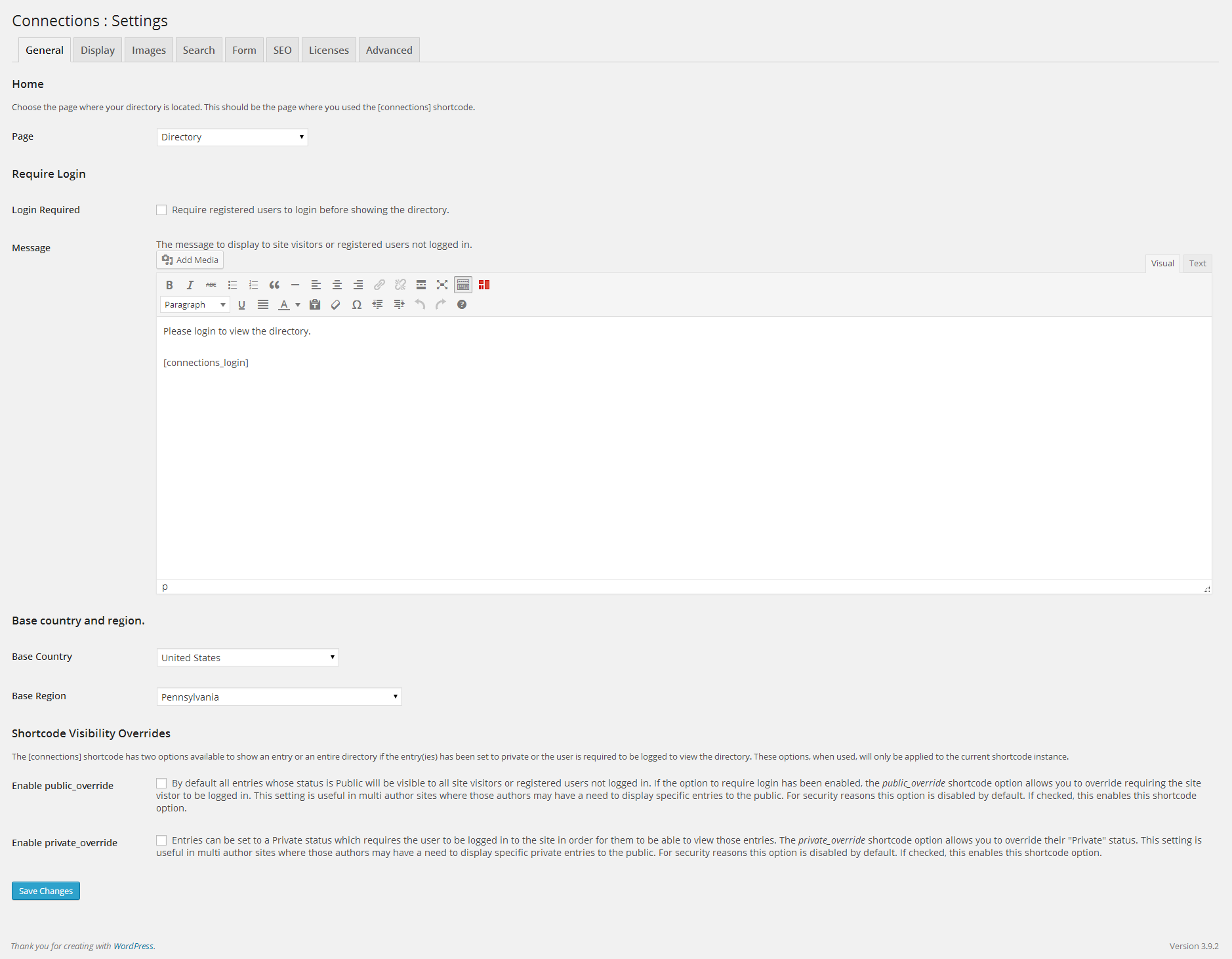
The Settings admin page where you can configure the business directory options.

The Role and Capabilities admin page. Here you can assign which roles have which capabilities in viewing and managing the directory.

The Tools :: Export admin page contains many CSV export tools to allow you to easily export the data from your business directory.
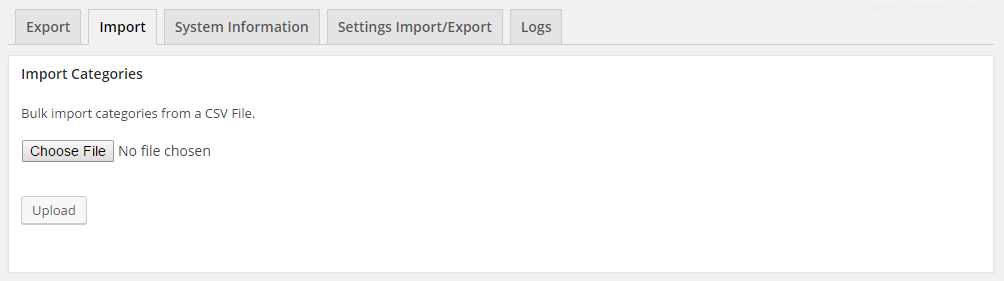
The Tools :: Import admin page allows you to quickly bulk import nested categories into your business directory.

In the event that you need support the Tools :: System Information admin page contains all the information needs about your directory installation which can be easily and quickly shared.

Need to move the configuration of your business directory from one site to another? The Tools : Settings Import/Export admin page allows you to do it with zero fuss. This will even migrate the Template Customizer settings applied to template and any of the settings for the premium extensions.
Changelog
Complete Changelog can be found here.
10.4.66 11/13/2024
- FEATURE: Update the Carousel Block to include an option to link to the Directory Entry Profile.
- NEW: Introduce
Field\Term_Radio_Group. - NEW: Introduce
\Entry\Functions::email()and\Entry\Functions::phone(). - NEW: Introduce
\Utility\_::maybeEcho(). - NEW: Introduce
cnRetrieve::countries()andcnRetrieve::regions(). - NEW: Add the search by country and regions (state) to the advanced search fields.
- TWEAK: Slight refactor of
\Form\Search::keywordField. - TWEAK: Add
nocacheto login URL. - TWEAK: Utilize native PHP
DateTime::createFromFormat()instead of the backward support polyfill. - TWEAK: Add
_wpnonceto the user login form. - BUG: Do not render the excerpt
divif there is no excerpt text. - BUG: Using ${var} in strings is deprecated, use {$var} instead.
- OTHER: Correct misspellings.
- OTHER: Bump Tested up to in README.TXT.
- OTHER: Limit README.txt tags to 5.
- OTHER: Reflow @todo.
- OTHER: Add
@todo. - OTHER: Correct phpDoc typo.
- OTHER: phpDoc corrections.
- I18N: Update Italian translation.
- WPCS: Remove trailing space.
- WPCS: Correct inline code comment.
- WPCS: There must be exactly one blank line before the tags in a doc comment.
10.4.65 02/28/2024
- NEW: Introduce
Field\Term_Checkbox_Group. - TWEAK: Make
\Form\Field\Select_Term::setQueryParameters()chainable. - TWEAK: Declare strict types in
\Form\Field\Checkbox_Group. - TWEAK: Add parameter and return types to
\Form\Field\Checkbox_Group. - TWEAK: Rename
\Form\Field\Select_Termto\Form\Field\Term_Select. - TWEAK: Remove unnecessary variable.
- TWEAK: In
\Form\Field\InputcreateLabelobject only when thelabelattribute is not empty. - TWEAK: Apply the Form field label only if the attribute is an instance of
\Form\Field\Label. - TWEAK: Rename object parameters to match the parameter name of the overridden class method.
- TWEAK: Refactor
Field\Term_Selectto matchField\Term_Checkbox_Groupfor consistency. - TWEAK: Update
\Form\Search\to include taxonomy term select dropdown fields. - TWEAK: Move logic from
\cnRetrieve::parseRequest()to\Request::parse()for thecn-catandcn-cat-slugquery variables. - BUG: Ensure
labelattributes are preserved when applying the field label position. - DEV: phpDoc corrections.
- DEV: phpDoc updates.
- DEV: Add phpDoc to
\Form\Field\Checkbox_Group.
10.4.64 02/19/2024
- NEW: Introduce
Fields\Select_Term. - NEW: Introduce
\Form\Field\Select::getOptions()and\Form\Field\Select::hasOptions. - TWEAK: Remove BOM when importing a Category CSV file.
- TWEAK: Change the variable
$fileinitial value fromnullto an empty string. - TWEAK: Increase the number of lines of the CSV file that is utilized to automatically determine the CSV enclosure character.
- TWEAK: Do not render form header and footer sections if they do not contain any content.
- TWEAK: Remove unused import from
\Form\Field\Select. - TWEAK: Remove unnecessary
\Form\Field\Select::walkOptions(). - TWEAK: Add the
$filter_by_itemdefault string when registering a taxonomy. - TWEAK:
Field\SelectextendInputinstead ofField. - TWEAK: Replace legacy
cnTemplatePart::walker('term-select')with modernField\Select_Term. - TWEAK: Move the loading of the term walkers to the autoloader and files into the
Walkerfolder. - OTHER: Correct misspellings.
- DEV: phpDoc corrections.
- DEV: Add return type declaration to
\Form\Field\Select::getFieldHTML(). - DEV: Add phpDoc to
\Form\Field\Select. - DEV: Rename variable.
10.4.63 02/06/2024
- FEATURE: Introduce
core uninstall. - TWEAK: Register the setting section and field for the “Uninstall” setting option. Trigger a browser prompt form confirmation.
- TWEAK: Make
initOptions()public. - TWEAK: Remove manual loading of the cnRole class as it is already included in the autoloader classmap.
- TWEAK: Move the
Connections_Directory()global function from theConnections_Directoryclass to the base plugin file. - TWEAK: Move the Activate/Deactivate hooks to their own class/file.
- TWEAK: Refactor
uninstall.phpto delete the plugin data, options, and tables if the option is enabled in the settings. - BUG: Prevent date from being displayed twice in the Recently Added/Modified Dashboard admin widgets.
- OTHER: Correct misspellings.
- OTHER: Add missing trailing period.
- DEV: phpDoc corrections.
- DEV: phpDoc updates.
10.4.62 01/29/2024
- FEATURE: Introduce the Settings Reset tool.
- FEATURE: WP-CLI: Introduce
settings <command>. - TWEAK: Ensure Dashboard Awaiting Moderation, Recently Added, and Recently Modified widgets use the site options for the date and time format.
- TWEAK: Make
cnSettingsAPI::getAll()public. - TWEAK: Reset the confirmation text field in the Database Reset tool after both error and success.
- TWEAK: Reset
cnEntry_HTML::getCategoryBlock()to its default parameters after each entry render. - DEV: phpDoc corrections.
- DEV: phpDoc updates.
- ESLint: corrections.
- WP-CLI: Add success messages to the
tablescommands.
10.4.61 01/19/2024
- FEATURE: Introduce the WP-CLI commands
core versionandtables <command>. - FEATURE: Introduce the Database Reset Tool.
- NEW: Introduce
\Request::isCLI(). - TWEAK: Replace deprecated
cnShortcode::addFilterRegistry()calls with\Template\Hook_Transient::add(). - TWEAK: Use instance of
Termin\cnTemplatePart::categoryBreadcrumb(). - TWEAK: Route to the PHP error log, developer deprecated notices when running WP-CLI commands.
- TWEAK: Add JSDoc for global variable to enable code completion.
- BUG: Remove empty strings from the page title pieces to prevent leading/trailing page title separators from displaying.
- OTHER: Correct misspellings.
- DEV: phpDoc corrections.
- DEV: Add comment to
phpcs.xml. - WPCS: Inline comments must end in full-stops, exclamation marks, or question marks.
- WPCS: Spaces must be used for mid-line alignment; tabs are not allowed.
- WPCS: Disable
PEAR.NamingConventions.ValidClassName.StartWithCapitalandWordPress.NamingConventions.PrefixAllGlobals.NonPrefixedClassFound. - WPCS: Ignore WPCS flags in
Utility\_deprecated.
10.4.60 12/22/2023
- NEW: Introduce
CN_Walker_Term_Select_List_Enhanced::generateSelectAllOption(). - NEW: Introduce
CN_Walker_Term_Select_List_Enhanced::generateSelectNoneOption(). - TWEAK: Adjust Rank Math robots meta, set noindex on term pages.
- TWEAK: Utilize the
wpseo_robots_arrayfilter to improve Yoast SEO integration by settingnoindexon the pg and term slug pages. - TWEAK: Use strict comparison.
- TWEAK: Refactor
CN_Walker_Term_Select_List_Enhanced::render()to utilizegenerateSelectAllOption(). - TWEAK: Refactor
CN_Walker_Term_Select_List_Enhanced::render()to utilizegenerateSelectNoneOption(). - TWEAK: Simplify string concatenation.
- TWEAK: Update max tested WP version.
- OTHER: Correct misspelling.
- DEV: Remove unnecessary trailing semi-colon.
- DEV: Remove @noinspection tag.
- DEV: phpDoc updates.
- DEV: phpDoc corrections.
- DEV: Remove WPCS exclusions.
- DEV: Remove commented out unused code.
- WPCS: Use the DIR constant instead of calling dirname(FILE) (PHP >= 5.3).
- WPCS: Update properties for
Universal.WhiteSpace.PrecisionAlignment. - WPCS: Universal.WhiteSpace.CommaSpacing.TooMuchSpaceAfter.
- WPCS: Universal.WhiteSpace.CommaSpacing.SpaceBefore.
- WPCS: Generic.WhiteSpace.IncrementDecrementSpacing.SpaceAfterDecrement.
- WPCS: Squiz.Commenting.FunctionComment.ParamCommentFullStop.
- WPCS: Generic.WhiteSpace.LanguageConstructSpacing.IncorrectSingle and Squiz.Strings.ConcatenationSpacing.PaddingFound.
- WPCS: Generic.WhiteSpace.IncrementDecrementSpacing.SpaceAfterIncrement.
- WPCS: Universal.CodeAnalysis.StaticInFinalClass.NewInstance.
- WPCS: Unnecessary “echo sprintf(…)” found. Use “printf(…)” instead.
- WPCS: The DEFAULT body must start on the line following the statement.
- WPCS: Universal.WhiteSpace.CommaSpacing.SpaceBefore.
- WPCS: Expected 1 space before the array closer in a single line array.
- WPCS: Expected 1 space after FUNCTION keyword; 0 found.
- WPCS: Function closing brace must go on the next line following the body; found 1 blank lines before brace.
- WPCS: Expected 1 blank line at end of file.
- WPCS: The closing brace for the class must go on the next line after the body.
- WPCS: Universal.WhiteSpace.CommaSpacing.SpaceBefore.
- WPCS: Use “self” instead of “static” when using late static binding in a final OO construct.
- WPCS: Opening statement of multi-line function call not indented correctly.
- WPCS: The file-level docblock must follow the opening PHP tag in the file header.
10.4.59 12/01/2023
- NEW: Introduce
Request::isSingle(). - TWEAK: Replace
cnEntry_Actionwith\Hook\Action\Admin_Bar::addEditEntry(). - TWEAK: Refactor
\Form\Field\Optionto support theclassandstyleattributes. - TWEAK: Refactor
CN_Walker_Term_Select_List_Enhanced::do_el()to utilize\Form\Field\Option. - TWEAK: Refactor
CN_Walker_Term_Select_List_Enhancedto ensure inherited method parameter names match. - TWEAK: Remove unused import.
- DEV: phpDoc corrections.
- DEV: phpDoc updates.
- WPCS: Add method return type.
- WPCS: It is recommended not to use reserved keyword “default” as function parameter name. Found: $default.
- WPCS: Add missing parameter type declaration.
- WPCS: Exclude a few WP VOP Go sniffs.
- WPCS: Inline comments must end in full-stops, exclamation marks, or question marks.
10.4.58 11/27/2023
- TWEAK: Delete extra trailing period from inline code comment.
- OTHER: Correct misspellings.
- OTHER: Update the dist files.
- WPCS: A single space must follow the
functionkeyword. - WPCS: Update phpcs ignore.
- WPCS: Spaces must be used for mid-line alignment; tabs are not allowed.
- DEV: Update WPCS to version 3.0.
- DEV: npm audit fix.
- DEV: Update webpack.
- DEV: Add the custom role capability properties to phpcs.xml.
- DEV: phpDoc corrections.
10.4.57 11/17/2023
- NEW: Introduce
CN_Walker_Term_Select_List_Enhanced::generatePlaceholder(). - TWEAK: Ensure the
\Simple_History\Simple_Historyclass exists before adding the Simple History logger registration hook to prevent possible fatal errors when older version of Simple History are installed. - TWEAK: Ensure the core WP default filters exists for WP User authentication during the REST API request.
- TWEAK: Simply direct access exit.
- TWEAK: Refactor
\Form\Field\Option::prepareAttributes()to process custom attributes. - TWEAK: Refactor
CN_Walker_Term_Select_List_Enhanced::render()to utilizegeneratePlaceholder().
10.4.56 11/10/2023
- BUG: Correct parameter used when defining the “remember me” checkbox in the login form.
- BUG: Prevent fatal PHP error if
wp_signon()returns and instance ofWP_Errorinstead of an instance ofWP_User.
10.4.55 10/26/2023
- NEW: Introduce
Shortcodeabstract class to reduce code duplication when registering shortcodes with WordPress. - TWEAK: Replace instances of
strip_tags()withwp_strip_all_tags(). - TWEAK: Add an
is_string()check to_string::stripTags()to help ensure no PHP deprecation notices are thrown. - TWEAK: Utilize
_string::stripTags()instead ofstrip_tags()to help ensure no PHP deprecations notices. - TWEAK: Remove unused commented out code referencing a method long removed in
cnRetrieve. - TWEAK: Remove use of deprecated
cnShortcode::addFilterRegistry()calls inShortcode\Entry. - TWEAK: Refactor
Shortcode\Entryto utilizeShortcodeto reduce code duplication. - BUG: Do not overwrite the
categoryshortcode value if thecn-catrequest variable is empty. - DEV: phpDoc corrections.
10.4.54 10/20/2023
- BUG: Use
Request::setVar()to reset the pagination value when the offset count is greater than the total row count to prevent a potential query loop and PHP fatal error.
10.4.53 10/16/2023
- FEATURE: Add integration and support for the Simple History plugin.
- TWEAK: Pass the
$argsparameter to thecn_edit_termsfilter. - TWEAK: Pass the
$argsparameter to thecn_edit_termsfilter. - BUG: Merge provided taxonomy labels with the default labels.
- OTHER: Correct misspellings.
10.4.52 09/29/2023
- TWEAK: Add webp as a valid image type when validating image uploads.
- BUG: Revert specificity CSS for icons to be more targeted to the Connections Brandicons (Icomoon).
10.4.51 09/28/2023
- TWEAK: Update Twitter to reflect the brand change to 𝕏. Add Google Scholar, ORCiD, ResearchGate, and 𝕏.
- TWEAK: Allow the Number metabox field type to be registered for the keyword search field.
- TWEAK: Apply CSS Lint style fixes.
- BUG: Ensure the
numbermetabox field value is properly sanitized. - DEV: Update the
distassets.
10.4.50 09/08/2023
- NEW: Introduce the
numberfield type in the Metabox API. - NEW: Introduce
Request\Input::setDefault(). - NEW: Introduce
User_Login::maybeRedirect(). - TWEAK: Ensure both the username and user email request values are sanitized before user.
- TWEAK: Move the permission check to the
permission_callbackfor theaccount/loginREST API endpoint. - TWEAK: Ensure the
rememberparameter for the login form is properly coerced into a boolean. - TWEAK: Remove unnecessary user login check before user sign on.
- TWEAK: Refactor the
account/loginendpoint to support thelogin_redirectfilter. - TWEAK: Rename the
redirectproperty toredirect_toin theaccountREST API route to match the core WordPress naming convention. - TWEAK: Remove use of
Request\Redirectin theAccount REST APIand utilize the requestredirect_toproperty. - TWEAK: If the URL passed into
From/setRedirect()fails validation set theredirectproperty to an empty string. - TWEAK: Refactor the default
redirect_tovalue to match WordPress core in the REST APIAccount\Loginendpoint. - TWEAK: Change the priority of the
parse_requestfrom10to11to stop Event Espresso from breaking the ability to parse the request variables. - BUG: Correct the default address name return value.
- DEV: Update
distfiles.
10.4.49 08/25/2023
- NEW: Introduce the
Emailfield to the Fields API. - NEW: Introduce
Request\Redirect. - NEW: Introduce the
account\registerREST API endpoint. - NEW: Introduce the Register User form.
- TWEAK: Rename the callback for the
account/loginendpoint touserLoginfor consistency in naming. - TWEAK: Move the confirmation message for the Request Reset Password form to the JSON response of the
account/request-reset-passwordendpoint. - TWEAK: Refactoring of the client-side JS form processing to allow confirmation messages to be passed via the REST API response.
- TWEAK: Refactor the core form submit event listener use of apiFetch, disabling the default parsing of API responses and use a private parse callback instead to ensure consistent request responses.
- BUG: Initialize the correct form in the
account/loginREST endpoint for validation. - OTHER: Correct misspelling.
- DEV: phpDoc corrections.
- DEV: Inline comments must end in full-stops, exclamation marks, or question marks.
- DEV: Parameter comment must end with a full stop.
- DEV: Remove unnecessary inline var phpDoc comment.
- DEV: Remove unnecessary import.
- DEV: Update the
distfiles.
10.4.48 08/10/2023
- NEW: Bump tested to WordPress version 6.3.
- NEW: Introduce the
account/reset-passwordREST API endpoint. - TWEAK: Refactor the toggle weak password confirm to use a boolean vs using the weak password score when determining whether to display or not.
- TWEAK: Add the default value and the field validation schema to the weak password confirmation.
- TWEAK: Remove the
loginhidden field from the reset password form. - TWEAK: Set password reset key cookie after rendering the reset password form.
- OTHER: Add punctuation to sentences.
10.4.47 08/04/2023
- NEW: Add support for the “Remember Me” checkbox in the login form.
- NEW: Introduce the
account/request-reset-passwordREST API endpoint. - NEW: Introduce the Account Request Reset Password form.
- NEW: Introduce
Form::getHeader()andForm::getFooter()so the sections of the form be overridden. - NEW: Introduce the Reset Password form.
- TWEAK: Add support for
implicit/afterandimplicit/beforewhen defining field label positioning. - TWEAK: Minor CSS tweaks, adding gaps between fields and a space between a checkbox field and its label.
- TWEAK: Set form description in the constructor.
- TWEAK: Removed unused class property.
- TWEAK: Add default styling for form confirmation and error messages.
- TWEAK: Refactor the Form API JavaScript to support multiple forms on a page when attaching event listeners.
- TWEAK: Remove unused
messageproperty from the baseFormobject. - TWEAK: Set the default value of the
headerandfooterproperties to be an empty string in theFormobject. - TWEAK: Refactor
Form::getShortname()to not use a static variable as each new form instance must return the current instance class shortname. - TWEAK: Add output buffering to the
Formobject actions. - TWEAK: Add action before and after rendering a form field in the
Formobject. - TWEAK: Add a space between a checkbox field and its label.
- TWEAK: Add current user can check before registering an admin message.
- TWEAK: Change filter name from
Connections_Directory/Form/{Form_Name}/Render/Field/BeforetoConnections_Directory/Form/{Form_Name}/Field. - OTHER: Correct misspellings.
- DEV: Remove @todo.
- DEV: phpDoc corrections.
- DEV: Update .eslintrc.
- DEV: Update the
distfiles.