

Consignment Store For WooCommerce
Easily allow sellers to submit items for your review to your consignment store. Once approved, items are added to your WooCommerce store.
Plugin info
Maintenance & Compatibility
Maintenance score
Actively maintained • Last updated 74 days ago
Is Consignment Store For WooCommerce abandoned?
Likely maintained (last update 74 days ago).
Compatibility
Similar & Alternatives
Explore plugins with similar tags, and compare key metrics like downloads, ratings, updates, support, and WP/PHP compatibility.
Description
CWS Consignment Store for WooCommerce lets the general public upload their items for consideration to your online and physical consignment store.
You will be notified that an item has been submitted. You can review the item and either approve or reject.
If you approve, the item will be added to WooCommerce and is immediately available in your store. You may change the “split” on the revenue from the item. The default is 50-50.
If you reject, the seller will be notified by email.
You can also use the plugin to put your existing inventory online. Use the easy form, snap a few pictures, and it will automatically be added to your WooCommerce online store without going through the approval step.
Uninstalling the plugin will remove all associated tables and data.
Pre-requisites:
WooCommerce
Live Demo
Seller’s Form to Add Item and the Admin area
Doc
Features
- Image resized on user’s device before upload
- Images deleted from Media Library if item is rejected
- Help seller set a price by displaying lowest, highest and average prices for items in your store, by category.
- Track payouts to the seller once an item sells.
Installation
The easiest way to install CWS Consignment Store is via your WordPress Dashboard. Go to the “Plugins” screen, click “Add New”, and search for “CWS Consignment” in the WordPress Plugin Directory. Then, click “Install Now” and wait a moment. Finally, click “Activate” and start using the plugin!
Manual installation works just as for other WordPress plugins:
- Download and extract the ZIP file.
- Move the folder “cws-consignment” to the “wp-content/plugins/” directory of your WordPress installation, e.g. via FTP.
- Activate the plugin “CWS Consignment Store” on the “Plugins” screen of your WordPress Dashboard.
- Create a page for potential Sellers to submit their items and add the shortcode [additemform]
- Review the submitted items in the WordPress admin area.
Frequently Asked Questions
Images are resized to a maximum of 800px height or 600px width.
If you are logged in to your site, go to the page where you have included the [additemform] shortcode and you will see SKU as the first input field.
SKU’s do need to be unique. Since this is for a consignment shop it is assumed each item is unique and requires its own sku.
I have seen this on Microsoft Edge when there is a security plugin such as WordFence activated. You need to allow basedir to be posted. In WordFence, go to All Options and scroll down to Allolisted URLs. Add a new URL that is the page where your form is (/addanitem/ for example). Select Param Type POST Body, and enter basedir in the Param Name. Click ADD. Add another rule now for the ajax file by entering URL /wp-content/plugins/cws-consignment/public/class-cws-consignment-public.php. And again select Param Type POST Body, and enter basedir in the Param Name. Click ADD. And Save Changes.
Review feed
Screenshots

Add Item Form
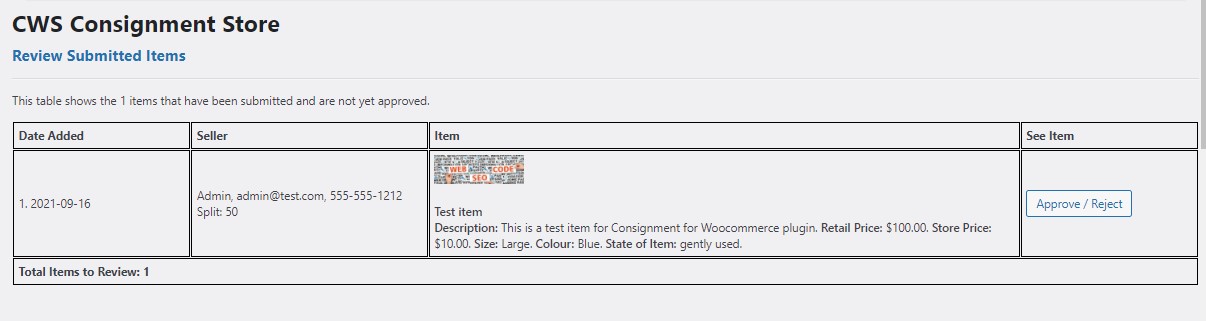
Review Submitted Items

Manage Payouts

Settings

Documentation
Changelog
2.7
- Fix scrollintoview and error messaging.
2.6.2
- Fix multiple image upload.
2.6.1
- Remove console logs.
2.6
- Change to form submission to work with WordPress 6.9.
2.5
- Big changes! Images will now be resized to a maximum of 800px wide or 600px high on the user’s device, before uploading. You should experience some faster upload speeds.
2.4
- Make database queries use prepare.
2.3
- Add another split.
2.2
- Fix documentation regarding shortcode.
2.1
- Cleanup and update old code. Add more warning and error messages to image uploads.
2.0
- Tested with WordPress 6.8
1.8.1
- Update the README
1.8
- Remove reCaptcha 2 from plugin
1.7.9
- Go through WP 6.6 compatibility requirements. No changes required.
1.7.8
- Always show store policy if it exists
1.7.7
- Change class name from hidden to cwshidden
1.7.6
- Update version tag
1.7.5
- Fix for multisite
1.7.4
- Change current URL
1.7.3
- Initialize variable
1.7.2
- Fix for PHP 8
1.7.1
- Update version number
1.7
- Feature add: added more Store Split options
1.6
- Feature add: added 0/100 as an option for the split (100% to seller)
1.5.2
- Remove debug message
1.5.1
- Spelling error
1.5
- Small formatting change
1.4
- Remove admin-ajax references since causing 403 errors
1.3
- Validate works with WordPress 5.9
1.2
- File verification at upload and attach
1.1
- Add more file verification
1.0
- First release