

Plugin info
Maintenance & Compatibility
Maintenance score
Stale • Last updated 280 days ago • 2 reviews
Is Contact Form 7 CiviCRM integration abandoned?
Likely maintained (last update 280 days ago).
Compatibility
Similar & Alternatives
Explore plugins with similar tags, and compare key metrics like downloads, ratings, updates, support, and WP/PHP compatibility.
Description
This plugin adds integration for CiviCRM to Contact Form 7. With this plugin it is possible to submit a contact to a local or remote CiviCRM system.
This adds a CiviCRM tab to Contact Form confgurations. If you enable CiviCRM processing the form will be submitted to the CiviCRM API v3. For information about using CiviCRM’s API see https://docs.civicrm.org/dev/en/latest/api/
The API requires an Entity and an Action. You may need to add additional parameters depending for the Entity/Action you specify. Use the API Explorer on your CiviCRM system to determine what additional parameters are required. The form parameters will automatically be included in the API call and the form variables need to match those expected by the API.
For example, if the API call needs a field called first_name then your form template should have a field called first_name (not first-name or firstName etc)
Installation
- Upload the plugin files to the
/wp-content/plugins/plugin-namedirectory, or install the plugin through the WordPress plugins screen directly. - Activate the plugin through the ‘Plugins’ screen in WordPress
- Use the Settings > CiviCRM Contact Form 7 Settings screen to configure the plugin, or follow the Settings link from the plugins page
- Enable CiviCRM on each CF7 form.
Frequently Asked Questions
Review feed
Screenshots
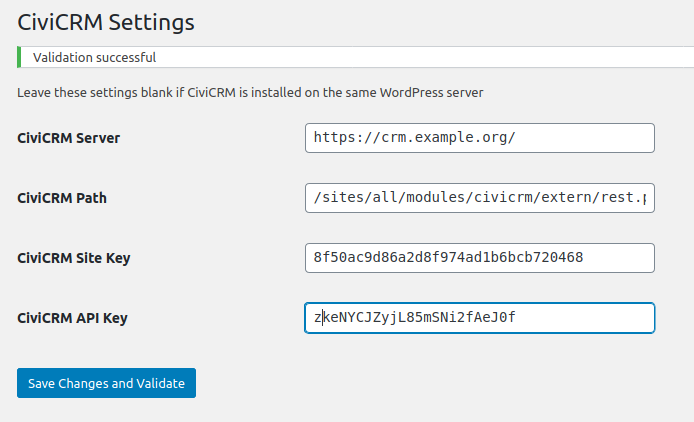
This screenshot shows the settings screen, using the traditional extern/rest.php endpoint

This screenshot shows the screen for enabling and setting up CiviCRM integration on a contact form.
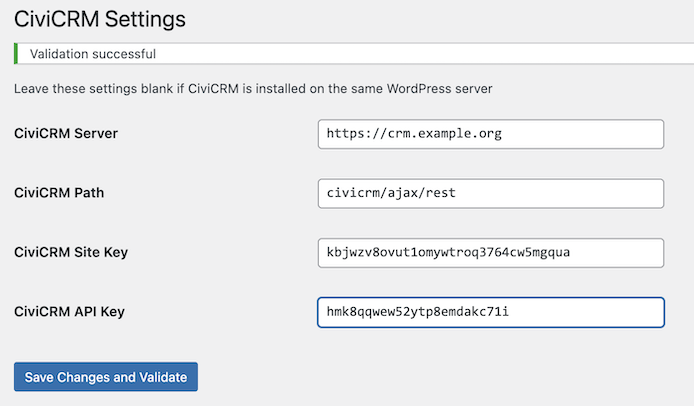
This screenshot shows the settings screen, using the modern civicrm/ajax/rest endpoint (note no trailing slash for the server and no leading slash for the path)
Changelog
1.10
Fix https://wordpress.org/support/topic/civicrm-processing-cant-be-disabled-with-fix/
1.9
Fix for WordPress 5.8
1.8
Fix for validation when no local CiviCRM
1.7
Added validation to settings page
Added link to settings from plugins page
1.6
- Updated readme
1.5
- Updated readme
1.4
- Updated text domain
1.3
- Updated data handling and added a path for the civicrm installation
1.2
- Updated readme
1.1
- Changed text domain
1.0
- Initial commit