

Contact Form 7 Gravity Forms Importer
Convert Contact Form 7 forms into Gravity Forms forms.
Plugin info
Maintenance & Compatibility
Maintenance score
Possibly abandoned • Last updated 4071 days ago • 15 reviews
Is Contact Form 7 Gravity Forms Importer abandoned?
Possibly abandoned (last update 4071 days ago).
Compatibility
Similar & Alternatives
Explore plugins with similar tags, and compare key metrics like downloads, ratings, updates, support, and WP/PHP compatibility.
Description
Re-written! Ignore the bad reviews 🙂
We’ve finally re-written the plugin, so check it out and see for yourself before you let the bad reviews stop you!
This plugin requires both the Contact Form 7 plugin and the amazing contact form plugin Gravity Forms
Import your existing Contact Form 7 forms into Gravity Forms
If you are migrating from Contact Form 7 to Gravity Forms, this is the tool for you. Easily import your CF7 forms into Gravity Forms rather than re-creating them manually.
- Recreate notification emails inside Gravity Forms
- Do you have customized email notifications set up so that you and the submitter receive finely created emails? This plugin will import the email templates into Gravity Forms and will even re-map the CF7 tags for you.
- Create inputs for each of your CF7 form fields
- Automatically adds labels and auto-configures input types like name, email, phone, address, and more.
- Imports the class names, required fields, maximum input length
- Also import validation error messages
- Adds the CF7 input name as Gravity Forms parameter names
Supports Contact Form 7 3.0
For those of you using the latest version of Contact Form 7, you’ll be pleased to know that the importer works with Contact Form 7 2.x as well as Contact Form 7 3.
Other Gravity Forms Add-ons:
- GravityView – Display your Gravity Forms entries on your website.
- Gravity Forms Mad Mimi Add-on – Integrate Gravity Forms with Mad Mimi, a beautiful email marketing service.
- Gravity Forms Highrise Add-on – Integrate Gravity Forms with Highrise, a CRM
- Gravity Forms + Constant Contact – If you use Constant Contact and Gravity Forms, this plugin is for you.
Installation
- Upload plugin files to your plugins folder, or install using WordPress’ built-in Add New Plugin installer
- Activate the plugin
- Click on the menu item under Gravity Forms’ menu called
Forms. The link is namedCF7 Import. This will take you to the importer page; - Choose a Contact Form 7 form from the dropdown menu
- Click “Import from Contact Form 7”
- The form should import!
Frequently Asked Questions
How do I use the plugin?
- Install the plugin;
- Click on the menu item under Gravity Forms’ menu called
Forms. The link is namedCF7 Import. This will take you to the importer page; - Choose a Contact Form 7 form from the dropdown menu
- Click “Import from Contact Form 7”
- The form should import!
Does the plugin support Contact Form 7 2.x?
Nope, sorry. Upgrade CF7 before using this plugin.
What is the plugin license?
This plugin is released under a GPL license.
Review feed
Saves some effort, but not quite there
Screenshots
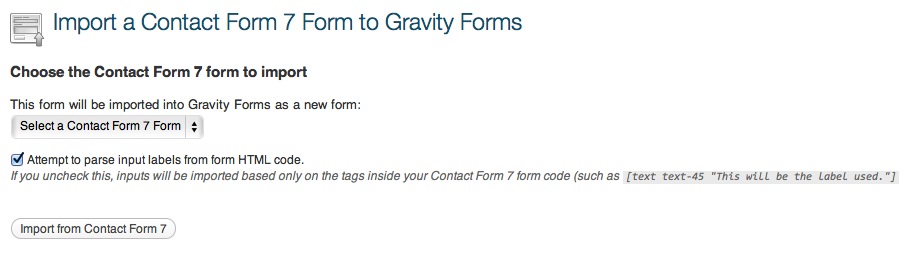
The import page
Changelog
2.0 on February 8, 2015
- Major update – fixes issues with Contact Form 7 3.x and Graviy Forms 1.8+
- No longer supports Contact Form 7 2.x
- Added translation files
1.0.1
- Added option to combine address & name fields
1.0
- Launched plugin