

Content Recycler
Content Recycler, as the name implies, recycles your old content so they show up on the blog page as if they were newly published.
Plugin info
Maintenance & Compatibility
Maintenance score
Possibly abandoned • Last updated 2830 days ago
Is Content Recycler abandoned?
Possibly abandoned (last update 2830 days ago).
Compatibility
Similar & Alternatives
Explore plugins with similar tags, and compare key metrics like downloads, ratings, updates, support, and WP/PHP compatibility.
Description
If enabled, this plugin checks if you haven’t posted anything in a while and reuses the oldest post by updating it’s published date. This is useful if you go on a vacation or simply become too busy to update your site. Making your blog page (usually the homepage) always “fresh” from the SEO and users’ point of view.
Support development of Content Recycler WordPress plugin by Alekhin
Affiliate marketers could also benefit from this functionality, aside from the SEO and blog page freshness, by putting the old affiliate links back to the front, effectively recycling content.
The same goes for bloggers who have read-worthy posts but are buried deep down the hundreds of newer posts.
The threshold time can be configured from as low as one hour, for really active websites that want to appear to still be active during writer downtimes, up to eternity (PHP max integer number of hours). The recommended value is between 24 – 72 hours. But it’s really up to you. An option to recycle nonhierarchical custom post types is also provided, in case that functionality is required.
A manual “Recycle Now” button is also provided. And finally, posts can be skipped by the recycling process by providing their IDs or slugs.
Installation
Just install like you normally do with any WordPress plugin.
- Upload
content recyclerto the/wp-content/plugins/directory - Activate the plugin through the
Pluginsmenu in WordPress Admin - Customize your settings through the
Tools » Content Recyclermenu and enable. - Done!
Frequently Asked Questions
Installation Instructions
Just install like you normally do with any WordPress plugin.
- Upload
content recyclerto the/wp-content/plugins/directory - Activate the plugin through the
Pluginsmenu in WordPress Admin - Customize your settings through the
Tools » Content Recyclermenu and enable. - Done!
Why is the F.A.Q. empty?
You’re probably seeing the initial release so there’s no F.A.Q. yet.
If you have any questions just go to the plugin site and leave a comment.
Review feed
Screenshots
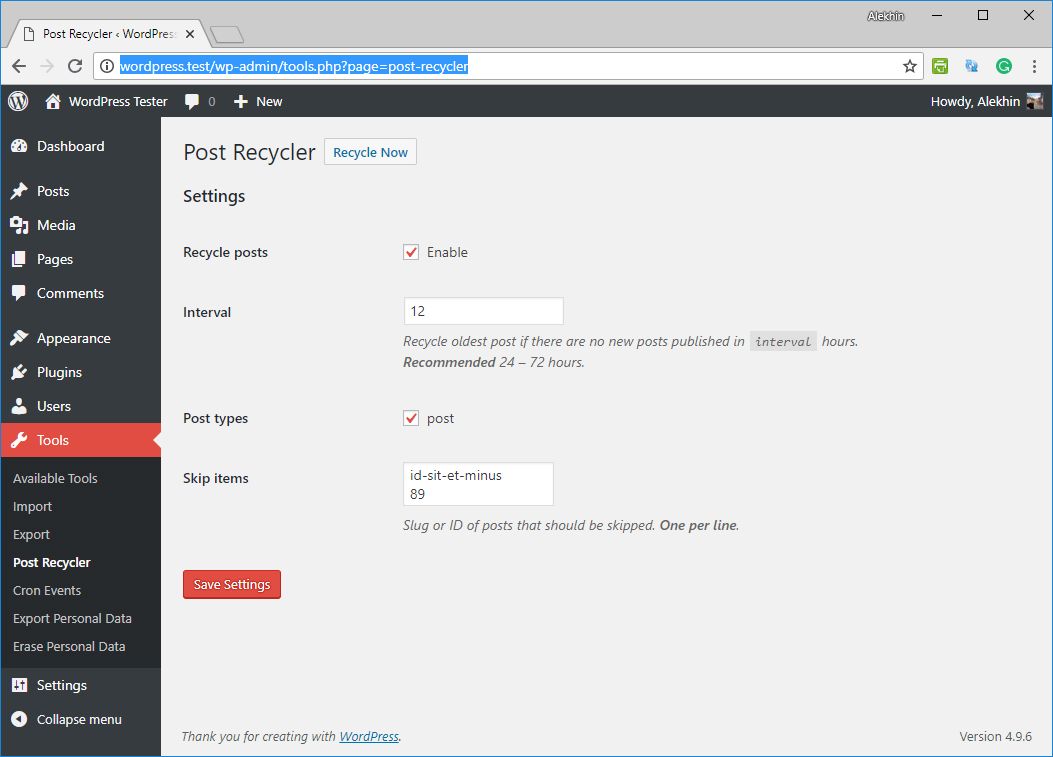
Administration Screen: Configure the behavior of the recycler plugin.
Changelog
1.0.0
- Initial release, no changes.