
Convert to Blocks
Convert to Blocks transforms classic editor content to blocks on-the-fly.
Plugin info
Maintenance & Compatibility
Maintenance score
Stale • Last updated 261 days ago • Support resolved 0% • 10 reviews
Is Convert to Blocks abandoned?
Likely maintained (last update 261 days ago).
Compatibility
Similar & Alternatives
Explore plugins with similar tags, and compare key metrics like downloads, ratings, updates, support, and WP/PHP compatibility.
Description
Convert to Blocks is a WordPress plugin that transforms classic editor content to blocks on-the-fly. After installing Gutenberg or upgrading to WordPress 5.0+, your content will be displayed in “Classic Editor Blocks”. While these blocks are completely functional and will display fine on the frontend of your website, they do not empower editors to fully make use of the block editing experience. In order to do so, your classic editor posts need to be converted to blocks. This plugin does that for you “on the fly”. When an editor goes to edit a classic post, the content will be parsed into blocks. When the editor saves the post, the new structure will be saved into the database. This strategy reduces risk as you are only altering database values for content that needs to be changed.
Note that Inner Blocks Transforms is only supported with the Gutenberg Plugin 10.9.0+.
Installation
Manual Installation
- Upload the entire
/convert-to-blocksdirectory to the/wp-content/plugins/directory. - Activate Convert to Blocks through the ‘Plugins’ menu in WordPress.
Frequently Asked Questions
Find a classic editor in the post, try to navigate away from the page. You will get an error saying your changes will be discarded. This is because Convert to Blocks converted your content to blocks on the fly and those changes will be saved when you update the post.
By default it will not.
Nested / Inner Block support does not work with Gutenberg bundled with WordPress Core <=5.7.2. This feature needs the Gutenberg Plugin >=10.9.0.
Review feed
Handy!
Very good, bulk is slow and error prone, but not developers fault
It works like a magic!
Screenshots
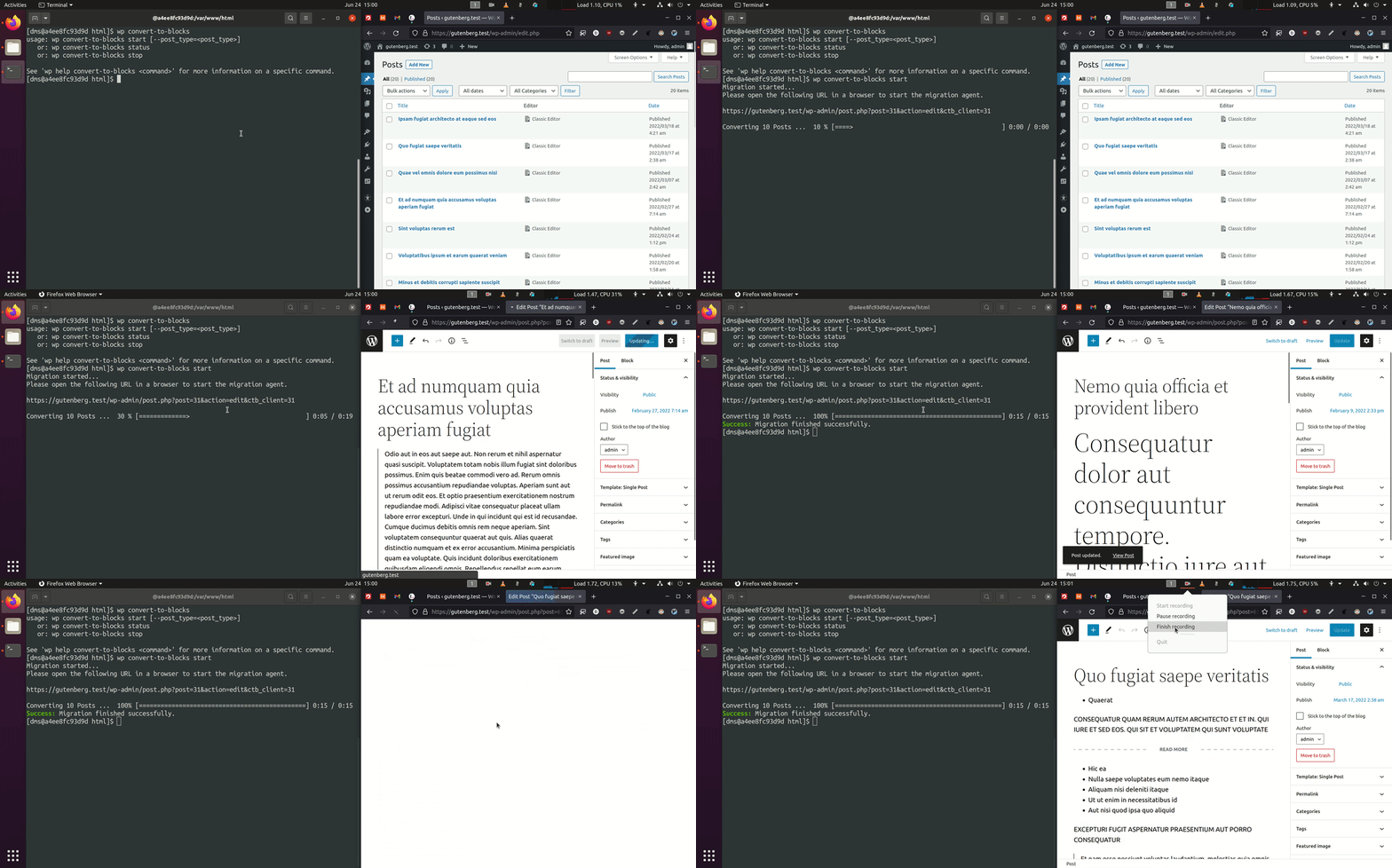
Bulk migration using the
wp convert-to-blocks startWP-CLI command that converts posts iteratively in the browser without requireing any manual input.
Changelog
1.3.4 – 2025-07-15
- Fixed: Ensure no PHP error is thrown on the plugin list screen when running PHP 8.0 (props @dinhac, @dkotter, @faisal-alvi via #210).
1.3.3 – 2025-07-14
- Added: Link to settings page from the plugin list page (props @badasswp, @dkotter via #195).
- Changed: Bump WordPress “tested up to” version 6.8 (props @jeffpaul via #199, #200).
- Changed: Bump WordPress minimum supported version to 6.6 (props @jeffpaul via #199, #200).
- Fixed: Fix PHP warning due to undefined array key (props @sksaju, @dkotter via #202).
- Fixed: i18n functions being called too early, causing PHP Notices (props @stormrockwell, @dkotter, @dsawardekar via #203).
- Security: Bump
cookiefrom 0.4.2 to 0.7.1,expressfrom 4.21.0 to 4.21.2,@wordpress/e2e-test-utils-playwrightfrom 1.7.0 to 1.18.0,serialize-javascriptfrom 6.0.0 to 6.0.2 andmochafrom 10.4.0 to 11.1.0 (props @dependabot, @Sidsector9 via #194). - Security: Bump
axiosfrom 1.7.4 to 1.8.3 (props @dependabot, @iamdharmesh via #196). - Security: Bump
http-proxy-middlewarefrom 2.0.6 to 2.0.9 andtar-fsfrom 3.0.8 to 3.1.0 (props @dependabot, @dkotter via #206).
1.3.2 – 2025-02-03
- Changed: Bump WordPress “tested up to” version 6.7 (props @colinswinney, @jeffpaul via #188, #190).
- Security: Bump
axiosfrom 1.6.8 to 1.7.4 (props @dependabot, @dkotter via #180). - Security: Bump
webpackfrom 5.91.0 to 5.94.0 (props @dependabot, @faisal-alvi via #181). - Security: Bump
wsfrom 7.5.10 to 8.18.0 and@wordpress/scriptsfrom 27.8.0 to 30.4.0 (props @dependabot, @faisal-alvi via #182, #189). - Security: Bump
expressfrom 4.19.2 to 4.21.0 (props @dependabot, @iamdharmesh via #185).
1.3.1 – 2024-08-20
- Changed: Bump WordPress “tested up to” version 6.6 (props @sudip-md, @jeffpaul, @Sidsector9, @ankitguptaindia via #174).
- Changed: Bump WordPress minimum from 6.3 to 6.4 (props @sudip-md, @jeffpaul, @Sidsector9, @ankitguptaindia via #174).
- Fixed: Issue with saving a post before the convert to blocks transform was completed (props @mdesplenter, @Sidsector9, @dsawardekar via #173).
- Security: Bump
bracesfrom 3.0.2 to 3.0.3 (props @dependabot, @Sidsector9 via #168). - Security: Bump
wsfrom 7.5.9 to 7.5.10 (props @dependabot, @Sidsector9 via #169).
1.3.0 – 2024-05-14
- Added: Block Catalog integration, and pagination support (props @dsawardekar, @iamdharmesh via #164).
- Changed: Adjust
enable_block_editormethod only to alter posts that support the gutenbridge (props @stormrockwell, @Sidsector9, @jeffpaul, @dsawardekar via #136). - Changed: Bump WordPress “tested up to” version 6.5 (props @QAharshalkadu, @jeffpaul, @Sidsector9, @sudip-md, @dkotter via #146, #161).
- Changed: Replaced lee-dohm/no-response with actions/stale to help with closing no-response/stale issues (props @jeffpaul via #159).
- Changed: Bump Node version from 16 to 20 (props @aaronjorbin, @Sidsector9, @dkotter via #160).
- Changed: Bump
actions/upload-artifactfrom v3 to v4 (props @iamdharmesh via #162). - Security: Bump
follow-redirectsfrom 1.15.2 to 1.15.4 (props @dependabot, @dkotter via #153). - Security: Bump
browserify-signfrom 4.0.4 to 4.2.2 (props @dependabot, @dkotter via #145). - Security: Bump
@babel/traversefrom 7.11.5 to 7.23.7 (props @dependabot, @dkotter via #155). - Security: Remove old dependencies in favor of using
@wordpress/scriptsin our build workflow (props @Sidsector9, @dkotter via #167).