
CPJ Calendar Appointment Scheduler
This plugin creates a block that can be added to any page or post. The block creates a calendar with selectable dates which then display a list of tim …
Plugin info
Maintenance & Compatibility
Maintenance score
Possibly abandoned • Last updated 966 days ago
Is CPJ Calendar Appointment Scheduler abandoned?
Possibly abandoned (last update 966 days ago).
Compatibility
Similar & Alternatives
Explore plugins with similar tags, and compare key metrics like downloads, ratings, updates, support, and WP/PHP compatibility.
Description
This plugin creates a block that can be added to any page or post. The block creates a calendar with selectable dates which then display a list of times that are selectable and then collects contact information. On successful collection of date, time and contact information, an e-mail is sent to customer confirming appointment date and an e-mail is sent to admin notifying user of new appointment. E-mail content and notify email address are customizable via admin options page. Version 2 adds administration tools, can now view customer list and upcoming appointments, can modify customer, add new appointments, and delete appointments and customers. Also scheduling options have been added to set global times available and also can block out times on a individual day. Instructions for use: In page or post click add a block. search for ‘cpj’ and select CPJ Calendar Scheduler.
Installation
- Upload the plugin files to the
/wp-content/plugins/cpj-calendar-appointment-scheduledirectory, or install the plugin through the WordPress plugins screen directly. - Activate the plugin through the ‘Plugins’ screen in WordPress
- In page or post click add a block. search for ‘cpj’ and select CPJ Calendar Scheduler
Frequently Asked Questions
go to cpauljarvis.com
You need to set up your global available times in admin panel.
Review feed
Screenshots

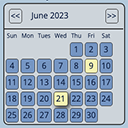
Calendar with selectable dates.

Available times are dislayed after date is selected

Customer Information is requested after date and time are selected

Output confirmation of appointment

Admin panel showing upcoming appointments and customer list

Window for modifying, deleting customer and appointments

Admin panel for modifying E-mail Settings

Admin panel for setting global available times and for blocking out individual times
Changelog
0.1.0
- Release
0.1.2
*Bug fixes
= 1.0.0
*Stable Version
= 2.0.0
*Added administration tools to modify, delete and create new appointments and customers. Also added time management tools to set up global times available and to block out times per individual day. Bug Fixes.