

Custom Post Type WooCommerce Integration
Integrates custom post type with WooCommerce, simplifying management and sales. No need manual product creation for each CPT.
Plugin info
Maintenance & Compatibility
Maintenance score
Maintained • Last updated 132 days ago • 17 reviews
Is Custom Post Type WooCommerce Integration abandoned?
Likely maintained (last update 132 days ago).
Compatibility
Similar & Alternatives
Explore plugins with similar tags, and compare key metrics like downloads, ratings, updates, support, and WP/PHP compatibility.
Description
There is no necessity to publish WooCommerce products separately for custom post type posts.
This plugin extends the WooCommerce plugin by allowing a custom post type (CPT) to be added. OR Use WooCommerce for payments only.
This Plugin provides a simple solution to effortlessly manage and sell any kind of Custom Post Types within WooCommerce with just a few clicks.
No advanced WordPress skills required – anyone with basic knowledge can easily install and utilize this plugin. Bid farewell to the need for manual product creation in WooCommerce.
👉 Documentation | Get Pro 👈
Its compatibility with popular plugins and themes ensure flexibility for various needs. The user-friendly interface allows easy customization and management of personalized products.
By offering unique items that cater to individual preferences, this plugin enhances the e-commerce experience, fostering customer loyalty.
Quickly and easily sell pages, posts and custom post types through WooCommerce with this plugin.
🏆 ACF
Create a price field using ACF, add a price to a post, and then enter the price meta key in the settings. After that, use the shortcode to show the cart button.
🏆 Free Features
- Unlimited post type can integrate with WC
- Add meta field for regular price field
- Add meta field for sale price field
- Fallback Regular Price field: If the meta fields are already in place, then select that key as fallback meta key for regular price
- Fallback Sale price field: If the meta fields are already in place, then select that key as fallback meta key for sale price,
- Provided shortcode for display “Woocommerce Notice”
- Provided shortcode for display “price”
- Provided shortcode for display “Cart Button”
- Provided shortcode for display “Short description”
- Make Archive Page Similar to Shop Page
- Make Single Page Similar to Product Page
- Product Category
- Product Tag
🏆 PRO Features
- All free Features Included
- Quick Edit
- Product Type – Simple product, Variable product, External/Affiliate product, Grouped Product
- Post Show on Shop page Like Product
- Add sale price dates
- Inventory – Add SKU, Stock management, track stock quantity, Stock status, Sold individually, Limit purchases to 1 item per order
- Shipping product data
- Product Gallery Images
- Add Downloadable Product, Download limit, Download expiry.
- Download file form WooCommerce user account.
- CPT Upsells And Cross-sells.
- Provided Shortcode for Display “SKU”, “Attributes”, “Gallery Image” with Thumb Slider
- Product Review
- Product Schema/Structured data
- Product Attributes
🏆 To integrate a custom post type with WooCommerce, follow the steps below
-
Install and activate the “Custom Post Type Woocommerce Integration” plugin on your WordPress site.
-
After activation, a new menu item named “WC Integration” will appear in the WordPress admin sidebar. Click on it to access the plugin settings.
-
In the plugin settings page, locate the “Select Post type” option, And select your CPT.
-
Switch on to Add Default Price Field And Others Meta Fields.
🏆 Integrate If the Price fields are already in place
-
You need to select the appropriate meta key associated with the price information for the selected custom post type.
-
If regular price meta fields are already in place, then select meta key for regular price,
-
If sale price meta fields are already in place, then also select meta key for sale price,
-
Save the settings after selecting the custom post type and the price meta key to confirm your integration preferences.
🏆 Show cart button and price
-
Now, you can use the provided shortcodes to display the price and cart button for the custom post type in your WooCommerce shop or any other suitable location on your website.
-
To display the price, insert the shortcode [cptwooint_price/] on the desired pages, posts, or templates.
-
To display the cart button, use the shortcode [cptwooint_cart_button/] in the appropriate location where you want it to appear for your custom post type.
-
Make sure to add these shortcodes correctly, and once you do, the price and cart button for your custom post type should be visible as intended.
-
By following these steps and using the provided shortcodes, you can seamlessly integrate a custom post type with WooCommerce and effectively display the price and cart button for your custom posts.
🏆 WooCommerce for payments only
CPT WOO Integration, help you to use only for payment with woocommerce. Use WooCommerce just for the payment and checkout (because woocommerce is compatible with a lot of payment providers), but You do not need the whole shop overhead. no need enter the product in the database,
Just the landing page connect to the WooCommerce by using this plugin.
🏆 Accept donations in woocommerce
Accept Donation is limited feature, But it enough for some of the users. They are accepting donations for specific amounts by integrating a page or post with WooCommerce.
🏆 Other Plugins Support
- LearnPress: Documentation
- ACF: Documentation
- BA Book Everything: Documentation
- JetEngine
- Custom Post Type UI
- Extra product options For WooCommerce ( Free/Pro Both Version )
- WooCommerce Bookings ( Pro )
- Easy Booking for WooCommerce ( Pro )
- Support to many more plugins.
Installation
Frequently Asked Questions
The “CPT Woo Integration” plugin is a WordPress plugin that allows you to integrate a custom post type with WooCommerce.
It provides a seamless way to incorporate custom post types into your WooCommerce shop, including displaying prices and adding cart functionality.
After activating the “CPT Woo Integration” plugin, a new menu item called “Wc Integration” will appear in the WordPress admin sidebar.
Click on this menu item to access the plugin settings.
- To integrate a custom post type with WooCommerce using the “CPT Woo Integration” plugin, follow these steps:
- Access the plugin settings by clicking on “CPT Woo Integration” in the WordPress admin sidebar.
- In the plugin settings page, locate the “Select Post type & Price Meta key” option.
- Choose the desired custom post type from the dropdown list.
- Select the appropriate meta key related to the price for the selected custom post type.
- Save the settings.
The “CPT Woo Integration” plugin provides the following shortcodes:
[cptwooint_price/]: Displays the price for the custom post type.
[cptwooint_cart_button/]: Displays the cart button for the custom post type.
You can use the shortcodes [cptwooint_price/] and [cptwooint_cart_button/]
in any appropriate location within your WordPress site, such as pages, posts, or templates. Simply add the shortcodes to the desired location,
and they will display the price and cart button for your custom post type.
Yes, the “CPT Woo Integration” plugin allows you to integrate multiple custom post types with WooCommerce. You can repeat the integration process for each custom post type by selecting the appropriate post type and price meta key in the plugin settings.
The compatibility of the “CPT Woo Integration” plugin with the latest version of WooCommerce may vary.
It is always recommended to keep both the plugin and WooCommerce updated to ensure compatibility and avoid any potential issues.
Review feed
Easy to use
Useful Plugin
Screenshots
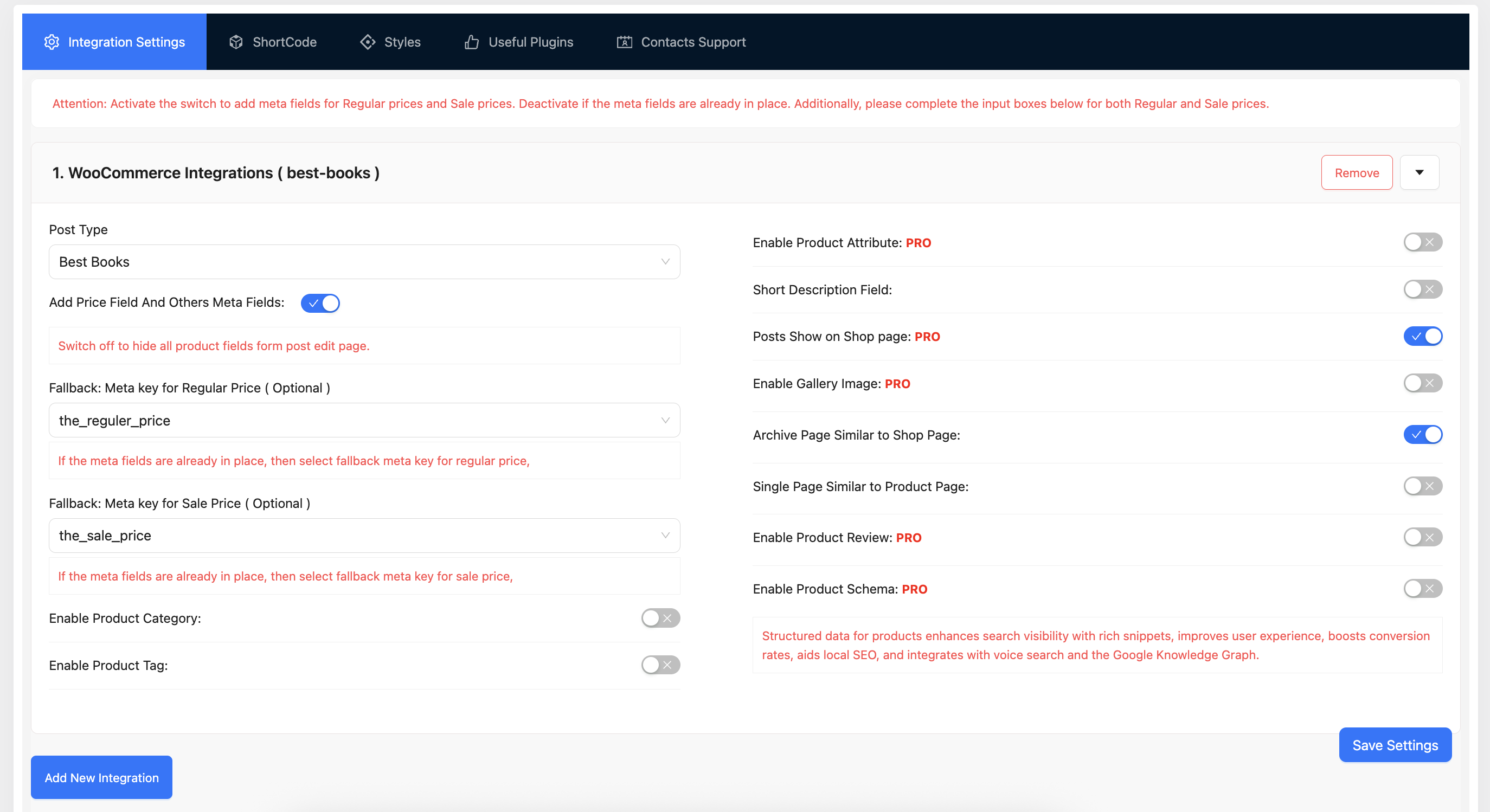
Integration Settings
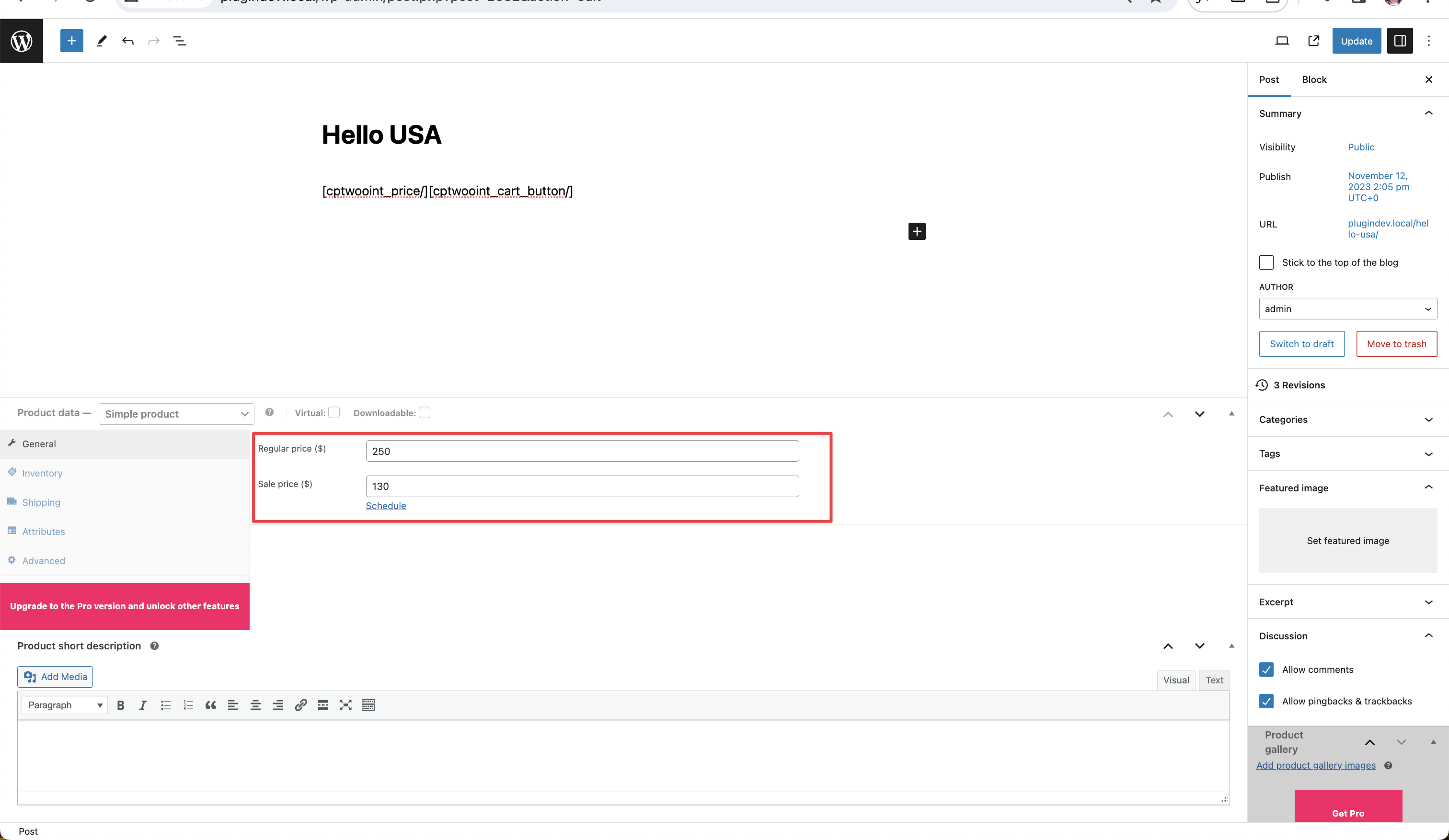
Price Meta Field
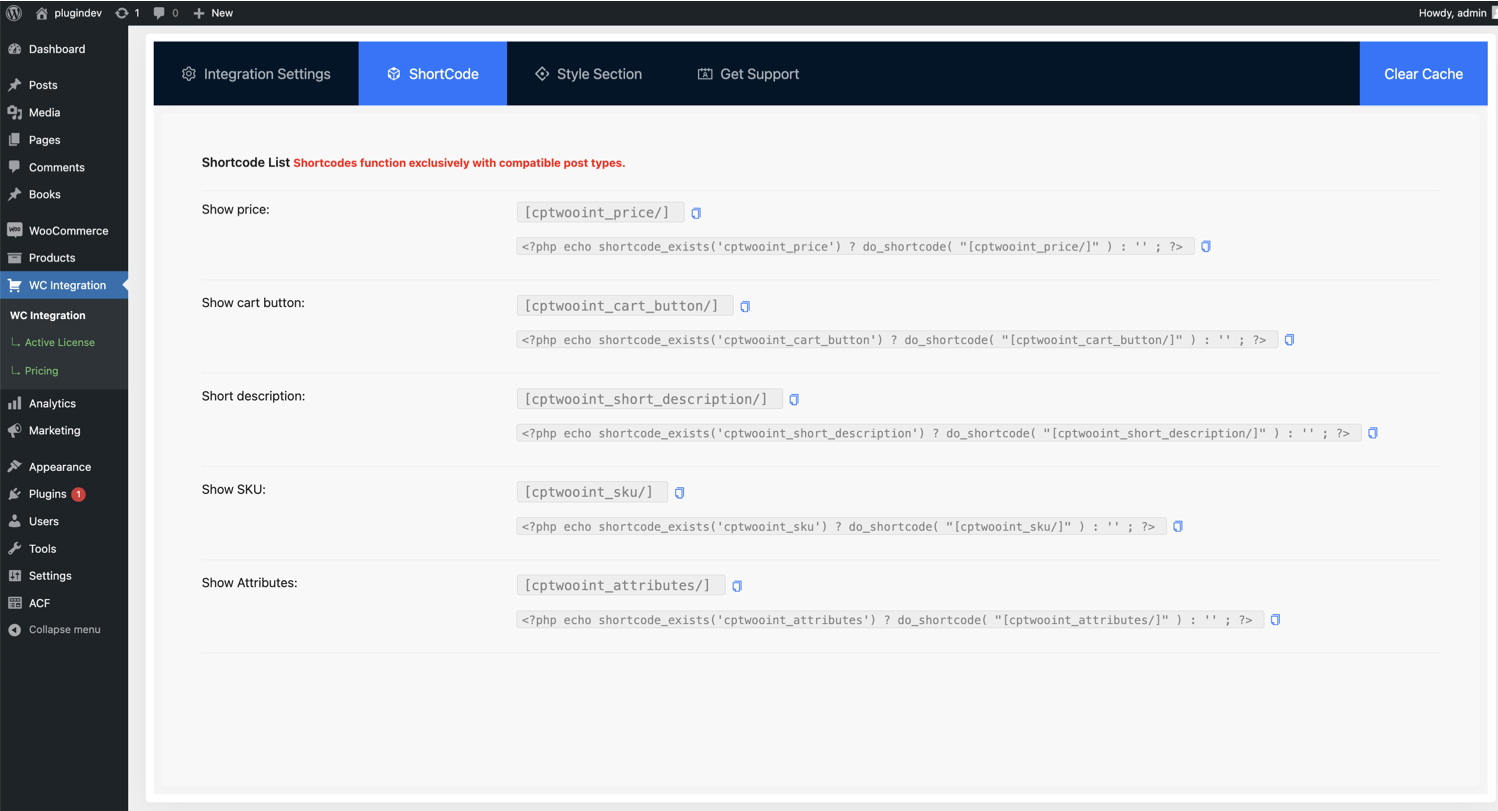
ShortCode
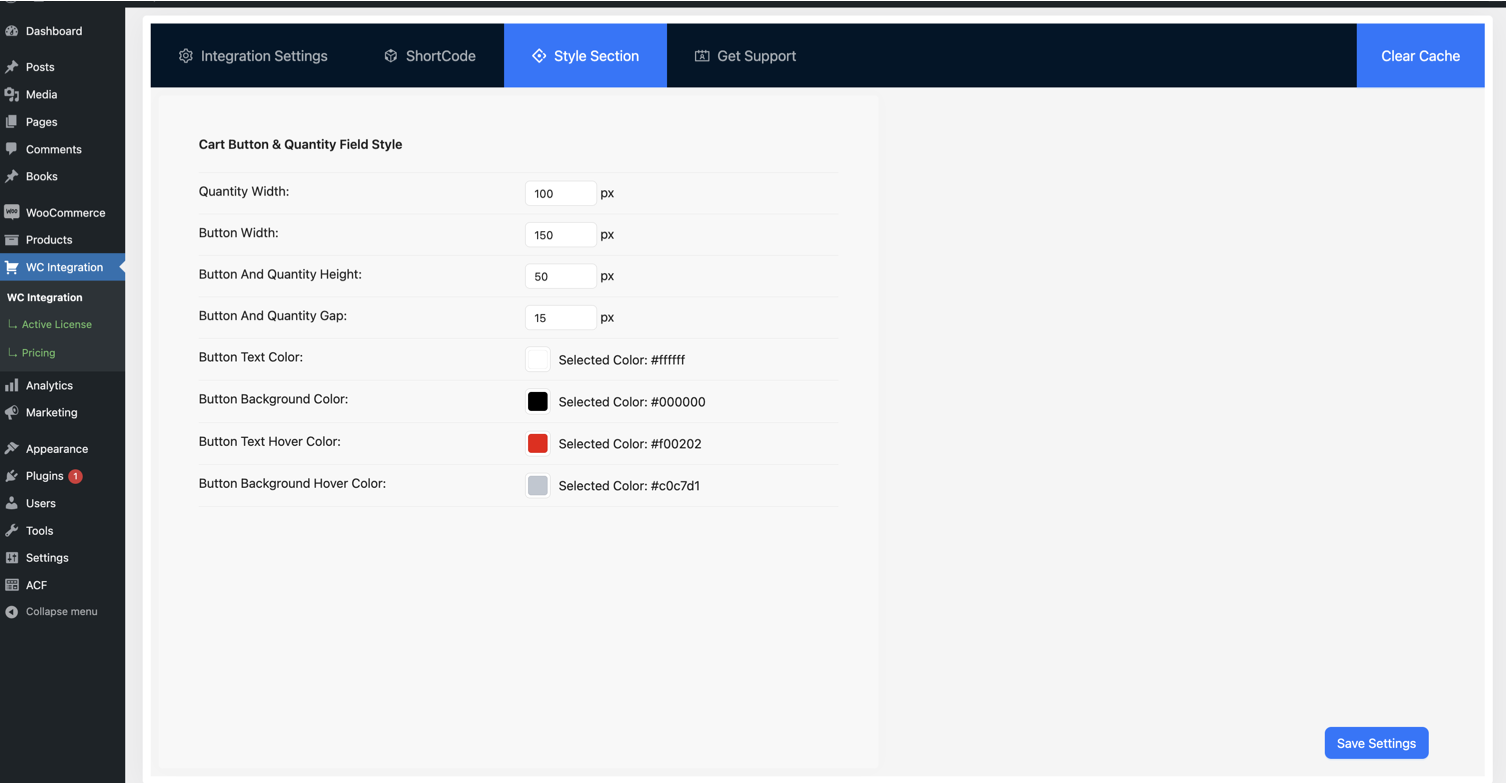
Button Style
Changelog
2.2.4 ( Nov 15, 2025 )
- Fixed: Activation Hook Run properly.
- Fixed: Display Price Issue resolve
2.2.3 ( Oct 27, 2025 )
- Fixed: Deprecated Asset Handler resolve
- Update: Product MEta field Settings Label Changes
2.2.2 ( Aug 20, 2025 )
- Fixed: Support Url Change
- Fixed: Display Price Issue resolve
2.2.1 ( Aug 12, 2025 )
- Fixed: Price Multiple Calculation Issue Fixed
2.2.0 ( Jul 30, 2025 )
- Update: CPT Price Cart Calculation Functionality
- Change: Hooks
cptwoo_product_get_priceParameters Changes - Fixed: Price Conflicting With 3rd Party Plugin
- Visual Composer Compatibility.
2.0.10 ( January 27, 2025 )
- Support: Woocommerce Assets Added Admin Page
2.0.0 ( June 25, 2024 )
- Updated: File Structure Change
- Updated: Hooks System Implement By Hooks Loader
- Added: Upgrade Notice added
1.3.10 ( May 28, 2024 )
- Fixed: Admin Page Issue
- Added: Submenu Added
- Added: New Feature Compatibility For addons
1.3.0 ( February 08, 2024 )
- Support: Addons Compatibility
- Fix: Single Page Issue
- Added: Archive Page Similar to Shop Page
- Added: Single Page Similar to Product Page
1.2.0 ( 11 December, 2023 )
- Added: Addons Support For Variation CPT
- Support: Both single and archive pages can exhibit a layout similar to the WooCommerce page
1.1.0 ( October 24, 2023 )
- Added: More meta field added
1.0.0 ( August 06, 2023 )
* Initial Plugin.