

Bulk Post Category Creator
This easy-to-use plugin allows to create post categories in bulk and assign those categories to posts at the same time.
Plugin info
Maintenance & Compatibility
Maintenance score
Possibly abandoned • Last updated 533 days ago • 7 reviews
Is Bulk Post Category Creator abandoned?
Possibly abandoned (last update 533 days ago).
Compatibility
Similar & Alternatives
Explore plugins with similar tags, and compare key metrics like downloads, ratings, updates, support, and WP/PHP compatibility.
Description
This plugin allows to create post categories in bulk and assign those categories to posts at the same time.
To create multiple categorised you just have to enter categories separated by commas in ‘Enter categories separated by commas’ field.
You can also create the categories as child by selecting parent category in ‘Parent Category’ dropdown.
The Description field is also available to set description for the categories which you will be creating.
The main feature of the plugin is, you can select multiple posts in ‘Select Posts’ option and created categories will get assigned to those selected posts.
Some of our other free plugins
Some of our Pro plugins
Installation
Method 1:
- Download the plugin bulk-wordpress-category-creator.zip
- Unpack the bulk-wordpress-category-creator.zip file and extract the bulk-wc-category-creator folder
- Upload the plugin folder to your /wp-content/plugins/ directory
- Go to WordPress dashboard, click on Plugins from the menu
- Locate the Bulk WooCommerce Category Creator and click on Activate link to activate the plugin.
Method 2:
- Download the plugin bulk-wordpress-category-creator.zip
- Go to WordPress Dashboard-Plugins-Add New
- Click on Upload Plugin link from top
- Upload the downloaded bulk-wordpress-category-creator.zip file and click on Install Now
- After installation, click on Activate Plugin link to activate the plugin.
Frequently Asked Questions
Review feed
Screenshots
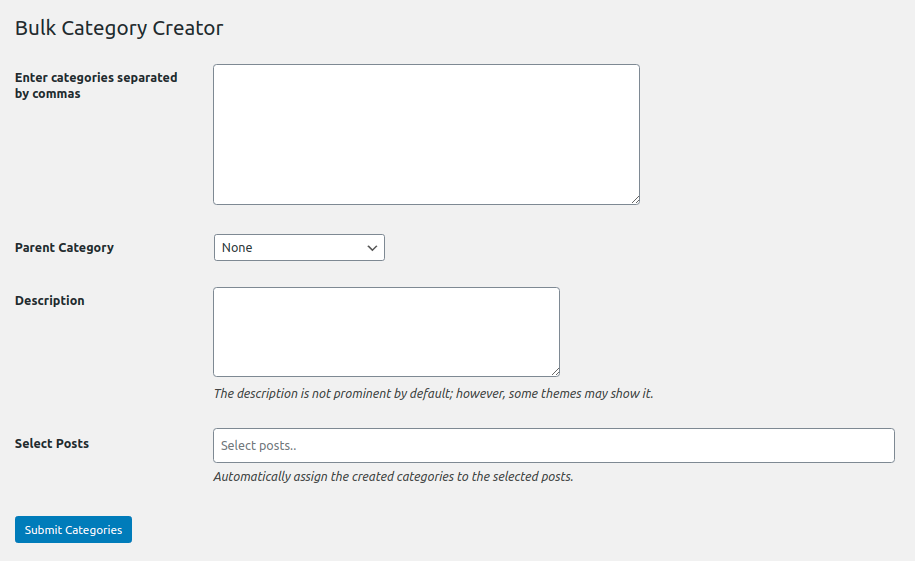
Screenshot 1
Changelog
1.7 (20.10.2024)
- WordPress v6.6.2 Compatibility.
1.6 (08.07.2023)
- WordPress v6.2 Compatibility.
1.5 (29.01.2022)
- WordPress v5.9 Compatibility.
1.4 (28.08.2020)
- WordPress v5.5 Compatibility.
1.3 (23.03.2020)
- Fix: Js file of plugin was not being loaded.
1.2 (22.03.2020)
- Added field for Description.
- Allowing to set created categories to posts at the time of bulk categories creation.
- WPCS compliance.
1.0 (27.09.2019)
- Initial release.