
![[CR]PostWarning](https://s.w.org/plugins/geopattern-icon/crpostwarning.svg)
[CR]PostWarning
help you avoid a situation where you publish post but forgot to set title / tags / categories / faetured images / etc.
Plugin info
Maintenance & Compatibility
Maintenance score
Possibly abandoned • Last updated 5604 days ago
Is [CR]PostWarning abandoned?
Possibly abandoned (last update 5604 days ago).
Compatibility
Similar & Alternatives
Explore plugins with similar tags, and compare key metrics like downloads, ratings, updates, support, and WP/PHP compatibility.
Description
Have you ever been in situation where you publish post. But displayed in wrong location due to forgot setting the right tags / categories.
Or, broken blog layout because of forgot to setting featured images.
Don’t worry, this plugin will help you remember that. You could also set custom warning messages to your like.
Installation
- Upload
crpostwarningdirectory to the/wp-content/plugins/directory - Activate the plugin through the ‘Plugins’ menu in WordPress
- Go to Settings »
[CR]Post Warningand set your warning messages
Frequently Asked Questions
What is the minimum PHP requirement?
For the plugin itself, PHP4 and JAVASCRIPT activated. Right, you need javascript to be able to use this plugin.
Review feed
Screenshots
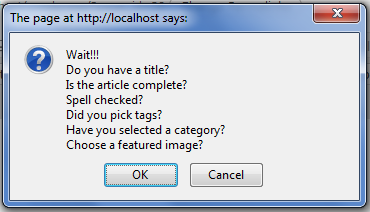
This is what you'll see whenever you push the publish button

This is where admin setting located

Input your custom messages here