

Current Date Shortcode For WordPess
Easily display the current date anywhere using a simple shortcode, Gutenberg block, Elementor addon
Plugin info
Maintenance & Compatibility
Maintenance score
Stale • Last updated 348 days ago • 1 reviews
Is Current Date Shortcode For WordPess abandoned?
Likely maintained (last update 348 days ago).
Compatibility
Similar & Alternatives
Explore plugins with similar tags, and compare key metrics like downloads, ratings, updates, support, and WP/PHP compatibility.
Description
Embed Dynamic Dates in Your WordPress Site with a Shortcode
This plugin simplifies adding the current date, month, or year anywhere on your WordPress website using a shortcode. Simply insert [current-date] and it’ll automatically update with the current date based on your language settings.
Flexible Date Formatting Options
Need a specific date format? No problem! Pass a format attribute with the shortcode for customization.
Example
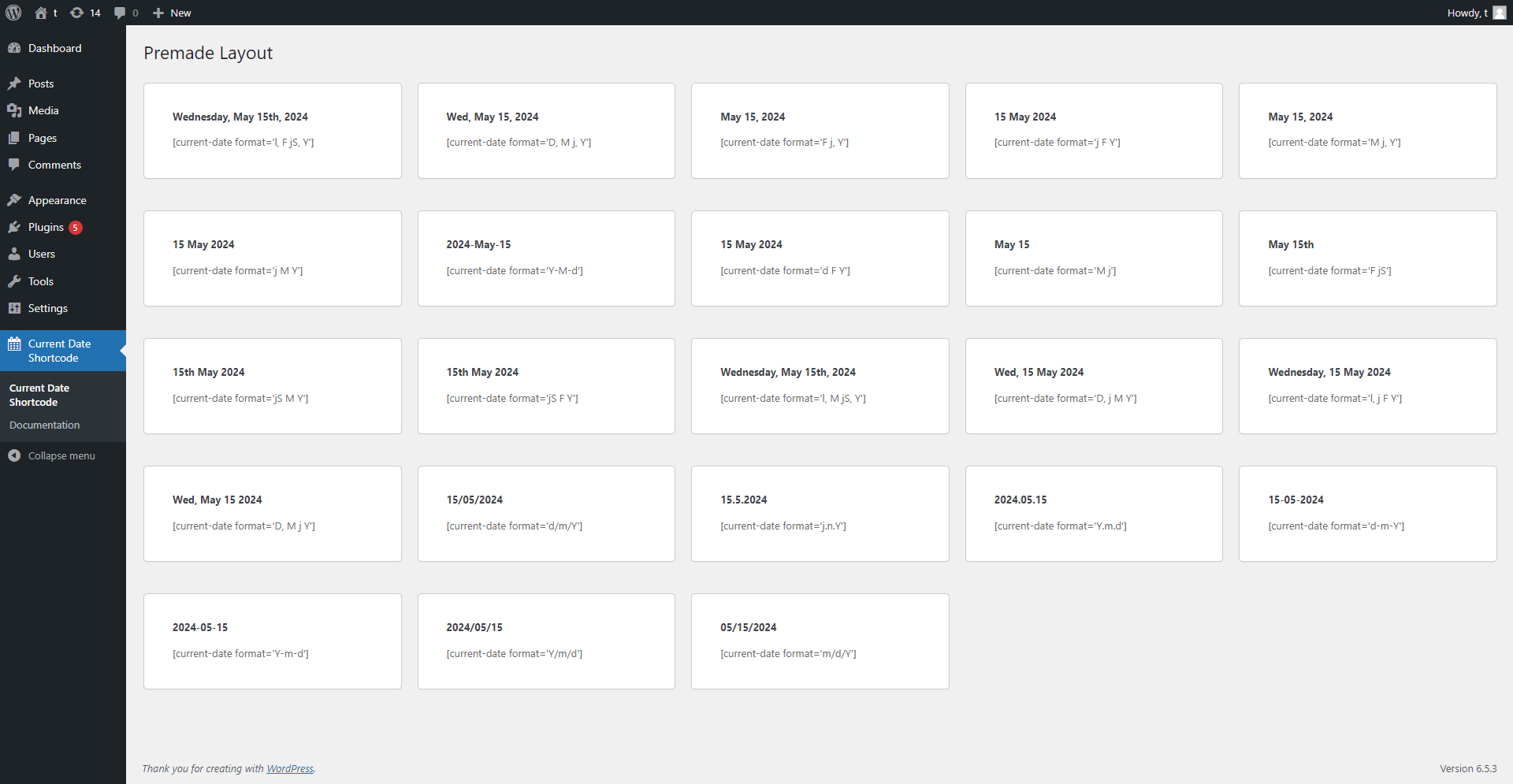
[current-date format=’l, F jS, Y’] displays the date as “Tuesday, May 21st, 2024”
[current-date format=’D, M j, Y’] displays the date as “Tue, May 21, 2024”
[current-date format=’F j, Y’] displays the date as “May 21, 2024”
[current-date format=’j F Y’] displays the date as “21 May 2024”
[current-date format=’m/d/Y’] displays the date as “05/21/2024”
[current-date format=’Y/m/d’] displays the date as “2024/05/21”
[current-date format=’Y-m-d’] displays the date as “2024-05-21”
[current-date format=’d-m-Y’] displays the date as “21-05-2024”
[current-date format=’Y.m.d’] displays the date as “2024.05.21”
[current-date format=’j.n.Y’] displays the date as “21.5.2024”
[current-date format=’d/m/Y’] displays the date as “21/05/2024”
[current-date format=’D, M j Y’] displays the date as “Tue, May 21 2024”
[current-date format=’l, j F Y’] displays the date as “Tuesday, 21 May 2024”
[current-date format=’D, j M Y’] displays the date as “Tue, 21 May 2024”
[current-date format=’jS F Y’] displays the date as “21st May 2024”
[current-date format=’F jS’] displays the date as “May 21st”
[current-date format=’M j’] displays the date as “May 21”
[current-date format=’Y-M-d’] displays the date as “2024-May-21”
Easy to Use, Powerful Customization
This user-friendly plugin empowers you to seamlessly integrate dynamic dates into your WordPress content, enhancing both functionality and user experience.
Support
If you encounter any issues or have questions about the plugin, please visit our support forum at Submit Ticket. We are here to help you with any concerns you may have.
If you have any questions, please email us at [email protected]
Contribute
The full source code is available on GitHub Repository. Feel free to contribute or report an issue.
Installation
There is no prerequisites for installing Current Date Shortcode For WordPess. You can follow the steps below to complete the installation.
Automatic Installation
- Go to
Plugins > Add Newscreen from your WordPress website dashboard. - Search for
Current Date Shortcode For WordPess. - Install and activate the plugin, that’s it!
Frequently Asked Questions
Yes, it’s completely free.
Review feed
Screenshots


Changelog
1.0.4
- Updated date function from dateI18n to gmdateI18n for improved internationalization support
- Added backward compatibility for existing blocks using previous versions
- Performance improvements for date rendering
1.0.3
Add New date shortcode.
1.0.2
WordPress 6.7 Compatibility: Improved stability and smooth operation with the latest WordPress version.
1.0.1
Update: Improved compatibility with WordPress 6.6.1, guaranteeing smooth operation and stability within the WordPress ecosystem.