

Current Year, Symbols and IP Shortcode
Useful shortcode for WordPress. Current year, copyright, symbols and user IP with shortcode.
Plugin info
Maintenance & Compatibility
Maintenance score
Maintained • Last updated 126 days ago • 5 reviews
Is Current Year, Symbols and IP Shortcode abandoned?
Likely maintained (last update 126 days ago).
Compatibility
Similar & Alternatives
Explore plugins with similar tags, and compare key metrics like downloads, ratings, updates, support, and WP/PHP compatibility.
Description
Don’t work? Open ticket, we answer in max 48h.
How shortcode work: WordPress Codex
Full documentation and shortcode list: Documentation
Current year, copyright, symbols and user IP with shortcode.
[y] display current year 2020
[m] display current month October
[d] display current day 25
[dmy] display current date 01/01/2023
[c] display copyright symbol ©
[t] display registered trademark symbol ®
[tm] display unregistered trademark symbol ™
[sm] display service mark symbol ℠
[cc] display Copyright
[cy] display symbol of copyright and current year ©2019
[cyy year=”2003″] display symbol of copyright, first year, current year ©2003-2019
[cyyl year=”2003″] display copyright, first year, current year Copyright 2003-2019
[cyyls year=”2003″] display copyright (+©), first year, current year ©Copyright 2003-2019
[show_user_ip] display ip of current user
Useful attribute for extend shortcode functionality
Format Attribute for Year
For shortcode with year you can choose format with attribute format=””. It support “Y” (es.2019) or “y” (es.19). Default format without attribute is “Y”.
You must enter year attribute in the same format.
Example
[cyy year=”03″ format=”y”] ©03-19
[cyy year=”2003″ format=”Y”] ©2003-2019
Format Attribute for Month
For shortcode with month you can choose format with attribute format=””. It support “F” – “m” – “M” – “n”.
Format Attribute for Day
For shortcode with day you can choose format with attribute format=””. It support “D” – “d” – “j” – “N”
Format Attribute for current date
All php date function attributes.
Offset Attribute
For day shortcode [d] you can add offset with attribute offset=””. It support + or -.
For month shortcode [m] you can add offset with attribute offset=””. It support + or -.
For year shortcode [y] you can add offset with attribute offset=””. It support + or -.
For current date shortcode [dmy] you can add offset with attribute offset=””. It support + or – in standard php date format, for ex. + 1 year or – 1 day.
Example
[d offset=”+1″] 2023
[m offset=”+1″] 2 (if current month is January)
[y offset=”+1″] 2 (if current day is 1)
[dmy offset=”+ 1 year”] 01/01/2023
Installation
- Upload the plugin files to the ‘/wp-content/plugins/’ directory, or install the plugin through the WordPress add plugins page directly.
- Activate the plugin through the ‘Plugins’ page in WordPress.
- Add shortcode in all position where WordPress accept it.
Frequently Asked Questions
Read how WordPress shortcode work: WordPress Codex
[y] display current year 2020
[m] display current month October
[d] display current day 25
[dmy] display current date 01/01/2023
[c] display copyright symbol ©
[t] display registered trademark symbol ®
[tm] display unregistered trademark symbol ™
[sm] display service mark symbol ℠
[cc] display Copyright
[cy] display symbol of copyright and current year ©2019
[cyy year=”2003″] display symbol of copyright, first year, current year ©2003-2019
[cyyl year=”2003″] display copyright, first year, current year Copyright 2003-2019
[cyyls year=”2003″] display copyright (+©), first year, current year ©Copyright 2003-2019
[show_user_ip] display ip of current user
Full list here: Documentation
[c] display copyright symbol ©
[t] display registered trademark symbol ®
[tm] display unregistered trademark symbol ™
[sm] display service mark symbol ℠
Symbols shortcode retrieve the most common “registration” symbols.
For more symbols shortcode write a support ticket!
[show_user_ip] display ip of current user
With IP shortcode you can retrieve your user IP.
For shortcode with year you can choose format with attribute format=””. It support “Y” (es.2019) or “y” (es.19). Default format without attribute is “Y”.
You must enter year attribute in the same format.
Example
[cyy year=”03″ format=”y”] ©03-19
[cyy year=”2003″ format=”Y”] ©2003-2019
For shortcode with month you can choose format with attribute format=””. It support “F” – “m” – “M” – “n”.
For shortcode with day you can choose format with attribute format=””. It support “D” – “d” – “j” – “N”
For day shortcode [d] you can add offset with attribute offset=””. It support + or -.
For month shortcode [m] you can add offset with attribute offset=””. It support + or -.
For year shortcode [y] you can add offset with attribute offset=””. It support + or -.
For current date shortcode [dmy] you can add offset with attribute offset=””. It support + or – in standard php date format, for ex. +1year or -1day.
Example
[d offset=”+1″] 2023
[m offset=”+1″] 2 (if current month is January)
[y offset=”+1″] 2 (if current day is 1)
[dmy offset=”+ 1 year”] 01/01/2023
Review feed
Easy and flexible to use
Screenshots
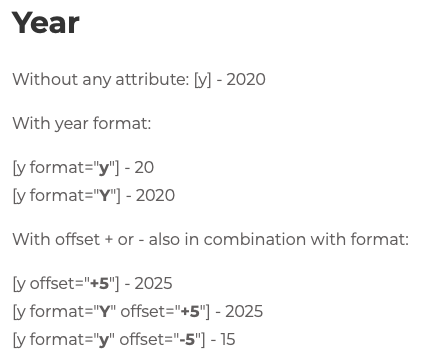
Year shortcode.

Month shortcode.

Day shortcode.

Copyright shortcode.

Symbols and IP shortcode.
Changelog
2.4.1
- Bugfix.
2.4
- Complete code revision.
2.3.5
- 6.6 compatibility.
2.3.4
- 6.5 compatibility.
2.3.3
- 6.4 compatibility.
2.3.2
- Code revisions.
2.3.1
- Bugfix and compatibility.
2.3
- Translation with date_i18n. Added current date shortcode (dmy).
2.2.3
- Months translatable with .pot.
2.1
- Bugfix.
2.0
- Bugfix.
1.9
- Compatibility WordPress 5.8.
1.8.3
- Compatibility WordPress 5.7.
1.8.2
- Bugfix.
1.8.1
- FAQ updated.
1.8
- New shortcode for month and day, new documentation.
1.7.2
- Version compatibility update.
1.7.1
- Version compatibility update.
1.7
- Bugfix and new shortcode for retrieve IP.
1.6
- New name and compatibility update.
1.5
- Bugfix and offset for [y] shortcode.
1.4
- Added ™ and ℠ symbol.
1.3
- Compatibility revision.
1.2
- Compatibility revision.
1.1
- Bugfix.
1
- Now you can format year with format=”” attribute. You can choose “y” or “Y”. More info in description.
0.4
- Now with [cyy] if current year is = attribute year, first year isn’t displayed. New shortcode [cyyl] for show “Copyright year-year”. New shortcode [cyyls] for show “©Copyright year-year”.
0.3.1
- Bugfix
0.3
- Added [cc] shortcode “Copyright”.
0.2
- Added more shortcode (copyright, trademark, copyright + year of creation + current year)
0.1
- Initial release