

Curriculum Vitae (by osFlake)
Show all your experience, hobbies, education and interests.
Plugin info
Maintenance & Compatibility
Maintenance score
Possibly abandoned • Last updated 4054 days ago
Is Curriculum Vitae (by osFlake) abandoned?
Possibly abandoned (last update 4054 days ago).
Compatibility
Similar & Alternatives
Explore plugins with similar tags, and compare key metrics like downloads, ratings, updates, support, and WP/PHP compatibility.
Description
Curriculum Vitae (by osFlake) is a WordPress plugin that show your CV on your websites. You could add your life experience, hobbies, education and interests using photos or graphics.
Curriculum Vitae (by osFlake) jest darmową wtyczką, która służy do zaprezentowania swojego CV na swojej stronie internetowej. Można tworzyć swoje kategorie życiorysu oraz dodawać własne grafiki.
Collaborators
Translators
- Pedro Marcelo de Sá Alves – Portuguese (Brazil)
License
This file is part of Curriculum Vitae.
CV is free software: you can redistribute it and/or modify it under the terms of the GNU General Public License as published by the Free Software Foundation, either version 3 of the License, or (at your option) any later version.
Curriculum Vitae is distributed in the hope that it will be useful, but WITHOUT ANY WARRANTY; without even the implied warranty of MERCHANTABILITY or FITNESS FOR A PARTICULAR PURPOSE. See the GNU General Public License for more details.
You should have received a copy of the GNU General Public License along with Curriculum Vitae. If not, see http://www.gnu.org/licenses/.
Installation
1.Extract the plugin’s folder in /wp-content/plugins/
2.Active plugin
3.Insert Name and surname and upload your photo
4.Add category of CV
5.Add items of your CV
If You want to show Your CV on page, You have to put shortcore [show-cv].
1.Wypakuj plugin do folderu /wp-content/plugins/ lub zaimportuj przez panel wordpressa
2.Aktywuj plugin
3.Wpisz imię, nazwisko oraz swoje zdjęcie profilowe do CV
4.Dodaj kategorie w kolejności wyświetlania
5.Dodawaj pozycje do swojego cv
Jeżeli chcesz wyświetlić swoje cv na dowolnej stronie lub wpisie, wpisz w treści shortcode [show-cv].
Frequently Asked Questions
How can I help with the translation of the plugin?
You can send the translation by e-mail. Send for [email protected].
Review feed
Screenshots
![This is view on main page. You have to put shortcode [show-cv].<br />](https://ps.w.org/curriculum-vitae-by-osflake/assets/screenshot-1.png?rev=1095055)
This is view on main page. You have to put shortcode [show-cv].

This is Admin Panel of CV.

This is CV settings page.
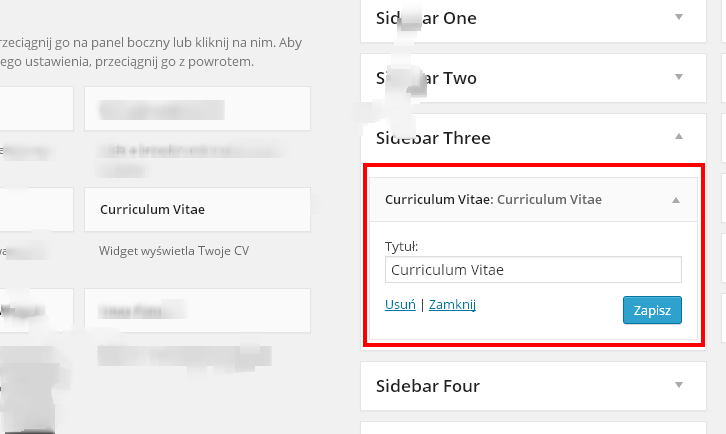
Widget area view. You could put Curriculum Vitae plugin to your widget area.

Viewing of curriculum vitae items

Instructions of putting information
Changelog
1.1.1
- Updated: Language pack (BR,EN,PL).
- Added: 2 screenshots.
- Updated: About page.
1.1
- Updated: Main structures were rebuilded
- Fixed: Problem with showing attributes (admin page)
- Added: Translation by Pedro Marcelo de Sá Alves
- Added: Managing schemas colors
- Added: About page
1.0.1
- Add featured images column to table on admin panel
- Add excerpt column to table on admin panel
1.0
- First release