

Custom Comment Notifications
Allow for the comment email notifications to be completely customized.
Plugin info
Maintenance & Compatibility
Maintenance score
Possibly abandoned • Last updated 3978 days ago • 6 reviews
Is Custom Comment Notifications abandoned?
Possibly abandoned (last update 3978 days ago).
Compatibility
Similar & Alternatives
Explore plugins with similar tags, and compare key metrics like downloads, ratings, updates, support, and WP/PHP compatibility.
Description
Custom Comment Notifications allows for the comment email notifications to be customized. This way you can choose what information gets included in the e-mail and
what information is left out. You can make the e-mails as detailed or as minimal as you desire. Through the use of some given variables, you are able to generate a
standard e-mail template that will be dynamically generated and sent to your authors and moderators. You can specify a separate template for your authors and another
for you moderators.
Available Variables
-
Post Variables
- Post ID
- Post Title
- Post Link
- Post Link URL
- Post Link to Specific Comment
- Post Link to Comments Section
-
Comment Variables
- Comment Author Name
- Comment Author Email
- Comment Author IP
- Comment Author Domain
- Comment Author URL
- Comment Author ARIN Lookup
- Comment Content
- Comments Awaiting Moderation (Moderator Templates Only)
-
Moderation Variables
- Delete/Trash Comment (Depends on EMPTY_TRASH_DAYS variable)
- Delete/Trash Comment URL (Depends on EMPTY_TRASH_DAYS variable)
- Approve Comment (Moderator Templates Only)
- Approve Comment URL (Moderator Templates Only)
- Spam Comment
- Spam Comment URL
- Moderation Panel Link (Moderator Templates Only)
- Moderation Panel Link URL (Moderator Templates Only)
-
Site Variables
- Site Link
- Site Link URL
- Blog Name
Planned Updates
- I plan on adding the following features shortly
- Ability to specify additional recipients of the e-mails on a per template basis
- This will allow for only the administrators to receive the moderation e-mails. Or if you have multiple moderators, it will allow each moderator to receive an e-mail
- The additional users will be required to have an account on your site
Installation
Automatic:
- Search for ‘custom comment notifications’ through the New Plugin Menu
- Install the plugin
- Activate either on a Network Level or on a Single Site Level
- Note that a network activation will activate on the sub-sites with individual template/settings options
Manual/FTP:
- Upload
custom-comment-notificationsdirectory to the/wp-content/plugins/directory - Activate the plugin through the ‘Plugins’ menu in WordPress
- Set up and customize the plugin through the ‘Settings’ Menu
Frequently Asked Questions
I have Custom Comment Notifications installed, now what?
Activate the plugin. It doesn’t matter if you choose to network activate or activate on a single site. Note that in a Network activation, it will activate the plugin on each site, but with individual templates/settings for each site.
Review feed
Screenshots
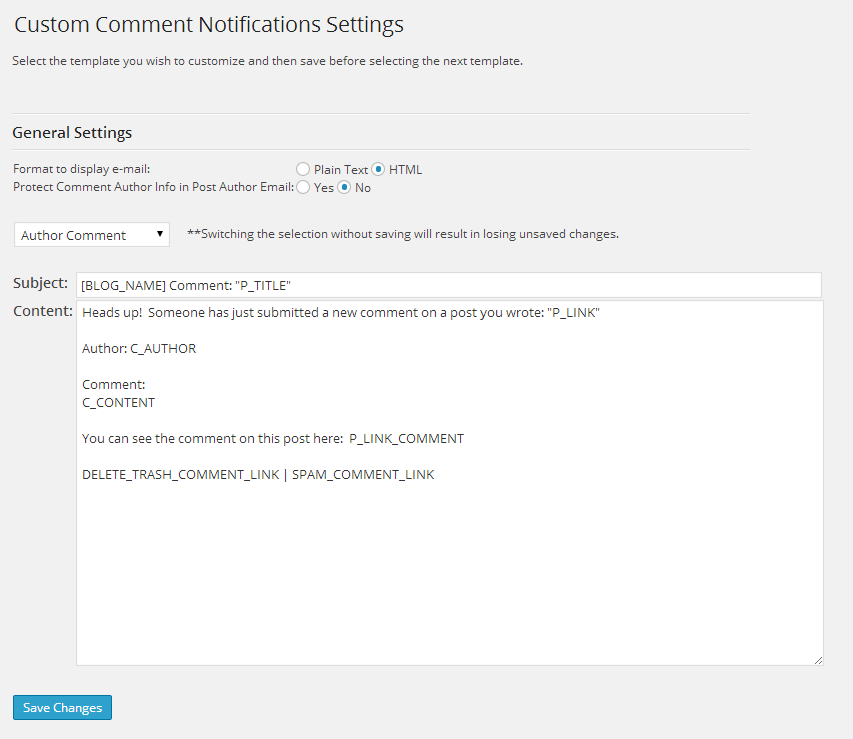
Settings Page

Available Variables

Example HTML E-mail

Example Plain Text E-mail
Changelog
1.0.8
- Bug Fixes
- An error when building the recipient lists for moderation emails (thanks WSP-webmaster)
1.0.7
- Enhancements
- URLs added as additional variables to the Links
1.0.6
- Enhancements
- Post Author variable added that will show the display name of the Post Author
1.0.5
- Enhancements
- Category variable added that will show the first category assigned to a post.
- Comment Excerpt variable added that will allow for the comment excerpt to be included in the email.
- Ability to specify additional recipients that will receive the e-mails in conjunction to the Site Administrator and Author.
- Ability to protect the comment author’s information in the moderation email. This functionality already existed for the author email.
1.0.4
- Enhancements
- Allow Post Author to be excluded from or included in moderation e-mails.
1.0.3
- Bug Fixes
- A bug with the localization caused all the text to break in the Settings Menu.
1.0.2
- Bug Fixes
- Some minor bug fixes.
1.0.1
- Bug Fixes
- Post Author must have ‘moderate_comments’ capability in order to trash or spam comments.
1.0
- This is the first release.