

Plugin info
Maintenance & Compatibility
Maintenance score
Possibly abandoned • Last updated 4654 days ago • 6 reviews
Is Custom CSV Export Plugin abandoned?
Possibly abandoned (last update 4654 days ago).
Compatibility
Similar & Alternatives
Explore plugins with similar tags, and compare key metrics like downloads, ratings, updates, support, and WP/PHP compatibility.
Description
This plugin allows you to export the values of custom fields into a CSV file. You can choose a post type (including defaults posts or pages)
as well as a list of custom field keys you wish to export. The plugin pulls the values for those fields from all instances of your chosen custom post type and provides a link to export them as a CSV file.
= .2 =
*Fixed bug that limited number of posts that could be exported
.r731619
.1
- Initial release of plugin.
Installation
- Upload
wp-ccsve.zipto the/wp-content/plugins/directory - Activate the plugin through the ‘Plugins’ menu in WordPress
- Go to Settings -> Custom CSV to access the plugins settings.
Frequently Asked Questions
How do I choose my post type and custom fields?
First, choose the post type you wish to export from the plugin’s Settings page. Then click “Save Changes.” At this point, a list of the custom fields associated with that post type will appear. Choose all of the fields you wish to export and click “Save Changes” again. Then click “Export” to get your CSV file.
I don’t see any custom fields on the Settings page. How come?
In the current version of the plugin, you mush first choose your post type and click “Save Changes” before you can see a list of the associated custom fields. Be sure to click “Save Changes” again in order to save your choices.
Review feed
Screenshots
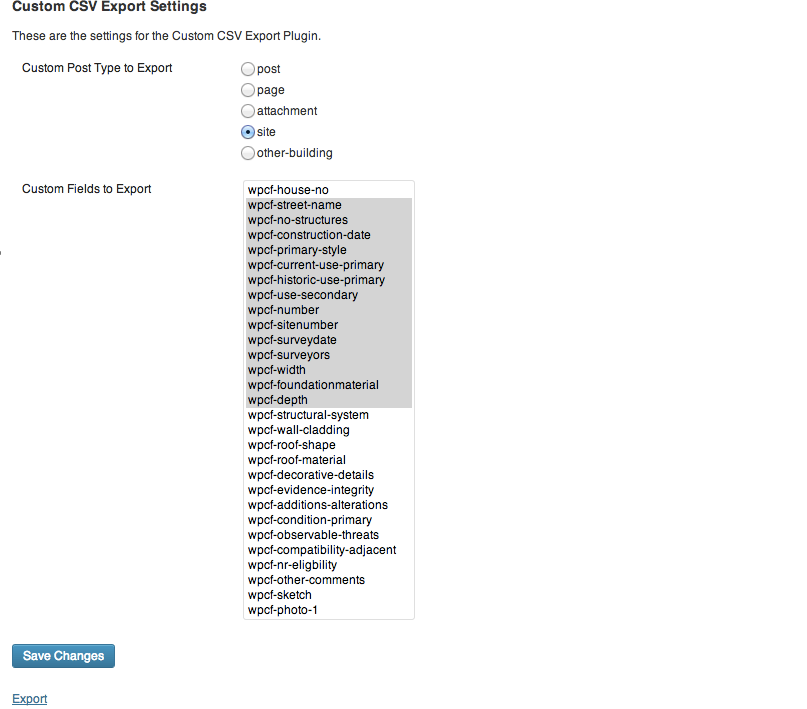
Screenshot of the plugin settings page.
Changelog
<<<<<<< .mine
.2
*Fixed bug that limited number of posts that could be exported