
Custom HTML Block Extension
Extend Custom HTML block to evolve into the advanced code editor.
Plugin info
Maintenance & Compatibility
Maintenance score
Maintained • Last updated 144 days ago • 12 reviews
Is Custom HTML Block Extension abandoned?
Likely maintained (last update 144 days ago).
Compatibility
Similar & Alternatives
Explore plugins with similar tags, and compare key metrics like downloads, ratings, updates, support, and WP/PHP compatibility.
Description
Custom HTML Block Extension extends Custom HTML block to evolve into the advanced code editor.
There are 50 different color themes to choose from, and you can select the one that best suits your taste.
This plugin features Emmet that expand shortcut input into complete code. This reduces the number of times you have to type and saves keystrokes.
You can change all kinds of settings to create your ideal editor in advanced mode.
And supports the classic editor, the theme/plugin editor, import/export editor settings, and change indentation.
Resources
monaco-editor
License: MIT License
Source: https://github.com/microsoft/monaco-editor
emmet-monaco-es
License: MIT License
Source: https://github.com/troy351/emmet-monaco-es
monaco-themes
License: MIT License
Source: https://github.com/brijeshb42/monaco-themes
webfontloader
License: Apache-2.0 License
Source: https://github.com/typekit/webfontloader
Web Font (Fira Code)
License: OFL-1.1 License
Source: https://github.com/tonsky/FiraCode
Web Font (Source Code Pro)
License: OFL-1.1 License
Source: https://github.com/adobe-fonts/source-code-pro
Web Font (Ubuntu Mono)
License: OFL-1.1 License
Source: https://ubuntu.com/legal/font-licence
Web Font (Anonymous Pro)
License: OFL License
Source: https://www.marksimonson.com/fonts/view/anonymous-pro
Installation
- Upload the
custom-html-block-extensionfolder to the/wp-content/plugins/directory. - Activate the plugin through the \’Plugins\’ menu in WordPress.
Frequently Asked Questions
Review feed
豊富なオプションでカスタマイズ性抜群!
控えめに言って最高です
これは常に入れておきたいプラグインです
I love it ♥
Screenshots

Custom HTML Block Extension

Various color themes

Faster coding with Emmet
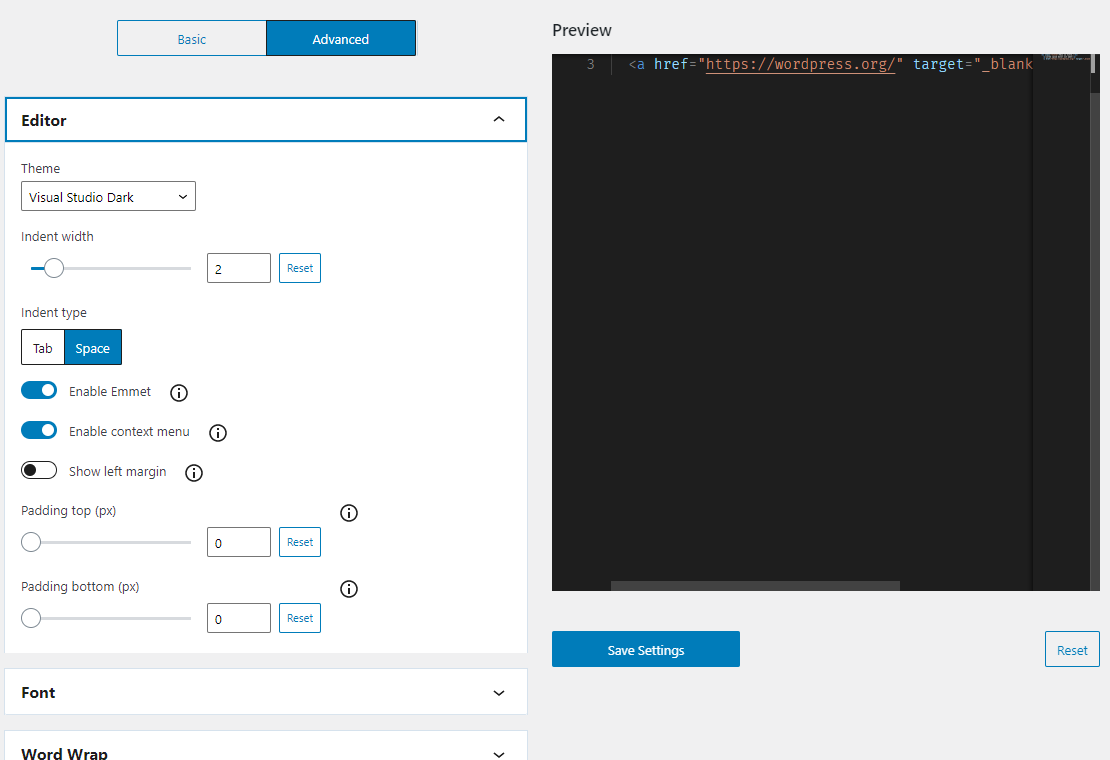
High customizability

Classic Editor support
Changelog
3.9.0
- Tested to WordPress 6.9
- Drop support for WordPress 6.6 and 6.7
- Drop support for PHP 7
- Enhancement: Show notification after exporting on the settings page
- Enhancement: Adjust UI elements to new 40px size
3.8.0
- Tested to WordPress 6.8
- Drop support for WordPress 6.5
- Enhancement: Use WordPress snackbar on the settings page
- Fix: No alert when leaving the theme/plugin editor
- Fix: Ajax on save doesn’t work in the theme/plugin editor
- Fix: “Save Options” button size on the settings page
3.7.0
- Tested to WordPress 6.7
- Drop support for WordPress 6.4
- Enhancement: Polish styles and layouts
- Fix: Minimap and toolbar overlap in the classic editor
3.6.0
- Tested to WordPress 6.6
- Drop support for WordPress 6.3
- Fix: Editor duplication on the classic editor
- Fix: Critical error when clicking tab on the settings page
- Fix: Ctrl+S shortcut not working on the classic editor
- Fix: Editor top margin misalignment on the classic editor
- Fix: Browser console error on the classic editor
- Fix: Browser console error on the Theme/Plugin Editor
3.5.0
- Tested to WordPress 6.5
- Drop support for WordPress 6.2
- Enhancement: Polish settings page and controls
- a11y: Make disabled button focusable
- Fix: react warning error in the change indentation popover
3.4.0
- Tested to WordPress 6.4
- Fix: Add media not work correctly on the classic editor
- Drop support for WordPress 6.1
3.3.2
- Fix: Browser warning error in WordPress 6.3
- Fix: User role settings are not applied to all editors
3.3.1
- Fix: some typos
3.3.0
- Tested to WordPress 6.3
- Enhancement: Add filtering function for settings
- Enhancement: Add monospace font
- Enhancement: Add user role permission setting
- Enhancement: Remove the editor refresh button on the settings page
- Enhancement: Apply theme color to the classic editor
- Enhancement: Use code tags in help modal description
- i18n: Apply more strict capitalization rule and grammar to strings
- a11y: Improve screen reader reading
- Fix: Full screen editor not showing on the block editor
- Clean: Polish change indentation popover style
- Drop support for WordPress 5.9, 6.0
- Drop support for PHP7.3
3.2.1
- Enhancement: Change modal HTML editor icon
3.2.0
- Tested to WordPress 6.2
- Feature: Add modal HTML editor
- Enhancement: Don’t display toolbar buttons when preview mode
- Fix: Wrong CSS for Monaco Editor in the block editor
- Fix: Copy and cut lines don’t work in the block editor
- Clean: Polish block editor popover UI
- Clean: Polish classic editor popover UI
- Clean: Polish setting page UI
3.1.0
- Tested to WordPress 6.1
- Drop support for WordPress 5.6 through 5.8
- Clean: Bump monaco-editor version
- Enhancement: Apply admin color scheme to the settings screen
- Fix: the position of notifications on the settings screen
3.0.3
- Bundle the core files of the Monaco Editor
3.0.2
- Tested to WordPress 6.0
- Update author name
3.0.1
- Doc: Fix typo
3.0.0
- Update: Support for full site editor, mobile / tablet device preview, and block template editor
2.5.0
- Tested to WordPress 5.9
- Update: UI improvement of the indent conversion tool in block editor
- Update: Disable the code editor in full site editor, mobile / tablet device preview, and block template editor
- Remove: Support for local translation files
2.4.3
- Fix: Wrong CSS for IntelliSense
2.4.2
- Fix: Incorrect search box style
2.4.1
- Clean: Remove unnecessary file included in the release
2.4.0
- Fix: Editor mode is not detected correctly under certain conditions
- Clean: Update monaco editor version
- Clean: change PHP namespace
2.3.3
- Fix: Editor mode is not detected correctly under certain conditions
2.3.2
- Clean: Update npm packages and run a lint check
- Fix: Indent conversion tool style
2.3.1
- Fix: Wrong CSS for IntelliSense
2.3.0
- Add: Theme/Plugin Editor support
- Code refactoring
- Clean: Update npm packages
2.2.3
- Fix: Quick tag insertion is not reflected in the classic editor
2.2.2
- Fix: Emmet does not work in the classic editor
2.2.1
- Clean: Update npm packages
- Remove: Bundled language files
2.2.0
- Add: Indent conversion tool
- Fix: Add handling of the classic editor when it does not support the content editor
- Doc: Update welcome guide, translation file
- Fix: The visual editor added in the metabox does not show up in the Classic Editor
2.1.2
- Fix: Characters are not visible until the conversion is confirmed when typing Japanese
2.1.1
- Doc: Update tested up to
2.1.0
- Tested to WordPress 5.8
- Fix: Issue with the correct block icon not being displayed
- Clean: Update npm packages
- Add: Ctrl+S shortcut action to the classic editor
- Fix: Editor mode is not detected correctly the first time the Classic Editor is used
2.0.2
- Fix: Error that occurs when the visual editor is disabled in the classic editor
2.0.1
- Fix: Problem about browser console error and incorrectly margin-top of the code editor at classic editor
2.0.0
- Doc: Update translation file
- Add: Classic Editor support
1.2.1
- Fix: Problem aoubt the cut/copy shortcut action does not work properly depending on the settings
1.2.0
- Doc: Update translation file
- Add: Import/Export editor config tool
- Clean: Ajust internal logic
1.1.0
- Doc: Update translation file
- Doc: About how to add custom fonts
- Add: Filter hook for adding custom fonts
1.0.3
- Fix: Indent of the sample code in the editor config preview is not consistent with the settings
- Fix: Incorrect HTML syntax in the sample code of the editor config preview
- Clean: Ajust internal logic
- Change: the range of some setting items
- Style: Add space between the horizontal scroll bar and the handle of resizable box
1.0.2
- Clean: Re-record and compress gif files
1.0.1
- Clean: remove console.log
- Clean: remove .eslintignore from .distignore
1.0.0
- Initial release