

Custom Order Meta Box
This plugin adds a custom meta box on WooCommerce order pages in the WordPress admin dashboard. With this plugin, store administrators can view all me …
Plugin info
Maintenance & Compatibility
Maintenance score
Possibly abandoned • Last updated 513 days ago
Is Custom Order Meta Box abandoned?
Possibly abandoned (last update 513 days ago).
Compatibility
Similar & Alternatives
Explore plugins with similar tags, and compare key metrics like downloads, ratings, updates, support, and WP/PHP compatibility.
Description
This plugin adds a custom meta box on WooCommerce order pages in the WordPress admin dashboard. With this plugin, store administrators can view all meta fields associated with each order in one place, making it easier to manage and review order-specific data such as custom fields, tracking numbers, or additional notes added by other plugins. This can save time and improve order management efficiency for WooCommerce store managers.
Short Description
A WooCommerce plugin that adds a custom meta box to order pages in the admin area, displaying all order meta fields for quick access.
Support
For more information, documentation, or support, please visit MJ Digital Design or open a support ticket in the WordPress plugin directory.
Installation
- Upload the plugin files to the
/wp-content/plugins/custom-order-meta-boxdirectory, or install the plugin through the WordPress plugins screen directly. - Activate the plugin through the ‘Plugins’ screen in WordPress.
- Go to the WooCommerce order edit page to see the custom meta box with all order meta fields.
Frequently Asked Questions
This plugin displays all the meta fields associated with WooCommerce orders in a custom meta box on the order edit page.
Yes, the plugin has been tested with the latest version of WooCommerce.
No, this plugin only displays meta fields in a custom meta box. It doesn’t modify or delete any order data.
Not currently. The plugin displays all meta fields associated with an order.
Review feed
Screenshots
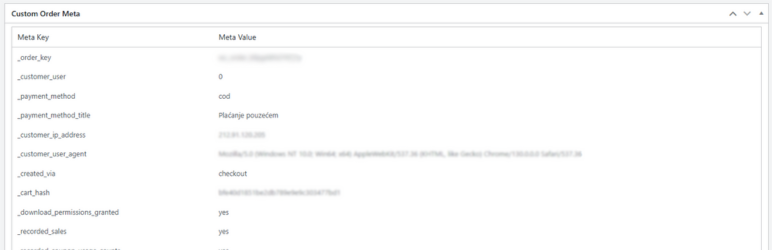
The custom meta box displayed on the WooCommerce order edit page.
Changelog
1.0
- Initial release.