

Custom Post Type Parents
Set a "parent page" for custom post types that is indicated in menus, lists of pages, and the Simple Section Navigation widget.
Plugin info
Maintenance & Compatibility
Maintenance score
Maintained • Last updated 178 days ago • 6 reviews
Is Custom Post Type Parents abandoned?
Likely maintained (last update 178 days ago).
Compatibility
Languages
Similar & Alternatives
Explore plugins with similar tags, and compare key metrics like downloads, ratings, updates, support, and WP/PHP compatibility.
Description
Compatible with PHP 8.2
Like this plugin? Please consider leaving a 5-star review.
This plugin is meant to solve the problem of highlighting “parent” pages for Custom Post Types in the menu and lists of pages. It integrates with custom menu output as well as output for any functions like wp_list_pages() that utilize the page_css_class or nav_menu_css_class filters. When viewing a custom post type, the assigned “parent page” will be indicated with standard WordPress classes (e.g. current_page_item) in navigation menus and lists of pages.
Usage
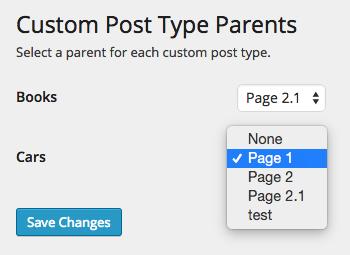
- In the admin, navigate to Settings > Custom Post Type Parents
- For each custom post type, use the dropdown to select a “parent page”
Menus and lists of pages will now have the appropriate classes applied to the specified parent pages. Additionally, Custom Post Type Parents will apply these classes to Simple Section Navigation widgets, if the plugin is installed.
Classes
Custom Post Type Parents applies the following classes to parent and ancestor pages (all classes are consistent with default WordPress classes and are backwards compatible).
Parent
* current-menu-parent
* current_page_parent
* current-custom-post-type-parent
* current-{post type}-parent
Ancestor
* current-menu-ancestor
* current_page_ancestor
* current-custom-post-type-ancestor
* current-{post type}-ancestor
Installation
Manual Installation
- Upload the entire
/custom-post-type-parentsdirectory to the/wp-content/plugins/directory. - Activate Custom Post Type Parents through the ‘Plugins’ menu in WordPress.
Frequently Asked Questions
You can report security bugs through the Patchstack Vulnerability Disclosure Program. The Patchstack team help validate, triage and handle any security vulnerabilities. Report a security vulnerability.
Review feed
Screenshots

Changelog
1.1.3
- Change CSS classname (from custom- to current-) to match documentation and keep the same format for all classes.
1.1.2
- Fix: memory issue infinitely calling constructor.
1.1.1
- Fix: widget constructor call throwing deprecated notice.
1.1.0
- Include posts and pages in customizeable list.
- Update parent select to show hierarchy indenting for easier use.
1.0.1
- Fix issue in which custom post types weren’t appearing – code was incorrectly referencing
slug - Add admin text to indicate if no custom post types are available to edit
1.0.0
- First release