

Extra Custom Product Tabs for WooCommerce
Add extra multiple custom tabs with tab name and content in single product using WooCommerce.
Plugin info
Maintenance & Compatibility
Maintenance score
Possibly abandoned • Last updated 1725 days ago • 1 reviews
Is Extra Custom Product Tabs for WooCommerce abandoned?
Possibly abandoned (last update 1725 days ago).
Compatibility
Similar & Alternatives
Explore plugins with similar tags, and compare key metrics like downloads, ratings, updates, support, and WP/PHP compatibility.
Description
**Custom Produuct Tabs Woocommerce plugin ** using this plugin you can extends WooCommerce to allow shop owners to add custom multiple tabs to single product. All tabs will display on the individual product pages to the right of the default “Description” tab.
**Extra product tabs ** are managed on the single Edit Product screen and can be added on a per product basis. You can also enable / disable the tabs, create or Edit or saved or remove the tabs and add them to multiple products as needed.
👉**Plugin Features**
- Option to Enable/Disable product tabs
- Create or Add multiple product tabs
- Remove product tabs anytime
- Custom product tab content displayed on the front end
If you want more information about this plugin or another one don’t doubt to visit our website: https://www.codevyne.com/
TECHNICAL SUPPORT
If any problem occurs, please contact us at [email protected]
How to Add Extra Custom Product Tabs for WooCommerce
Installation
- Upload the directory
/custom-product-tabs-for-woocommerce/to the/wp-content/plugins/directory - Activate the plugin through the ‘Plugins’ menu in WordPress
- Click on “WC Extra Tabs” menu under product data on edit product page
Frequently Asked Questions
Review feed
Screenshots
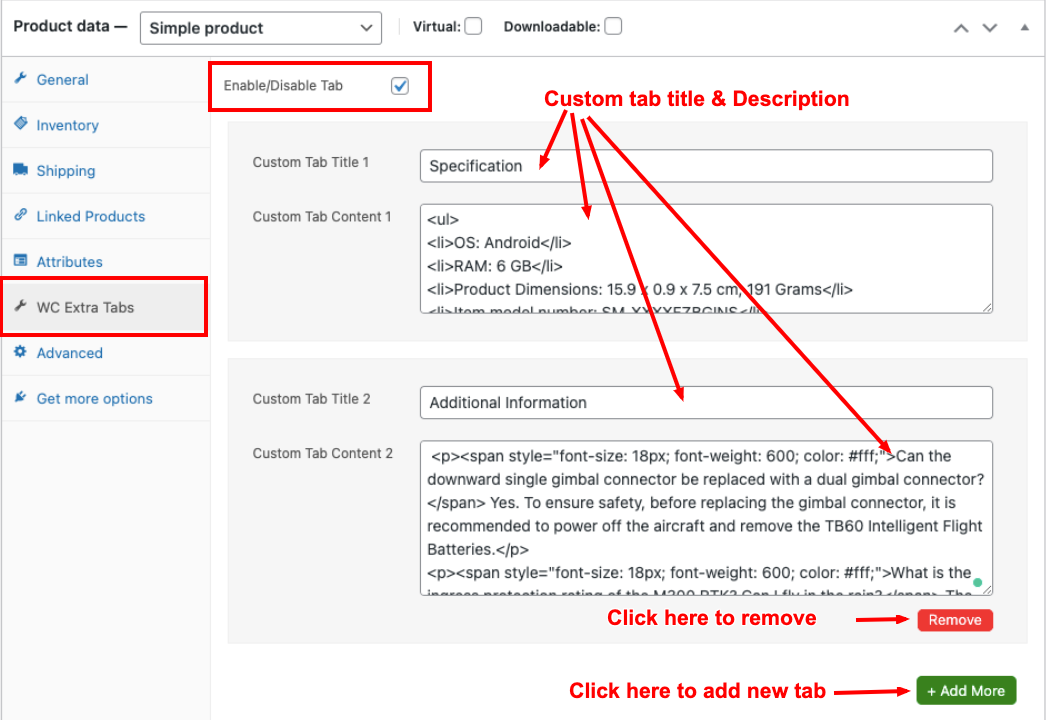
WC Extra Tabs Manager screenshot on "Edit Product" page

Extra custom product tabs title and content preview on the front end
Changelog
1.2
- Fixed some js issue
1.0
- Initial Plugin Release.