

Custom Product Type for WooCommerce – Add-Ons, Data, Options, Layouts, Booking & Appointments
Create WooCommerce Add-Ons, Data, Options, Booking, Layouts, and Appointments as custom product types. Revolutionize store's possibilities!
Plugin info
Maintenance & Compatibility
Maintenance score
Maintained • Last updated 120 days ago • 7 reviews
Is Custom Product Type for WooCommerce – Add-Ons, Data, Options, Layouts, Booking & Appointments abandoned?
Likely maintained (last update 120 days ago).
Compatibility
Languages
Similar & Alternatives
Explore plugins with similar tags, and compare key metrics like downloads, ratings, updates, support, and WP/PHP compatibility.
Description
Custom Product Type for WooCommerce helps you create unique WooCommerce product types with fully custom tabs, admin-only fields, layout control, and advanced booking fields.
Designed for all types of products eg. (services, classes, tickets, or appointment-based businesses), this plugin gives you full visual control of WooCommerce single product data — from field structure to layout to display locations.
📺 YouTube Tutorials: Watch the full playlist
🔁 Create Multiple Product Types: Define as many types as you want, each with its own tab, fields, layout, and output position.
🌐 WPML + Polylang Support: Fully multilingual ready.
💳 Checkout-Safe: Fields do not conflict with WooCommerce cart, pricing, or payments.
✅ What You Can Do with This Plugin
- 🧩 Add custom fields to WooCommerce product types (text, select, checkbox, radio)
- 📄 Display product data before/after title, add-to-cart, price, or meta
- 🧠 Create Custom Product Types with dedicated admin tabs
- 🎨 Choose from 4 built-in layout templates for the single product page
- 🏷️ Apply custom badges per product type
- 🧾 Add static structured data like instructor name, ticket ID, session time, etc.
- 🔎 Use shortcodes: `[cwpt_products product_type=\”your_type\”]`
- 🌐 Multilingual with WPML/Polylang
- 🛒 Hide/show product types from shop/catalog
- 🔒 Add user input fields (text, textarea, select, etc.) [Pro]
- 🔒 Enable interactive booking calendars & date pickers [Pro]
- 🔒 Add file upload, WYSIWYG, email, color picker fields [Pro]
- 🔒 Create field-based pricing logic [Pro]
🆓 Free Features
- ✅ Create unlimited custom product types
- ✅ Add custom WooCommerce admin tabs with fields
- ✅ Choose field display locations (before/after title, price, cart, meta)
- ✅ Field types: Text, Textarea, Select, Radio, Checkbox
- ✅ 4 Single product page layout templates
- ✅ Product badge support per product type
- ✅ Shortcode: `[cwpt_products product_type=\”your_type\”]`
- ✅ Show/hide product types from shop/catalog
- ✅ Custom taxonomy support
- ✅ WPML and Polylang compatible
- ✅ Works with all WooCommerce payment gateways
💎 Premium Add-On Features
Unlock advanced control over your product types with the Pro version:
- 🔓 WooCommerce Product Add-Ons & Custom Fields
- 🔓 Interactive Booking Calendar and Date Picker
- 🔓 File Upload, Email, URL, and WYSIWYG fields
- 🔓 Color Picker and Taxonomy-based fields (radio/select)
- 🔓 Field pricing logic per selection
- 🔓 Buy Now Button field for fast checkout.
🧠 Popular Use Cases
- 📚 Books: Show author name, ISBN, edition, or series
- 🎟️ Event Tickets: Show date, seat category, meal preference
- 🎓 Courses: Display session type, instructor, language, duration
- 🔧 Services: Add service details, duration, or booking slots
- 🍱 Food Orders: Display ingredients, allergens, or category
== Upgrade to Pro ==
Unlock custom product workflows with booking fields, pricing logic, file uploads, WYSIWYG, and more advanced field types.
Demo & Tutorials
💡 Need Help?
👉 Get support on the WordPress.org Support Forum
👉 Access Premium Support
== More by WPSaad ==
- 🖼️ Image Alt Text Manager – Pro Version
- 🚚 Shipping Manager for WooCommerce – Pro Version
- 🧱 WPSaad Addons for Dokan and Elementor – Pro Version
- 💲 Bulk Wholesale Dynamic Pricing Buttons – Pro Version
- ⚙️ Product Add-Ons, Custom Fields, Booking & Extra Options – Pro Version
== Other Services ==
Installation
- Upload the plugin files to `/wp-content/plugins/`
- Activate the plugin through the ‘Plugins’ screen
- Go to WooCommerce Product Types to start building
Frequently Asked Questions
No. All fields and layouts are created visually from the admin.
Yes! Use one of 4 layout styles and choose placement locations (title, cart, meta, etc.).
Yes. It is fully translation-ready and supports WPML, Polylang, and Loco Translate.
Yes. The Pro version includes date and time picker fields for booking or scheduling services.
Yes. It uses native WooCommerce hooks and is compatible with any properly coded theme.
No. The free version displays admin-defined fields as static product data. The Pro version enables interactive input fields on the frontend.
Review feed
Great plugin & great support
Vary Good
Screenshots

General Settings

Custom Tab And Fields

Addons and Front options

Single product page custom tab and data
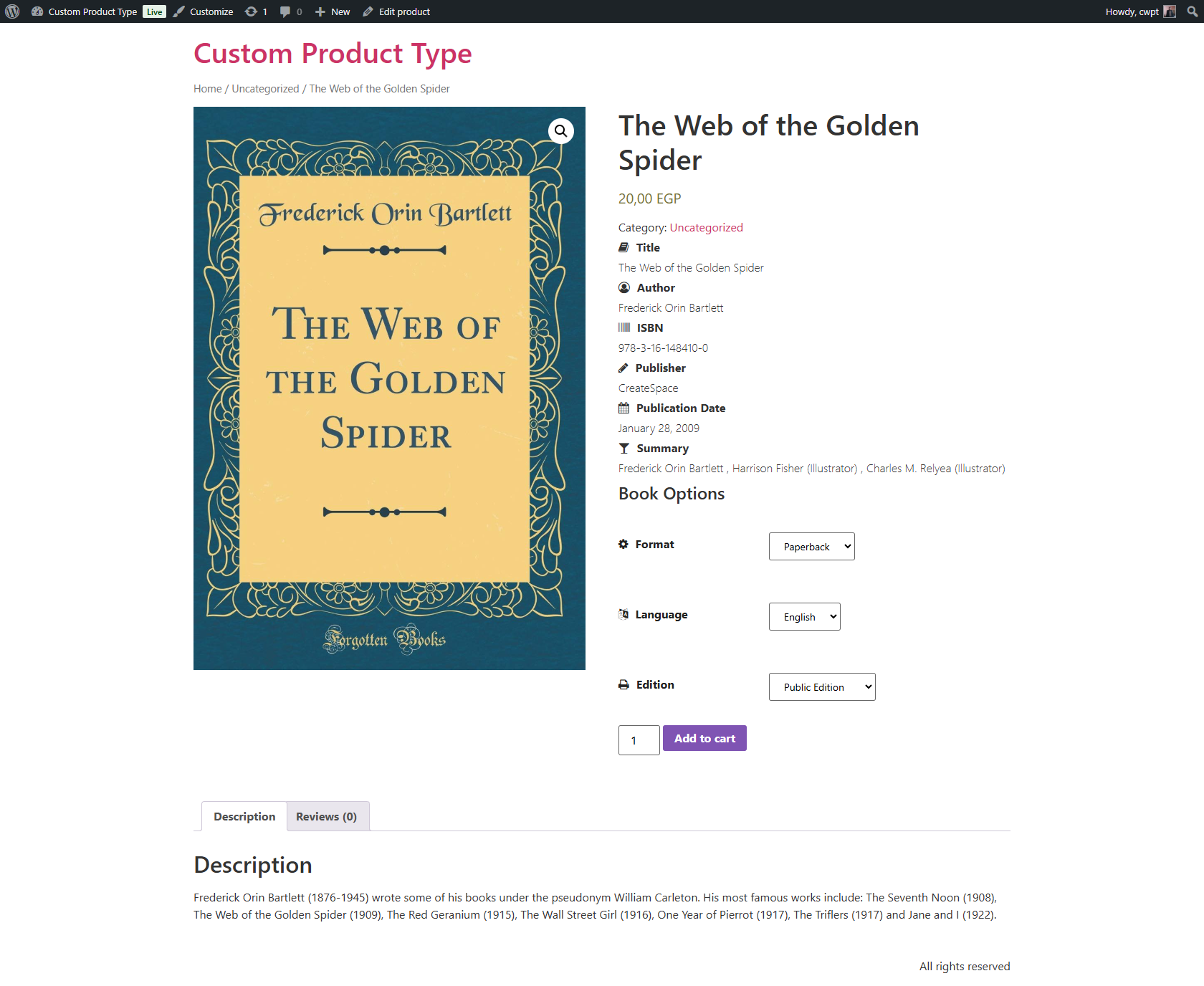
Front product page addons and data
Changelog
1.3.8
- Added PRO Layout 5
- Added PRO Buy Now Button
1.3.7
- Fixed product type selector
1.3.5
- Added polylang integeration
- Fixed class retrive in sync
1.3.4
- Metabox Removed
- Fixed Calendar Issue
- Fixed custom WooCommerce single product layout issues
1.3.3
- Added Custom WooCommerce Product Layouts feature
1.3.2
- Converted classes generator to inline code
1.3.1
- Added Required Asterisk
1.3.0
- Admin tab and fields pro to free
- Added product addons and booking field
1.2.4
- Added group div container