

Custom Search Results
Custom Search Results helps you put the important results first on searches, shows what users are searching for on your site.
Plugin info
Maintenance & Compatibility
Maintenance score
Possibly abandoned • Last updated 3431 days ago
Is Custom Search Results abandoned?
Possibly abandoned (last update 3431 days ago).
Compatibility
Similar & Alternatives
Explore plugins with similar tags, and compare key metrics like downloads, ratings, updates, support, and WP/PHP compatibility.
Description
Get insight into what your users are searching for on your website and customize the results they see. Do you have an important accouncement you want to show up at the top of your search results? Is there a specific product you want to promote?
Make sure your users get to see it when they search your site.
Major features include:
- Add Custom Search Results
- Order Custom Search Results
- Historical Search Statistics
- Configure which post types will be searched
Installation
From your WordPress dashboard
- Visit ‘Plugins > Add New’
- Search for ‘Custom Search Results’
- Activate Custom Search Results from your Plugins page.
- Visit ‘Custom Search Results’ > ‘Custom Post Types’
- Configure the posts types you want to be searchable
- Visit ‘Custom Search Results’ > ‘Custom Results’
- Configure the custom searches results you want to be displayed
- Add Posts/Pages/Products… to custom searches from the ‘Custom Search Results’-widget on the edit page of each post type.
Frequently Asked Questions
Review feed
Screenshots

Search Statistics - See search Statistics broken down by normal and custom searches

Search Statistics Details - Number of searches by search term

Custom Searches - Maintain your custom searches, and see how they are being used

Reorder Results - Order your custom search results the way you want
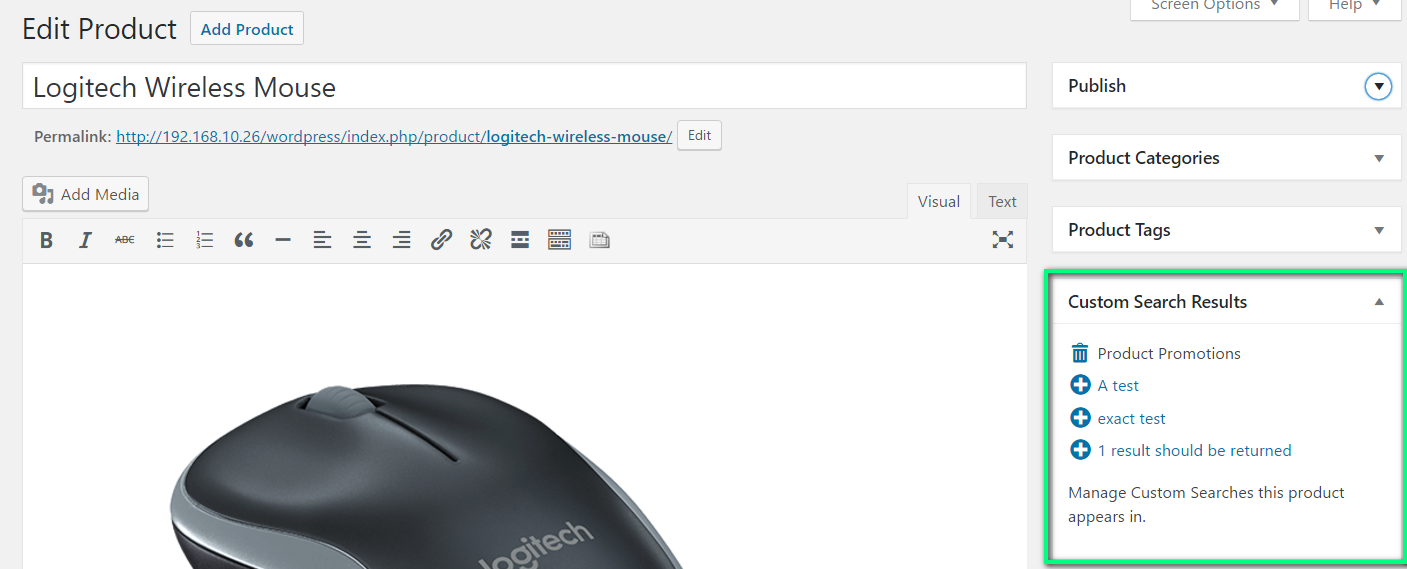
Add Page/Product to Custom Search - From the Edit interface, you can add Pages or any custom post type to custom search results

Customize Search Post Types - Customize the post types to be searched.
Changelog
1.0
First Release
- Add Custom Search Results
- Order Custom Search Results
- Historical Search Statistics
- Configure which post types will be searched