

Custom Tabs for BuddyPress
Add custom tabs to BuddyPress user profiles with role-based visibility and shortcode content, managed from the admin panel. Requires BuddyPress.
Plugin info
Maintenance & Compatibility
Maintenance score
Stale • Last updated 300 days ago • 1 reviews
Is Custom Tabs for BuddyPress abandoned?
Likely maintained (last update 300 days ago).
Compatibility
Similar & Alternatives
Explore plugins with similar tags, and compare key metrics like downloads, ratings, updates, support, and WP/PHP compatibility.
Description
The Custom Tabs for BuddyPress plugin, developed by Tycoonverse, allows you to add up to three custom tabs to BuddyPress user profiles. Each tab can display content via a WordPress shortcode and be restricted to specific user roles. Features include:
Create custom tabs with a name, unique slug, and shortcode (e.g., GamiPress achievements).
Control tab visibility by user roles (e.g., show only to administrators or subscribers).
Manage tabs from the WordPress admin panel under Settings > Custom BP Tabs.
Ideal for BuddyPress sites needing tailored profile tabs without extra features that slow down performance. Perfect for showcasing custom content or integrations with plugins like GamiPress or HivePress.
Use Shortcode For Elementor to Generate a Custom Template according to your specific need
and use its Shortcode to display Dynamic Content or use Ninja Forms Shortcode to display a form.
Installation
Upload the custom-tabs-for-buddypress folder to /wp-content/plugins/, or install via the WordPress plugins screen.
Activate the plugin through the ‘Plugins’ screen.
Go to Settings > Custom BP Tabs to configure up to three custom tabs with names, slugs, shortcodes, and allowed roles.
Frequently Asked Questions
Yes, BuddyPress must be installed and active for this plugin to work.
Yes, any valid WordPress shortcode can be used, such as GamiPress shortcodes for achievements or custom shortcodes for unique content.
In Settings > Custom BP Tabs, select the allowed user roles for each tab. Leave the roles field empty to make the tab visible to all users.
Ensure BuddyPress is active and the tab slug doesn’t conflict with existing BuddyPress components (e.g., ‘profile’, ‘messages’). Check the user’s role matches the tab’s allowed roles. If issues persist, inspect the profile navigation (right-click > Inspect) to verify the tab’s presence.
The plugin supports up to three custom tabs. Contact Tycoonverse for customization if more are needed.
Review feed
Screenshots
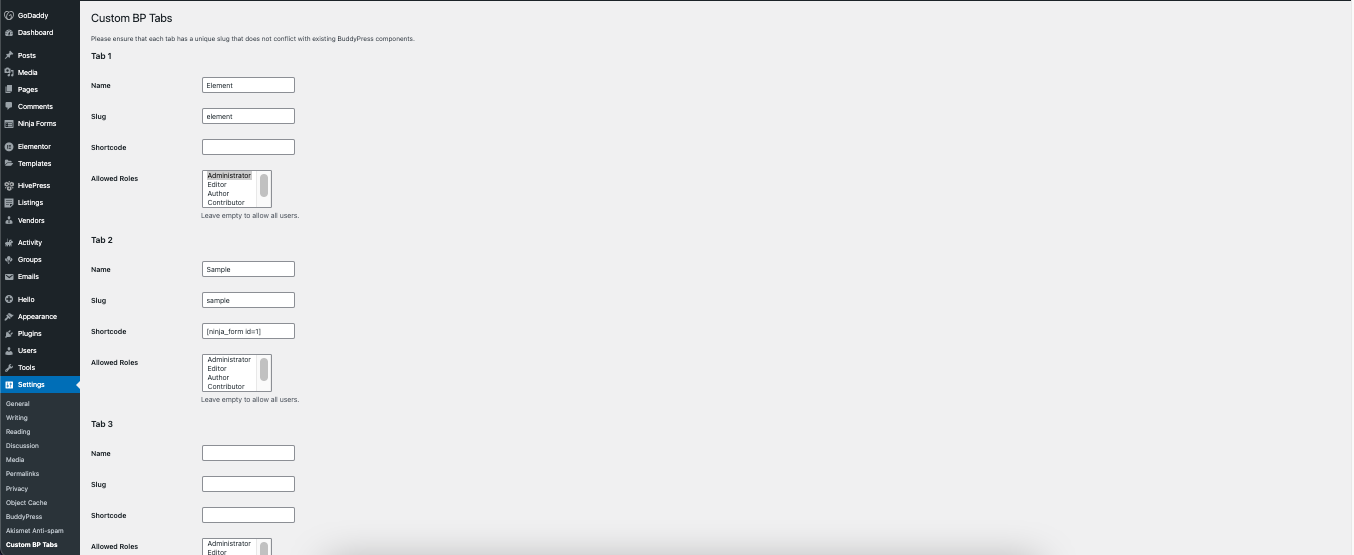
Admin settings page for configuring custom tabs.
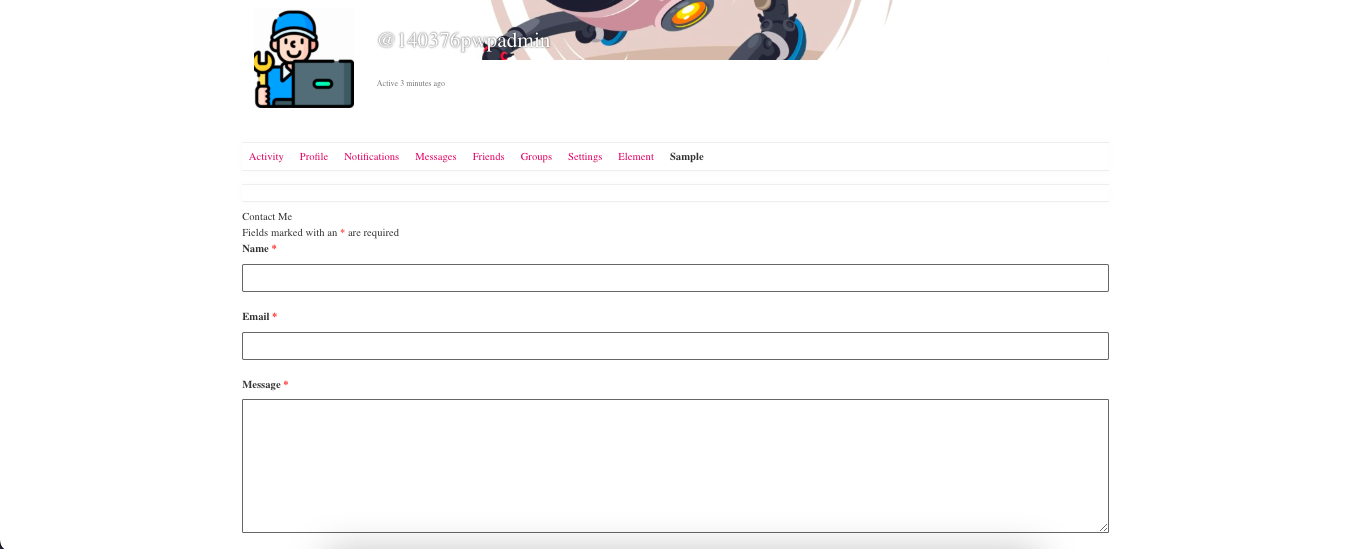
BuddyPress profile with a custom tab displaying shortcode content.
Changelog
1.0.0
Initial release.