

Custom User Registration Fields for Tutor LMS
Add Custom User Registration Fields for Tutor LMS.
Plugin info
Maintenance & Compatibility
Maintenance score
Stale • Last updated 222 days ago
Is Custom User Registration Fields for Tutor LMS abandoned?
Likely maintained (last update 222 days ago).
Compatibility
Similar & Alternatives
Explore plugins with similar tags, and compare key metrics like downloads, ratings, updates, support, and WP/PHP compatibility.
Description
Custom User Registration Fields for Tutor LMS extends your Tutor LMS registration process by allowing you to add custom fields for both student and instructor registrations. This plugin provides a simple admin interface to manage custom fields without any coding knowledge required.
How It Works
- Install and activate the plugin
- Navigate to Users Tutor LMS User Fields in your admin panel
- Add custom fields with labels and meta keys
- Fields automatically appear on registration forms
- User data is saved and displayed on profile pages
Tutorials & Guides
- 17 Awesome Websites Made with Tutor LMS
- The Complete List of Tutor LMS Shortcodes and How to Use Them – Tutor LMS
- Sending Reminder Emails to Inactive Students – Tutor LMS
- Tutor LMS – Get Student Information in PHP
- How to Hide, Remove or Disable Reviews or Star Rating in Tutor LMS
- Create a User Directory with Elementor
- Best WordPress LMS Plugins to Create and Sell Courses Online
More Plugins by UserElements
- Personalized User Menu for TutorLMS
- WP User Data
- User Broadcast Email
- Elementor Product Table for WooCommerce
Support
For technical support, feature requests, or general questions, please visit userelements.com or create a support ticket in the WordPress.org plugin forum.
Usage
Admin Panel
- Go to
Users->Tutor LMS User Fieldsto manage custom fields. - There are two tabs:
Student Registration FieldsandInstructor Registration Fields. - Add new fields by filling in the
Field LabelandMeta Keyand clickingAdd Field. - Remove fields by clicking the
Removebutton next to the respective field. - Save changes by clicking the
Save Changesbutton.
Frontend
Custom fields will automatically appear on the Tutor LMS registration forms for students and instructors.
Hooks and Functions
- Admin Menu:
- Adds a submenu under the
Usersmenu for plugin settings.
- Adds a submenu under the
- Custom CSS:
- Enqueues custom CSS for the plugin settings page.
- Settings Page:
- Displays the settings page for managing custom fields.
- User Meta:
- Adds and updates custom user meta during registration and profile updates.
- Profile Page:
- Displays custom fields on the user profile page.
- Registration Forms:
- Adds custom fields to Tutor LMS registration forms for students and instructors.
License
This plugin is licensed under the GNU General Public License v2.0. See the License URI for more details.
Credits
- Developed by userelements.
Support
For support, please visit userelements.com.
Installation
- Upload the plugin files to the
/wp-content/plugins/tutor-lms-custom-user-registration-fieldsdirectory, or install the plugin through the WordPress plugins screen directly. - Activate the plugin through the ‘Plugins’ screen in WordPress.
- Navigate to the ‘Users’ menu and select ‘Tutor LMS User Fields’ to configure the custom fields.
Frequently Asked Questions
Yes, this plugin is specifically designed to work with Tutor LMS and requires it to be installed and active.
Absolutely! The plugin provides separate sections for student and instructor registration fields.
Currently, all custom fields are optional. Users can complete registration without filling them out.
Yes, you can easily edit field labels, modify meta keys, or remove fields entirely from the admin panel.
All custom field data is stored as WordPress user meta, making it accessible through standard WordPress functions.
Review feed
Screenshots
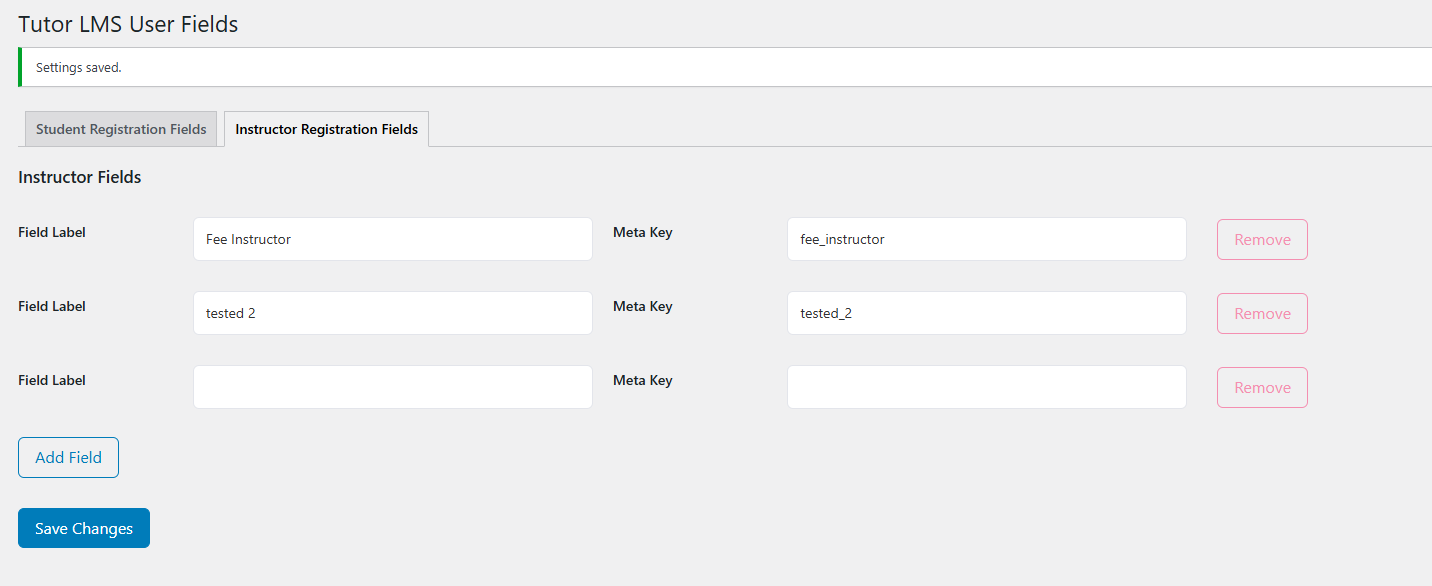
TutorLMS adding user registration fields
Changelog
1.3: August 25, 2024
- Fixed update_user_meta error that was preventing proper data saving
1.2: August 25, 2024
- Fixed Tested Up To Value
- Added wp_enqueue commands
- Fixed Internationalization
- Prefixed Options and Transients.
1.1: August 18, 2024
- Fix – Fix plugin name.
1.0: August 4, 2024
- Initial release.