

Customize Private & Protected – Change or remove title prefix and more
Use WP Customize to modify elements of password protected and private posts and pages.
Plugin info
Maintenance & Compatibility
Maintenance score
Maintained • Last updated 180 days ago • 3 reviews
Is Customize Private & Protected – Change or remove title prefix and more abandoned?
Likely maintained (last update 180 days ago).
Compatibility
Similar & Alternatives
Explore plugins with similar tags, and compare key metrics like downloads, ratings, updates, support, and WP/PHP compatibility.
Description
Use this plugin to hide or edit the prefix on your password protected or private page, add widget areas before and after the password protected form, and modify the label and submit button text. These changes are global and apply to all protected and private content respectively.
Donations
If you’d like to support future development, buy me a tea!
Installation
Through wordpress admin:
- Go to Plugins -> Add New
- Search for “Customize Private & Protected”
- Install the plugin
- Activate it
Through FTP:
Download the plugin
Unzip customize-private-protected.zip and upload the folder to the /wp-content/plugins/ directory
Activate the plugin through the ‘Plugins’ menu in WordPress
Frequently Asked Questions
After activation, use the WordPress Theme customizer (Dashboard > Appearance > Customize OR “Theme Customizer” in the WP admin bar). For password protected pages, the widgets areas are found in the widgets section of the customizer.
Review feed
Screenshots

Modify settings using the customizer.

For password protected pages/posts, two widget areas are added.
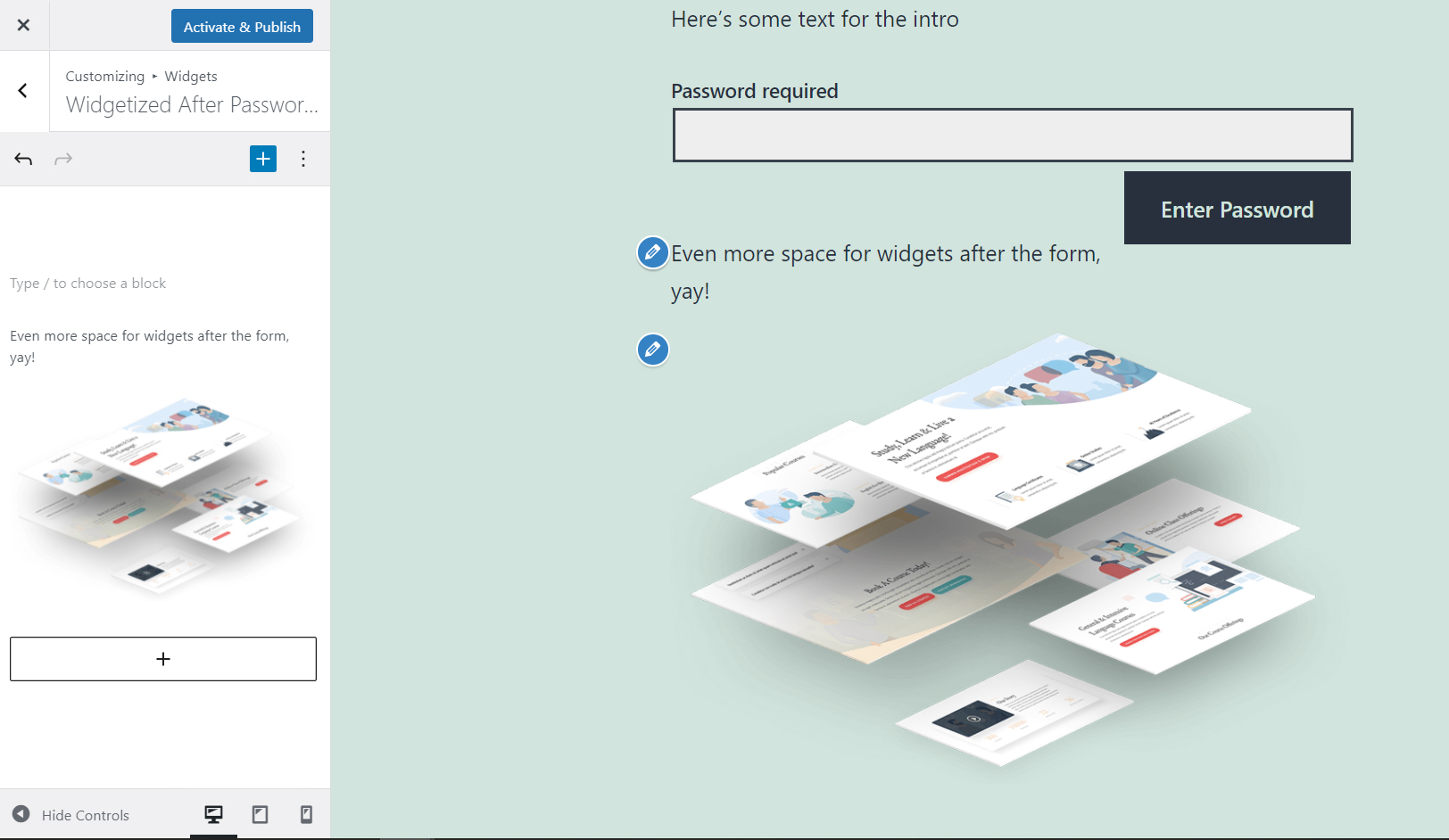
Customize as you like.
Changelog
1.3.4 – 10-04-2025
- Tested – Passed tests with WordPress version 6.8.3
1.3.3 – 01-18-2025
- Tested – Passed tests with WordPress version 6.7.1
- Fix – Added div element to clear float from form submit button
1.3.2 – 05-19-2024
- Tested – Passed tests with WordPress version 6.5.3
1.3.1 – 01-13-2024
- Tested – Passed tests with WordPress version 6.4.2
- Tested – Passed tests with PHP versions up to 8.1.23
1.3.0 – 07-03-2023
- Enhancement – Tweaked selective refresh to improve user experience for supported themes
- Enhancement – Text domain namespace added for internationalization support
1.2.0 – 04-15-2023
- Enhancement – Implemented selective refresh to improve user experience
1.1.1 – 03-18-2023
- Tested – Passed tests with WordPress version 6.2
- Tested – Passed tests with PHP versions up to 8.1.9
- Fix – Fixed variables for custom input attributes, which broke in PHP 8 and up.
1.1.0 – 01-16-2023
- Tested – Passed test with WordPress version 6.1.1
- Feature – Added ability to customize protected button appearance
- Enhancement – Enabled translation in plugin labels
- Enhancement – Minor cleanup
1.0.1 – 09-24-2022
- Tested – Passed test with WordPress version 6.0.2
- Enhancement – Added dismissible notice for plugin review
1.0.0 – 07-21-2022
- Tested – Passed test with WordPress version 6.0.1
1.0.0 – 05-25-2022
- Tested – Passed test with WordPress version 6.0
1.0.0 – 04-06-2022
- Tested – Passed test with WordPress version 5.9.3
- Enhancement – Updated default values for button and label
0.2.0 – 01-09-2022
- Enhancement – Made fields hide/show based on hide Prefix & Use Default checkboxes
- Enhancement – Added support for Divi password form
- Feature – Added option to display WordPress’ default form with widgets
0.1.0 – 08-31-2021
- Iniital Release