

Customizer
Add theme's or plugin's options to the WordPress Customizer. Build theme and plugin options accessible from WordPress front-end.
Plugin info
Maintenance & Compatibility
Maintenance score
Possibly abandoned • Last updated 4442 days ago • 1 reviews
Is Customizer abandoned?
Possibly abandoned (last update 4442 days ago).
Compatibility
Similar & Alternatives
Explore plugins with similar tags, and compare key metrics like downloads, ratings, updates, support, and WP/PHP compatibility.
Description
Customizer Plugin is a tool built for WordPress Theme Developers and Plugin Developers. It extends Customizer panel introduced in WP 3.4.
With Customizer Plugin you can:
- quickly add your theme’s or plugin’s options to the Customizer Panel without leaving the frontent preview
- take advantage of both serialized and non-serialized Theme Options
- add dropdowns, colour pickers, image uploaders, radio options and more
- extend your current theme to enable front-end customizations
Check this quick user guide for examples of how to configure WordPress Customizer.
Download the alpha version now and discuss the functionality or report a bug. Your feedback is appreciated.
Upcoming Features
The plugin is currently being developed to support even wider range of features and increase developers’ productivity. The final release will include:
Import / Export
Once you add your Theme Options to the Customizer’s panel you can save them to a .csv file and import into another project.
White-label mode
Future release will allow you to add controls to the front-end Customizer Panel, export them to a csv file and seamlessly integrate with your product (Theme or Plugin).
More Option Types
If the default text, image, color, radio, select and checkbox arent enough.
Installation
1. Download and install Customizer Plugin
Currently only available via downloads section.
2. Activate the plugin
3. Configure Settings
If your theme or plugin is storing options in a formalized format (recommended) you will have to configure this section. Select Use Serialization and specify your options name. For example if you are storing your options in my_options[option] format then the value of this field should be my_option.
configure serialized options
Don’t forget to save your changes.
Note: If you are working with more than one options array you will have to set your Sections and Controls (more about them in the second part of the guide) for the first table, go back to customizer options, change the Serialized Options Group Name and continue working on the second array in the frontend Customizer editor.
4. You can start working with Customizer.
See the second part of the guide: Working with Customizer.
Frequently Asked Questions
Is it possible to add x feature?
Yes, I will review every reasonable request and will consider implementing more functions.
Review feed
Screenshots
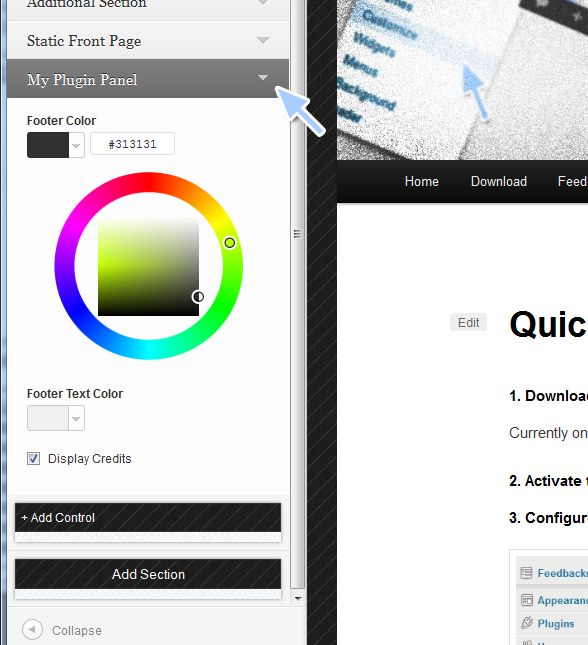
Panel created with Customizer

Customizer allows adding panels in front-end editor
Changelog
0.7
- Added: Drag and drop Sections – easily reorder sections
- Added: Section’s and Control’s ID’s are being autofilled basing on the Title/Label
- Added: Customizer-generated Sections are highlighted to indicate which Sections can be reorganized
- Removed: User no longer has to specify the Section’s priority (replaced with drag and drop functionality)
- Minor UI improvements
- Crucial compatibility improvements. Tested with WP 3.8.1
0.6
- Added autocomplete function to “Add Control” section (requires serialized options)
0.5
- First publicly released version of the plugin. Fully functional but might contain occasional bugs.