

Customizer Everywhere
Promote and enhance the use of customizer in more places; open post previews in the customizer and promote customize link to top of admin bar.
Plugin info
Maintenance & Compatibility
Maintenance score
Possibly abandoned • Last updated 4054 days ago
Is Customizer Everywhere abandoned?
Possibly abandoned (last update 4054 days ago).
Compatibility
Similar & Alternatives
Explore plugins with similar tags, and compare key metrics like downloads, ratings, updates, support, and WP/PHP compatibility.
Description
The “Preview” button when editing a post is replaced with a “Preview & Customize” button,
which opens the customizer with the current post’s preview loaded into the customizer preview window.
A separate window is opened for each edited post being previewed, as opposed to all previews going into the same window named wp-preview.
When a customizer preview is opened for previewing a post, clicking the Back (Close or Cancel) button in the
customizer controls, the opened window will close and the opener window will be focused on. This will rapidly take
you back to the page from which you opened the preview, assuming it is still open.
It is not helpful to see in browser tabs “Customize Twenty Twelve — WordPress”. This title assumes the primary
purpose of the customizer is to preview themes, when in reality it seems the primary purpose is to customize your
already-selected theme. In this latter case, it makes much more sense for the title to reflect the page currently
being previewed. So when in the customizer, the parent document title will reflect the title of the page currently
being previewed. As you navigate around the site within the preview iframe, the page’s title will update. This allows
you to see which page is being customized just by looking at the label on your browser’s tab.
In the Admin Bar, the “Customize” link is promoted from a submenu to a top-level position right after the Edit post
link.
This prominent placement of the “Customize” link in the admin bar, along with the customizer being opened when
previewing a post/page, are designed to encourage the use of the customizer in many more places than just the site’s
front page. The Widget Customizer plugin conditionally shows
control sections in the customizer based on whether or not that sidebar is currently rendered in the customizer
preview. Therefore, for some customizer controls to be accessed, the user must navigate—either within the customizer
or outside—to a page that has the element which a control customizes.
Development of this plugin is done on GitHub. Pull requests welcome. Please see issues reported there before going to the plugin forum.
Installation
Frequently Asked Questions
Review feed
Screenshots
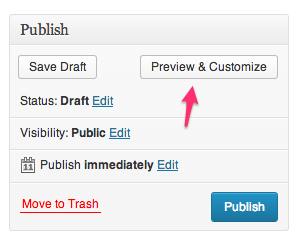
The “Preview” button is replaced with a “Preview & Customize” button

The “Customize” link in the Admin Bar is promoted to the top.

Close button in customizer actually closes window, returning focus to opening window. Browser tab includes title from page currently being previewed.
Changelog
0.1.2
Improve logic for filtering preview_post_link
0.1.1
Add Travis CI integration and pre-commit with various tests
0.1
First Release