

Customizer Export/Import
Easily export or import your WordPress customizer settings!
Plugin info
Maintenance & Compatibility
Maintenance score
Maintained • Last updated 175 days ago • 114 reviews
Is Customizer Export/Import abandoned?
Likely maintained (last update 175 days ago).
Compatibility
Languages
Similar & Alternatives
Explore plugins with similar tags, and compare key metrics like downloads, ratings, updates, support, and WP/PHP compatibility.
Description
Customizer Export/Import
The Customizer Export/Import plugin allows you to export or import your WordPress customizer settings from directly within the customizer interface! If your theme makes use of the WordPress customizer for its settings, this plugin is for you!
Please visit our blog for more info on the Customizer Export/Import plugin.
New! Export Options
The Customizer Export/Import plugin previously only exported options saved as theme mods using the get_theme_mods function, but that is no more! The Customizer Export/Import plugin now exports settings saved as options as well!
How It Works
Exporting customizer settings is easy. Click the export button from within the customizer and a file will automatically begin downloading with your settings. Export files are named after your theme and can only be used to import settings for the theme or child theme that they came from. Export files contain a serialized dump of mods retrieved using the get_theme_mods function or customizer settings saved as options.
Importing customizer settings is just as easy. Choose the export file you would like to import, select whether you would like to download and import images (similar to importing posts), and finally, click the import button. Once your settings have been imported the page will refresh and your new design will be displayed.
Exporting Custom Options
Developers can also have arbitrary options that aren’t part of the customizer exported by using the cei_export_option_keys filter. Those options can be exported and imported by adding your option key to the array of options that will be exported as shown below.
function my_export_option_keys( $keys ) {
    $keys[] = 'my_option_key';
    $keys[] = 'another_option_key';
    return $keys;
}

add_filter( 'cei_export_option_keys', 'my_export_option_keys' );
Known Issues
This plugin currently only works for active themes, not themes that are being previewed with either the Theme Test Drive plugin or the new customizer theme preview.
Contribute!
We’d love to hear your feedback as to how we could improve the Customizer Export/Import plugin, or better yet, see theme developers actively contribute! Don’t hesitate to let us know if you’re interested in contributing as we would gladly have others on board.
The Customizer Export/Import plugin is brought to you by the fine folks at Beaver Builder.
Installation
-
Install the Customizer Export/Import plugin either via the WordPress plugin directory, or by uploading the files to your server at wp-content/plugins.
-
After activating, the export/import functionality will be available as a separate section within the WordPress customizer.
Frequently Asked Questions
Please visit our blog for more info on the Customizer Export/Import plugin.
Review feed
Works wonderfully
Works great!
Worked perfectly
Always works great!
Screenshots
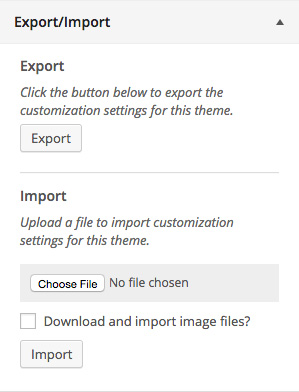
The export/import customizer section.
Changelog
Version 0.1
- Initial release.
Version 0.2
- Added cei_export_option_keys filter for exporting custom options.
Version 0.3
- Customizer settings saved as options are now exported and imported.
Version 0.5
- Fixed an issue with uploads in WordPress 4.7.1.
Version 0.6
- Trying another fix for the issue with uploads in WordPress 4.7.1.
Version 0.7
- Added support for exporting and importing custom CSS.
Version 0.8
- Added support for option data that has an empty value.
Version 0.9
- Allow options with
widgetorsidebarin their key to be exported.
Version 0.9.1
- Fixed issue with slashes in plugin asset urls and S3. Props Huskynarr.
Version 0.9.4
- Added callout for Assistant
Version 0.9.5
- Fixed minor security issue
Version 0.9.6
- Restrict uploads to users that can install plugins for better security.
Version 0.9.7.1
- Fixed minor security issue
Version 0.9.7.2
- Fixed mime type error
Version 0.9.7.3
- Fixed mime type error again
- Fixed non SSL links in plugin headers
Version 0.9.8
- Trim unwanted whitespace from imported file.