

Customizing – Post Types, Taxonomies & Fields
Custom post types, taxonomies and fields for WordPress.
Plugin info
Maintenance & Compatibility
Maintenance score
Possibly abandoned • Last updated 1920 days ago
Is Customizing – Post Types, Taxonomies & Fields abandoned?
Possibly abandoned (last update 1920 days ago).
Compatibility
Similar & Alternatives
Explore plugins with similar tags, and compare key metrics like downloads, ratings, updates, support, and WP/PHP compatibility.
Description
Customizing provides a nice interface for you to create custom post types, taxonomies and fields (meta boxes).
You’ll find the Customizing tools in the ‘Customizing’ menu.
In the ‘Custom Box’ screen, you may show and hide groups of fields, and order them the way you like.
All the settings are based on the WordPress API settings, therefore, the oficial guides apply to them.
Known Problems
- Custom boxes and user boxes won’t work if you have taxonomy terms with quotes.
Installation
- Upload the plugin files to the
/wp-content/plugins/customizingdirectory, or install the plugin through the WordPress plugins screen directly. - Activate the plugin through the ‘Plugins’ screen in WordPress
- Go to ‘Customizing -> Customizing Settings’ and check the tools you want to use.
Frequently Asked Questions
Review feed
Screenshots

'Add New Custom Type' screen, where you can create custom post types.
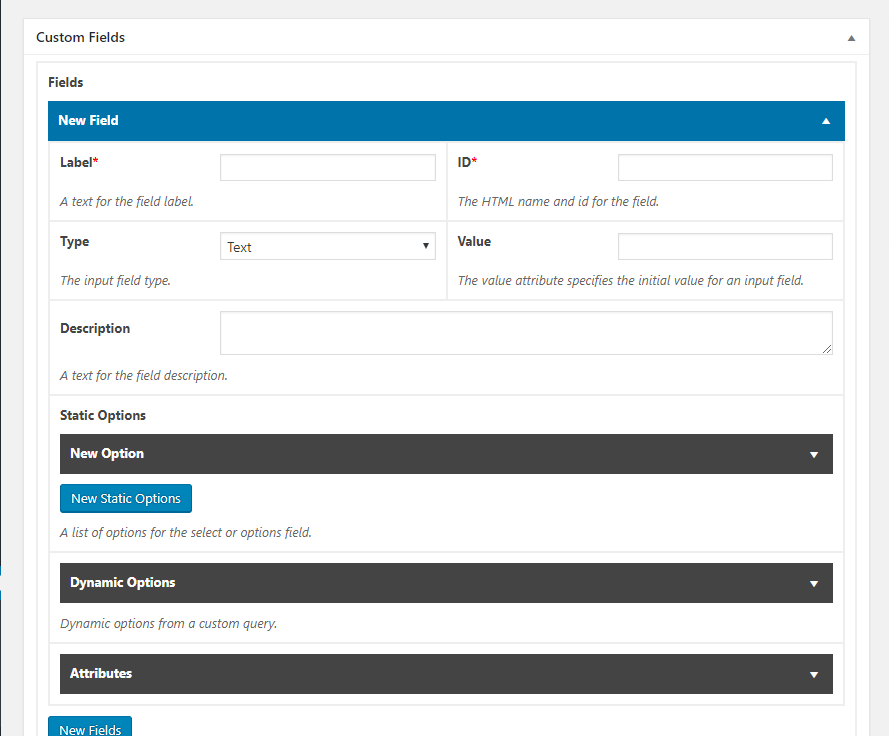
Fields section of the 'New Custom Box' screen, where you define the fields to be added to the custom meta box.
Changelog
1.1.0
- Added repeatable fields.
1.2.0
- Added custom user fields.
1.3.0
- Added the WYSIWYG field type.
2.0.0
- Redesigned the whole code to improve performance.
2.0.1
- Added some constants to be used in other plugins.