

Maintenance 22/1002428d since update
Active installs
10
Downloads
1,359
Reviews
1
Age
6.7y
Plugin info
Total downloads: 1,359
Active installs: 10
Total reviews: 1
Average rating: 5
Support threads opened: 0
Support threads resolved: 0 (0%)
Available in: 1 language(s)
Contributors: 1
Last updated: 6/25/2019 (2428 days ago)
Added to WordPress: 6/25/2019 (6 years old)
Minimum WordPress version: 4.0.1
Tested up to WordPress version: 5.2.21
Minimum PHP version: 5.2.4
Maintenance & Compatibility
Maintenance score
Possibly abandoned • Last updated 2428 days ago • 1 reviews
22/100
Is Slide Nav abandoned?
Possibly abandoned (last update 2428 days ago).
Compatibility
Requires WordPress: 4.0.1
Tested up to: 5.2.21
Requires PHP: 5.2.4
Similar & Alternatives
Explore plugins with similar tags, and compare key metrics like downloads, ratings, updates, support, and WP/PHP compatibility.
No similar plugins found yet.
Description
SlideNav is an Responsive Mobile Menu for WordPress. Inspired from native app off-canvas slide-out menus in mobile apps.
SlideNav is the best WordPress Responsive Mobile menu. Give your mobile user an app like experience from your wordpress site.
Easily customizable interface to match you existing site.
Features
- Native off-canvas menu
- Touch-enabled
- Set which side and where you want the button to show
- Naked Header
- Header Text or Logo Branding
- Hide specific elements when the SlideNav Menu is visible(theme menus, or any html element)
- Slide Direction (Left or Right)
- Search Option in Header
- Customizable Top Section
- Top Section Custom Content
- Search Option in Menu Top Section
- Customizable Theme Color
Installation
- Upload
cv-menuto the/wp-content/plugins/directory - Activate the plugin through the
Pluginsmenu in WordPress - Set your options from the Responsive Menu admin area
or
Download and install the .zip file in the WordPress plugin page of your website
Frequently Asked Questions
No FAQ available
Review feed
Alex Benedict Rozario
Superb
This is a very nice plugin to set up my menu for mobile devices.
Screenshots
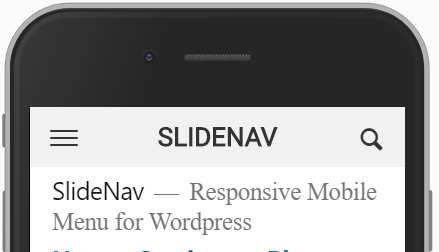
screenshot-1.png

screenshot-2.png
Changelog
No changelog available