

Dan's Embedder for Google Calendar
Dan's Embedder for Google Calendar was created out of a need to display Google calendars in both list and full view in a way that was mobile frie …
Plugin info
Maintenance & Compatibility
Maintenance score
Possibly abandoned • Last updated 905 days ago • 9 reviews
Is Dan's Embedder for Google Calendar abandoned?
Possibly abandoned (last update 905 days ago).
Compatibility
Similar & Alternatives
Explore plugins with similar tags, and compare key metrics like downloads, ratings, updates, support, and WP/PHP compatibility.
Description
Dan’s Embedder for Google Calendar was created out of a need to display Google calendars in both list and full view in a way that was mobile friendly, customizable via shortcode, and easy to style. No need to import events or manage them directly in WordPress. All you need is a public Google Calendar (or multiple!) and a free, easy to get API key.
Features:
-
Displays public calendars in a mobile friendly format
-
Offers Options for Full Calendar View, or Upcoming Events List
-
All options are configured via shortcode
-
Full Calendar offers mobile friendly tooltips with event title, time, and location
-
Upcoming Events List can specify how many items to show, or turn on auto-scroll
-
Custom div id can be set for every calendar, for individual theming of each calendar
-
No limit to the number of calendars you can link up
Shortcodes Cheatsheet:
-
Full Display
[dancal](defaults to 1st calendar) , or[dancal cal=1 divid=idname](where 1 is the number of calendar you want, and divid is the id of the outermost div, for theming purposes. If you don’t set divid, a random one is chosen to allow multiple calendars on the same page). -
Upcoming Events List:
[dancal_list], or[dancal_list cal=1 num=30 scroll=true divid=idname](1 is the calendar number, num is a number 0 for number of upcoming events to display, scroll is true or false to enable auto-scroll, , and divid is the id of the outermost div, for theming purposes. If you don’t set divid, a random one is chosen to allow multiple calendars on the same page))
For help creating an API key to use with this plugin, either check out the settings page in plugin, or the FAQ tab here.
Thanks to Mike @ WP Bullet for the banner and icon.
Dependencies and Liscencing
MIT: gcal-flow https://sugi.github.io/jquery-gcal-flow/
MIT: fullcalendar.io https://fullcalendar.io
MIT: qTip2 http://qtip2.com/
Installation
- Upload the plugin files to the
/wp-content/plugins/dans-gcaldirectory, or install the plugin through the WordPress plugins screen directly. - Activate the plugin through the ‘Plugins’ screen in WordPress
- Head over to the Dan’s GCal settings page, found on the Dashboard sidebar.
Frequently Asked Questions
To create API key, visit Google Developers Console. https://console.developers.google.com/
Then, follow bellow;
-
Create new project (or use project you created before).
-
Check “APIs & auth” -> “Credentials” on side menu.
-
Hit “Create new Key” button on “Public API access” section.
-
Choose “Browser key” and keep blank on referer limitation.
-
Set this key on the plugins setting page.
Once you have set the calendar as public, you can find the id with the following:
-
Visit https://calendar.google.com/, while logged in to your account.
-
On the left side, find the calendar you want and click the down arrow to the right of it.
-
Click on Calendar settings
-
Find the calendar link / id
Review feed
Screenshots

List view calendar created with Dan's Embedder for Google Calendar
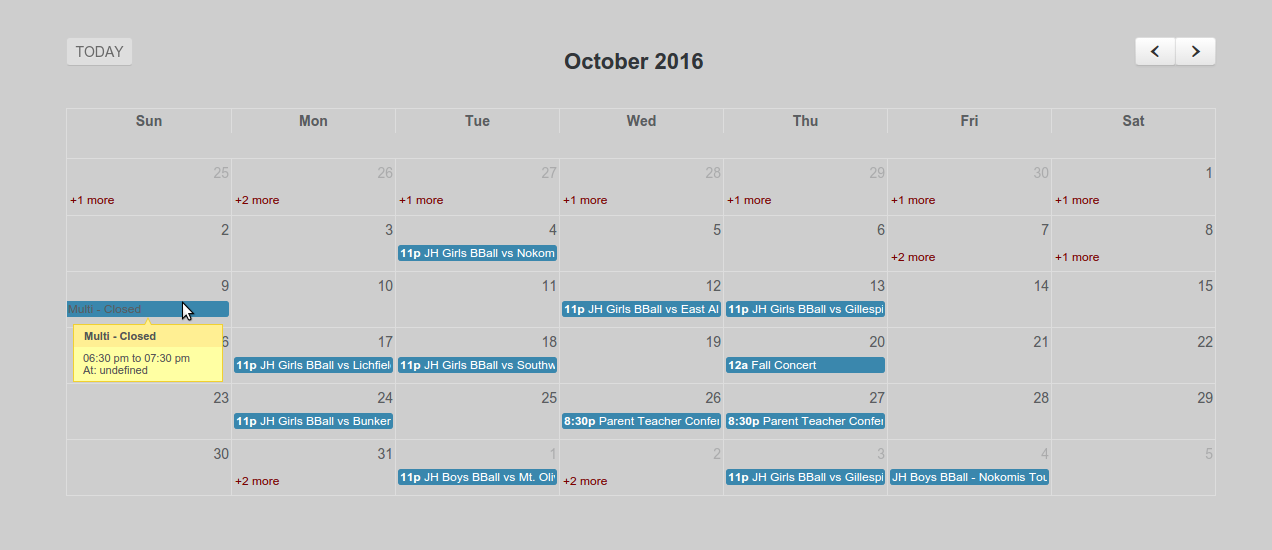
Full Size Calendar Created

Settings Page
Changelog
1.3
- Test with latest version of WP
- Security fix (thank you PatchStack!)
1.2
- Tested with latest version of WP, small fixes
1.1
- Added jquery as dependency for enqueue (fixes jquery not found)
- Moved settings dash link to tools submenu
- Tested for 4.7
1.0
- Initial Plugin Release