

Dashboard: Available Disk Space
Show remaining server disk space directly inside the “At a Glance” dashboard widget so you immediately see when storage is getting low.
Plugin info
Maintenance & Compatibility
Maintenance score
Maintained • Last updated 122 days ago • 1 reviews
Is Dashboard: Available Disk Space abandoned?
Likely maintained (last update 122 days ago).
Compatibility
Similar & Alternatives
Explore plugins with similar tags, and compare key metrics like downloads, ratings, updates, support, and WP/PHP compatibility.
Description
Dashboard: Available Disk Space extends the built-in At a Glance widget on your WordPress Dashboard with a compact “Available Storage Space” row.
When you open Dashboard Home, you’ll immediately see:
- How much disk space is used and free
- A clear progress bar that fills up as your server disk gets full
- A quick visual indication when you’re running low on storage
This is useful if:
- You’re on shared hosting and want to avoid “out of disk space” surprises
- You manage multiple client sites and need a quick disk space check right after login
- You want a lightweight alternative to full server monitoring or security suites
The plugin is intentionally small and dependency-free:
- No extra admin menus
- No tracking or data collection
- Just one clean line in At a Glance with a visual bar and readable numbers
Installation
- Upload the
dashboard-available-disk-spacefolder to the/wp-content/plugins/directory, or install the plugin via Plugins Add New and search for “Dashboard: Available Disk Space”. - Activate the plugin through the Plugins menu in WordPress.
- Go to Dashboard Home. In the At a Glance widget you’ll see a new “Available Storage Space” row with disk usage and a progress bar.
Frequently Asked Questions
The plugin uses PHP’s built-in disk_total_space() and disk_free_space() functions on the WordPress root path. This shows disk usage for the partition that hosts your WordPress installation.
It should work on most Linux-based shared hosting and VPS servers that allow PHP to read disk information. If disk_free_space() is disabled on your server, the widget will show a warning instead of breaking your dashboard.
No. The widget performs a single disk check when the Dashboard loads. There are no scheduled tasks or background processes.
Yes. Network-activate the plugin and the disk space widget will be available on the Network Admin Dashboard.
Not at the moment. The plugin is designed to keep things simple by integrating directly into the existing At a Glance widget instead of adding new Dashboard widgets.
Review feed
Screenshots
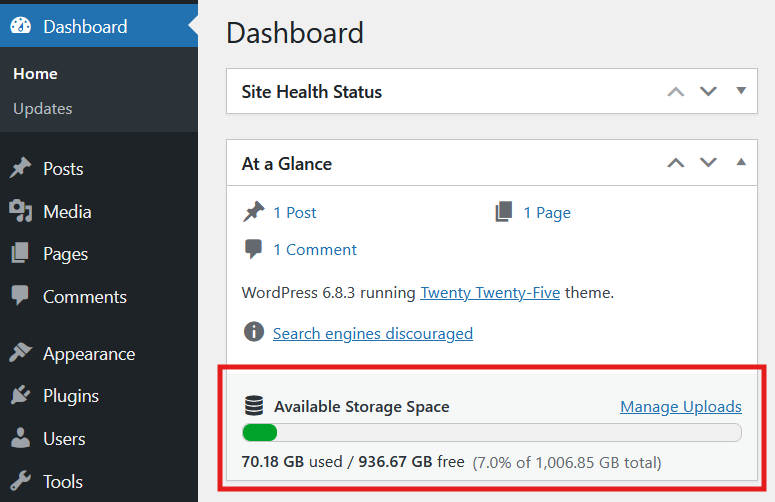
The At a Glance widget with the new “Available Storage Space” row showing a progress bar and human-readable disk usage (used, free, and total).
Changelog
1.0
- Initial release
1.0.1
- open_basedir restriction error bug fixed
1.0.2
- Some visual improvements
- Added multilanguaginal support
- Added comments to methods
1.0.3
- WordPress 3.0 compatibility fixes
1.0.4
- Bugfixes
1.1.0
- Updated Dashboard integration to show disk information inside the core At a Glance widget.
- Added capability check for
upload_filesto control who sees the storage information. - Added safer escaping, i18n-friendly formatting, and an inline-styled progress bar consistent with current WordPress admin colors.
- Introduced lightweight admin CSS for the “Available Storage Space” row and cleaner markup with translatable labels.
1.1.1
- Moved dashboard widget styles into a dedicated
style.cssfile and enqueue it on the Dashboard for easier maintenance. - Improved PHPCS compatibility across the plugin files.
- Added open_basedir-safe checks before reading disk stats.