

Dashboard Notes
Easily create notes/instructions in the WordPress admin using any widget you like!
Plugin info
Maintenance & Compatibility
Maintenance score
Maintained • Last updated 177 days ago • 19 reviews
Is Dashboard Notes abandoned?
Likely maintained (last update 177 days ago).
Compatibility
Languages
Similar & Alternatives
Explore plugins with similar tags, and compare key metrics like downloads, ratings, updates, support, and WP/PHP compatibility.
Description
The plugin Classic Widgets is needed (this plugin doesn’t work with Gutenberg).
Compatible with PHP 8.2
Do you find this plugin helpful? Please consider leaving a 5-star review.
Dashboard Notes lets you create super simple notes and instructions for your clients within the WordPress dashboard. Choose the color of the notification, whether or not to include a logo, and exactly what pages to include the notification on (uses simple URL matching).
Usage
- Install the Dashboard Notes.
- Go to Appearance > Widgets where you will see a new “Dashboard Notes” sidebar.
- To create a note, simply drag a new widget into the sidebar and give it some content (we typically use a text/HTML widget).
- Once you’ve added content to the widget, click save, and the Dashboard Notes settings for this widget will appear.
- Adjust the settings to meet your needs, and click save when you’re done.
- Refresh, or navigate to any page to see your new note in action.
- Use the plugin settings found via Settings > Dashboard Notes to choose which user roles can/can’t see the notices.
Credits
Special thanks to Kaspars Dambis for his work on Widget Context – much of this project is based on that code.
Installation
- Install the Dashboard Notes.
- Go to Appearance > Widgets where you will see a new “Dashboard Notes” sidebar.
- To create a note, simply drag a new widget into the sidebar and give it some content (we typically use a text/HTML widget).
- Once you’ve added content to the widget, click save, and the Dashboard Notes settings for this widget will appear.
- Adjust the settings to meet your needs, and click save again.
- Navigate to any page to see your new note in action.
Frequently Asked Questions
You can report security bugs through the Patchstack Vulnerability Disclosure Program. The Patchstack team help validate, triage and handle any security vulnerabilities. Report a security vulnerability.
Review feed
Screenshots
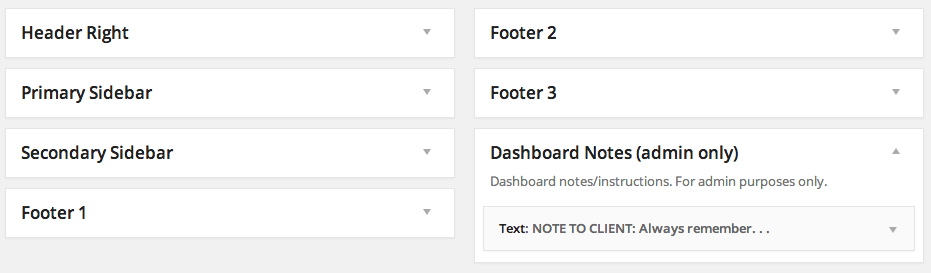
Dashboard Notes adds a new widget area which can be used to add new notes.
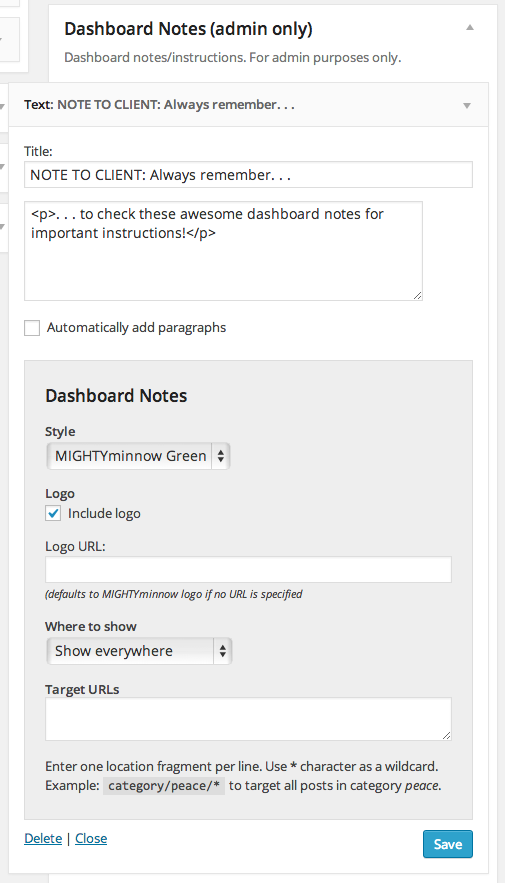
Each widget in the Dashboard Notes widget area has a number of settings you can use to customize how and where the note appears (note: you must initially save the widget once for these settings to appear).
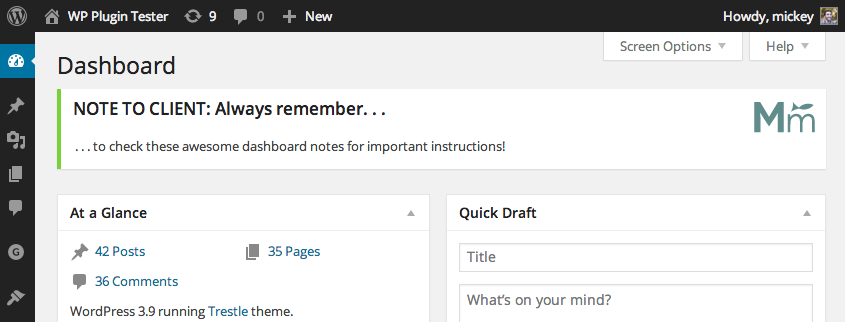
The final product! Add as many notes as you like.
Changelog
1.0.3
- Add plugin setting to choose which roles can and can’t see the dashboard notes.
- Added .pot file for translation.
1.0.2
- Added isset() to ‘include-logo’ option conditional to fix warning message
1.0.1
- Removed extraneous header info causing install error
1.0.0
- First release!