

David’s Ultra Quicktags
Adds new buttons to the Editor window (Amazon Links, Amazon Search, etc.).
Plugin info
Maintenance & Compatibility
Maintenance score
Possibly abandoned • Last updated 6133 days ago
Is David’s Ultra Quicktags abandoned?
Possibly abandoned (last update 6133 days ago).
Compatibility
Similar & Alternatives
Explore plugins with similar tags, and compare key metrics like downloads, ratings, updates, support, and WP/PHP compatibility.
Description
This plugin adds up to four new buttons / links to the WordPress Editor panel. You can select to add a quicktag to easily insert:
Amazon item links
Amazon product searches
custom span class
custom div class
The settings pane allows you to enter defaults, as well as your own Amazon associate ID.
Installation
- Upload davids-utra-quicktags folder to the
/wp-content/plugins/directory - Activate the plugin through the ‘Plugins’ menu in WordPress
Frequently Asked Questions
I can’t get the TinyMCE (Rich Text) buttons to display!
Make sure that you have uploaded the entire contents of the davids-ultra-quicktags folder. If it still doesn’t work, drop me a line.
Review feed
Screenshots

The first image screenshot-1.png shows the plain text / HTML editor version of the editing screen.
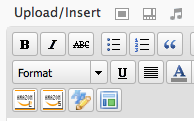
The second image screenshot-2.png shows the rich text / TinyMCE editor version of the editing screen.