

Debug Bar Cron
Debug Bar Cron adds a new panel to Debug Bar that displays information about WP scheduled events.
Maintenance 22/1004477d since update
Active installs
500
Downloads
136,104
Reviews
3
Age
14.0y
Plugin info
Total downloads: 136,104
Active installs: 500
Total reviews: 3
Average rating: 5
Support threads opened: 0
Support threads resolved: 0 (0%)
Available in: 1 language(s)
Contributors: 6
Last updated: 12/28/2013 (4477 days ago)
Added to WordPress: 3/29/2012 (14 years old)
Minimum WordPress version: 3.3
Tested up to WordPress version: f
Minimum PHP version: f
Maintenance & Compatibility
Maintenance score
Possibly abandoned • Last updated 4477 days ago • 3 reviews
22/100
Is Debug Bar Cron abandoned?
Possibly abandoned (last update 4477 days ago).
Compatibility
Requires WordPress: 3.3
Tested up to: f
Requires PHP: f
Languages
Similar & Alternatives
Explore plugins with similar tags, and compare key metrics like downloads, ratings, updates, support, and WP/PHP compatibility.
Query Monitor – The developer tools panel for WordPress
Rating 4.9/5 (461 reviews) • Active installs 200,000
Debug Bar Rewrite Rules
Rating 5.0/5 (5 reviews) • Active installs 900
ElasticPress Debugging Add-On
Rating 5.0/5 (2 reviews) • Active installs 900
Debug-Bar-Extender
Rating 4.6/5 (5 reviews) • Active installs 700
Debug Bar Actions and Filters Addon
Rating 4.5/5 (8 reviews) • Active installs 500
Description
Debug Bar Cron adds information about WP scheduled events to a new panel in the Debug Bar. This plugin is an extension for
Debug Bar and thus is dependent upon Debug Bar being installed for it to work properly.
Once installed, you will have access to the following information:
- Number of scheduled events
- If cron is currently running
- Time of next event
- Current time
- List of custom scheduled events
- List of core scheduled events
- List of schedules
Installation
- Install Debug Bar if not already installed (https://wordpress.org/extend/plugins/debug-bar/)
- Upload the
debug-bar-cronfolder to the/wp-content/plugins/directory - Activate the plugin through the ‘Plugins’ menu in WordPress
- View the WP schedule events information in the “Cron” panel in Debug Bar
Frequently Asked Questions
Is debugging cron easier with this plugin?
Yes
Review feed
Steven Gliebe
Great for checking if scheduled events running
This has been great for checking if WordPress's scheduled events are firing. Good for checking if you need to setup a real cron job or if that real cron job is failing. Very clear presentation.
Screenshots
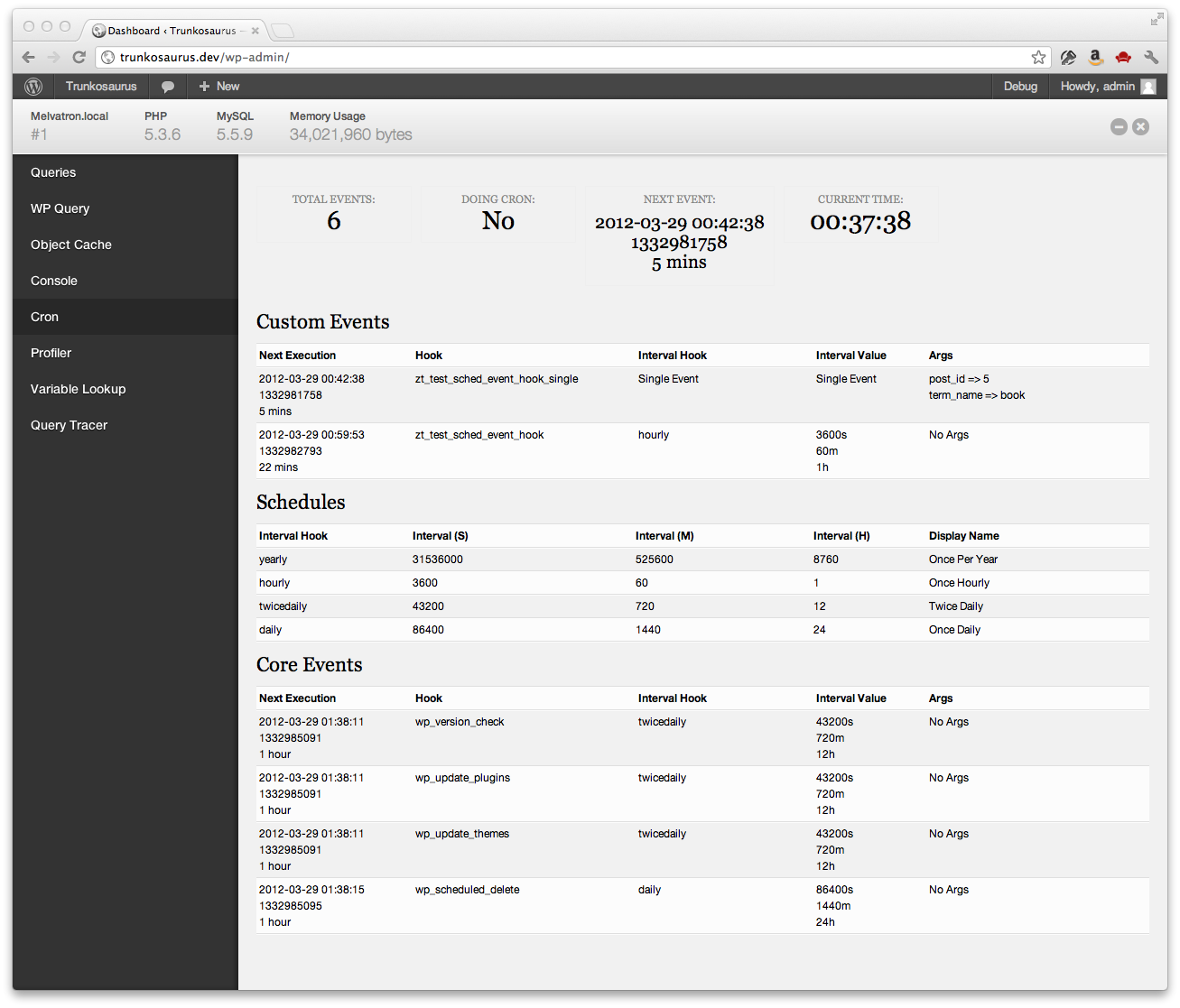
The Debug Bar Cron panel
Changelog
0.1.3
- Fixed ‘Array to string conversion’ error when Cron job arguments are in a multi-dimensional array – props Jrf, ethitter, and mintindeed.
- Fixed a number of HTML validation errors – props Jrf.
0.1.2
- Added indicators for missed events
0.1.1
- Readme updates
0.1
- Initial release