

Debugger & Troubleshooter
A WordPress plugin for debugging & troubleshooting. Safely simulate plugin deactivation, theme switching, and WP_DEBUG.
Plugin info
Maintenance & Compatibility
Maintenance score
Maintained • Last updated 131 days ago • 1 reviews
Is Debugger & Troubleshooter abandoned?
Likely maintained (last update 131 days ago).
Compatibility
Similar & Alternatives
Explore plugins with similar tags, and compare key metrics like downloads, ratings, updates, support, and WP/PHP compatibility.
Description
The “Debugger & Troubleshooter” plugin provides essential tools for WordPress site administrators to diagnose and resolve issues efficiently. It offers a dedicated section in the WordPress dashboard that displays comprehensive site health information and powerful debugging toggles.
Key Features:
- Troubleshooting Mode: Activate a unique, session-based “Troubleshooting Mode” for your current browser session. This means any changes you make are temporary and only visible to you. This mode allows you to:
- Simulate Plugin Deactivation: Selectively “deactivate” plugins. The plugin’s assets and code will be disabled for your session only.
- Simulate Theme Switching: Preview any installed theme, while the public-facing site continues to use the active theme.
- User Role Simulator: View your site as any other user or role (e.g., Subscriber, Editor) to test permissions and content visibility. This is session-based and includes a safe “Exit” button in the Admin Bar.
- Live Debugging: Safely enable
WP_DEBUGwith a single click from the admin dashboard. Errors are logged todebug.logwithout being displayed on the site, and you can view the log file directly in the plugin’s interface. - Comprehensive Site Information: Get a quick, organized overview of your WordPress environment in collapsible cards. This includes detailed PHP, Database, and Server information, a full list of all themes and plugins with their status, and important WordPress constants.
- Copy to Clipboard: A one-click button allows you to copy all the site information, making it incredibly easy to share with support forums or developers.
- Safe Debugging & Cache Bypassing: All troubleshooting actions are session-based. The plugin automatically attempts to bypass caching when Troubleshooting Mode is active, ensuring your changes are reflected instantly.
- User-Friendly Interface: An intuitive dashboard interface makes it easy to access all features.
- Admin Notices: Clear notices alert you when Troubleshooting Mode is active.
This plugin is an invaluable tool for developers, site administrators, and anyone who needs to debug WordPress issues without risking site downtime or affecting user experience.
Usage
Once the plugin is installed and activated, navigate to Tools > Debugger & Troubleshooter in your WordPress dashboard.
1. Site Information
The top section provides a comprehensive overview of your WordPress environment, organized into collapsible cards that are closed by default. Click on any card title to expand it and view the details.
2. Troubleshooting Mode
This session-based feature allows you to simulate theme switches and plugin deactivations without affecting your live website for other visitors.
3. User Role Simulator
Safely view your site as another user or role (e.g., “Subscriber” or “Editor”) without knowing their password. This is perfect for testing capabilities and content restrictions.
4. Live Debugging
This section allows you to safely manage WordPress’s debugging features.
- Enable Live Debug: Click this button to programmatically enable
WP_DEBUGandWP_DEBUG_LOG, while keepingWP_DEBUG_DISPLAYoff. This logs errors towp-content/debug.logwithout showing them to visitors. - Debug Log Viewer: A text area displays the contents of your
debug.logfile, allowing you to see errors as they are generated. - Clear Log: Safely clear the
debug.logfile with a click.
Installation
- Download the plugin ZIP file.
- Upload the plugin to your WordPress site:
- Navigate to Plugins > Add New in your WordPress dashboard.
- Click the “Upload Plugin” button.
- Choose the downloaded ZIP file and click “Install Now”.
- Activate the plugin through the ‘Plugins’ menu in WordPress.
- Once activated, go to Tools > Debugger & Troubleshooter to access the plugin’s features.
Manual Installation (if needed):
- Extract the
debug-troubleshooter.zipfile. - Upload the
debug-troubleshooterfolder to the/wp-content/plugins/directory via FTP or your hosting’s file manager. - Activate the plugin through the ‘Plugins’ menu in WordPress.
Frequently Asked Questions
A: Troubleshooting Mode uses a browser cookie specific to your session. When enabled, the plugin filters WordPress functions that determine active plugins and themes, redirecting them to your simulated settings. This happens only for your browser.
A: Yes. When Troubleshooting Mode is active, the plugin defines the DONOTCACHEPAGE constant, which instructs most caching plugins and hosting environments to bypass the cache for your session.
A: The plugin uses the plugins_loaded hook to define the WP_DEBUG constants programmatically. This happens very early in the WordPress loading sequence, effectively enabling debug mode for all requests while the feature is turned on.
Review feed
Innovative plugin
Screenshots

The main Debugger & Troubleshooter dashboard showing all feature sections.

An expanded view of the Site Information card, showing detailed lists of themes and plugins.

An example of the admin notice when Troubleshooting Mode is active.

The Live Debugging section with the log viewer.
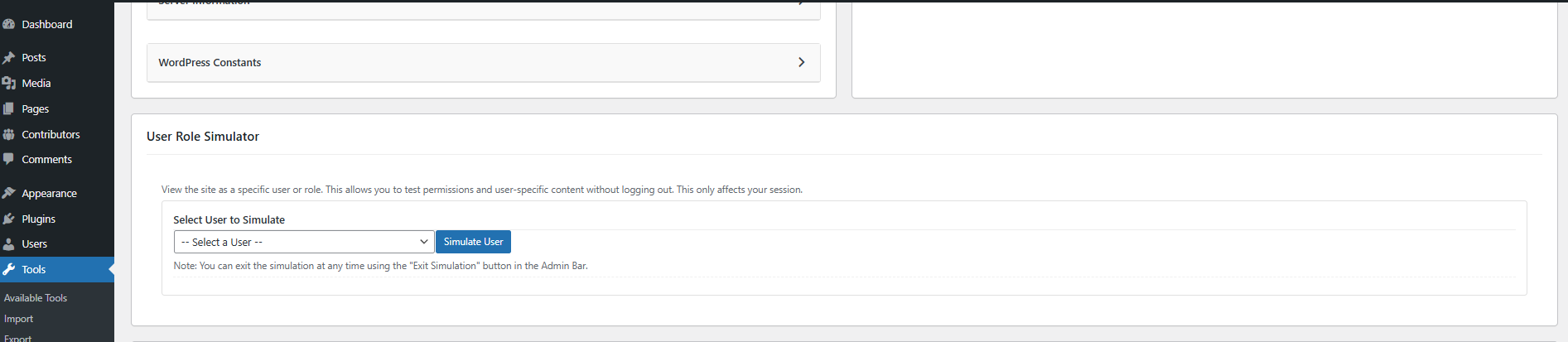
The User Role Simulator feature to switch to other user.
Changelog
1.3.1 – 2025-11-21
- Fix: Resolved a critical issue where admin scripts were not loading due to a hook name mismatch.
- Fix: Addressed WordPress coding standard issues (deprecated functions, security hardening).
1.3.0 – 2025-11-21
- Feature: Added “User Role Simulator” to view the site as any user or role for the current session.
- Enhancement: Added an Admin Bar “Exit Simulation” button for safe return to the administrator account.
- Fix: Improved layout stability for the troubleshooting dashboard.
1.2.1 – 2025-07-11
- Fix: Addressed all security and code standard issues reported by the Plugin Check plugin, including escaping all output and using the
WP_FilesystemAPI for file operations. - Fix: Replaced the native browser
confirm()dialog with a custom modal for a better user experience and to prevent potential browser compatibility issues.
1.2.0 – 2025-07-11
- Feature: Added “Live Debugging” section to safely enable/disable
WP_DEBUGandWP_DEBUG_LOGfrom the UI without editingwp-config.php. - Feature: Added a
debug.logfile viewer and a “Clear Log” button to the Live Debugging section.
1.1.1 – 2025-07-10
- Fix: Implemented cache-bypassing measures for Troubleshooting Mode. The plugin now defines the
DONOTCACHEPAGEconstant and sends no-cache headers to ensure compatibility with most caching plugins and server-side caches.
1.1.0 – 2025-07-09
- Feature: Site Information cards (WordPress, PHP, Database, Server, Constants) are now collapsible and closed by default for a cleaner interface.
- Feature: Added a “Copy to Clipboard” button to easily copy all site information for support requests or documentation.
- Enhancement: The “WordPress Information” card now displays a detailed list of all installed themes and plugins, along with their respective active, inactive, or network-active status.
- Enhancement: The theme and plugin lists within the “WordPress Information” card are now compact, showing counts by default with a “Show All” toggle to view the complete list.
- Enhancement: Expanded the displayed information for PHP, Server, and WordPress constants.
- Fix: Resolved a bug that prevented the collapsible sections from functioning correctly.
1.0.0 – 2025-06-25
- Initial release.