

Default Content
Inserts customizable default HTML content into the WordPress editor when creating a new post or page.
Plugin info
Maintenance & Compatibility
Maintenance score
Stale • Last updated 285 days ago
Is Default Content abandoned?
Likely maintained (last update 285 days ago).
Compatibility
Similar & Alternatives
Explore plugins with similar tags, and compare key metrics like downloads, ratings, updates, support, and WP/PHP compatibility.
Description
Default Content is a simple yet powerful WordPress plugin that automatically inserts predefined HTML content into the editor when you create a new post or page. You can enable or disable default content insertion separately for posts and pages, and customize the content using the built-in WordPress editor.
Features:
- Automatically insert default content for new posts or pages.
- Enable or disable default content separately for posts and pages.
- Customize content using the WordPress TinyMCE (WYSIWYG) editor.
- Saves time when publishing similar content repeatedly.
- Clean and lightweight code.
Credits
Developed by DIZE TECH IT SOLUTIONS
License
This plugin is licensed under the GPLv2 or later.
Installation
- Upload the plugin folder to the
/wp-content/plugins/directory or install it via the WordPress admin dashboard. - Activate the plugin through the ‘Plugins’ menu in WordPress.
- Go to
Settings > Default Contentto configure the plugin options.
Frequently Asked Questions
No, the plugin only affects new posts or pages that are created. It does not modify existing content.
Yes, you can selectively enable or disable the feature for posts and pages via the plugin settings page.
You can use any HTML tags supported by the WordPress visual editor.
Review feed
Screenshots
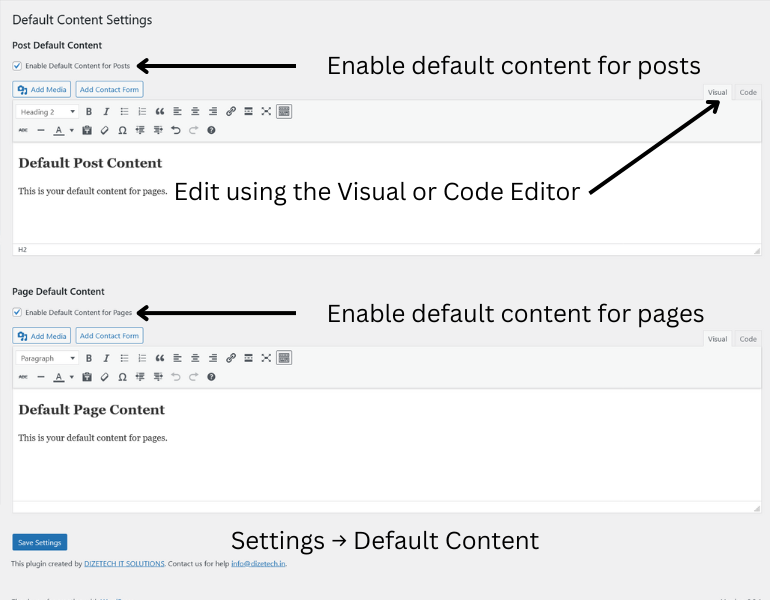
Settings page with options for posts and pages.

Example of default content in the post editor.
Changelog
1.1
- Added nonce verification and input validation for improved security.
- Updated code for WordPress.org plugin guidelines compatibility.
1.0
- Initial release.