

Delivery Countdown Timer
Show the nextday delivery timer with text based on cut off time.
Plugin info
Maintenance & Compatibility
Maintenance score
Possibly abandoned • Last updated 3590 days ago • 4 reviews
Is Delivery Countdown Timer abandoned?
Possibly abandoned (last update 3590 days ago).
Compatibility
Similar & Alternatives
Explore plugins with similar tags, and compare key metrics like downloads, ratings, updates, support, and WP/PHP compatibility.
Description
Display the delivery timer based on days and cut off time for woocommerce products like next day delivery and scheduled delivery to know the customer how much time is left for one day delivery.
Admin end we can modify the display text and need to show the timer before Add to Cart Button in single product page or not and may set each day individually, show or hide the weekends.
Use Timer as shortcode like on sidebar, below menu bar whereever you want
Timer location works based on wordpress default Timezone.
Installation
- Upload
delivery-countdown-timerfolder to the/wp-content/plugins/directory - Activate the plugin through the ‘Plugins’ menu in WordPress
- Go to Settings -> Countdown Timer in admin end / Go to Single Product page to see the timer
Frequently Asked Questions
Countdown Timer display settings?
It would display all days of a week.(Sunday – Saturday)
You may disable or skip the timer on holidays like saturday and sunday.
Is possible to display before cart button?
By default it displays at single product page before add to cart button. If you don’t want to show at here means you may uncheck it on its settings page.
Default options?
{clock-icon} To display clock icon.
{strong} To display content by bold from here.
{/strong} To display content by bold till here.
{delivery-time} To display the delivery time. Eg., 8PM
{delivery-day} To display the day and date. Eg., Monday, Sep 28
{timer} To display the timer
Review feed
Screenshots

Timer settings page in admin end.
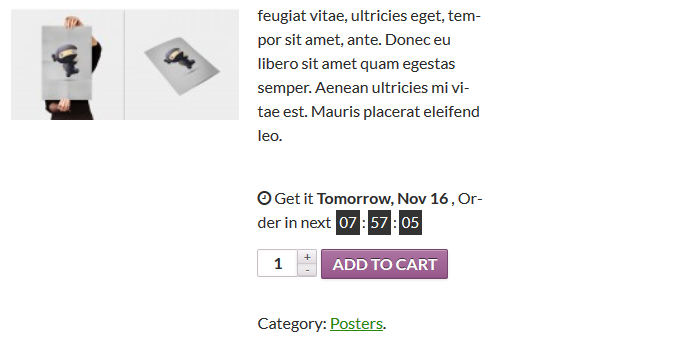
Show the timer before add to cart button.
Changelog
1.0
Initial Release